
Since its release last year, Spotify Mix has generated plenty of buzz. If you enjoy smooth transitions and a more immersive listening experience, it's definitely worth exploring. Once you get the hang of it, you may even feel like a home DJ — ready to level up your everyday listening or your next house party.
In this guide, we'll walk you through how Spotify Mix works and how it differs from other "Mix" features inside Spotify. You'll also learn how to use it on both desktop and mobile. Even better, we'll show you how to download your Spotify songs for true offline listening.
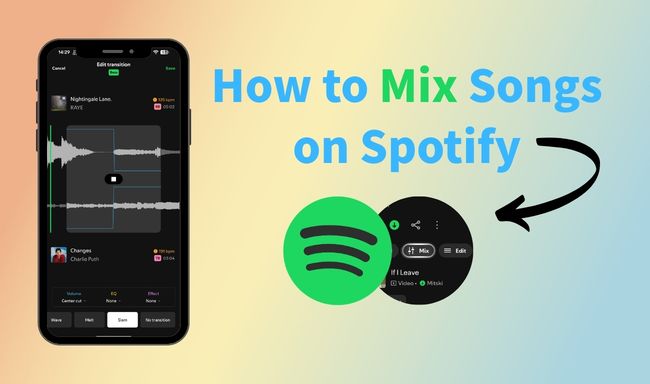
In simple terms, you can think of Spotify Mix as a personal DJ-style tool. It helps reduce pauses between tracks, adjust EQ and volume levels, and create a smoother overall listening experience.
When you enable Mix on a playlist you've created, you can view each track's key and BPM, making it easier to browse and rearrange songs. Then you can choose different transition styles — such as fade, rise, wave, or melt — to shape the flow and mood of your playlist.
So what's the difference between Spotify Mix and features like Daily Mix, AutoMix, or Blend?
| Feature | What It Is | Who Controls It | Best For |
| Spotify Mix | A tool to add DJ-style transitions to YOUR playlists | You | Creating customflowing playlists for parties, workouts, or personal enjoyment |
| Daily Mix | Personalized playlists (usually 6) updated daily based on your listening history | Spotify Algorithm | Discovering new music within your favorite genres without effort |
| AutoMix | A setting within the Mix feature that automatically generates smooth transitions | Spotify AI | Quick, effortless blending when you don't want to manually customize |
| Blend | A shared playlist that combines your taste with friends' | You + Friends | Discovering music together and seeing how your tastes overlap |
Looking for a way to download Spotify playlists without Premium? Check out 4 powerful Spotify playlist downloaders tested and recommended.
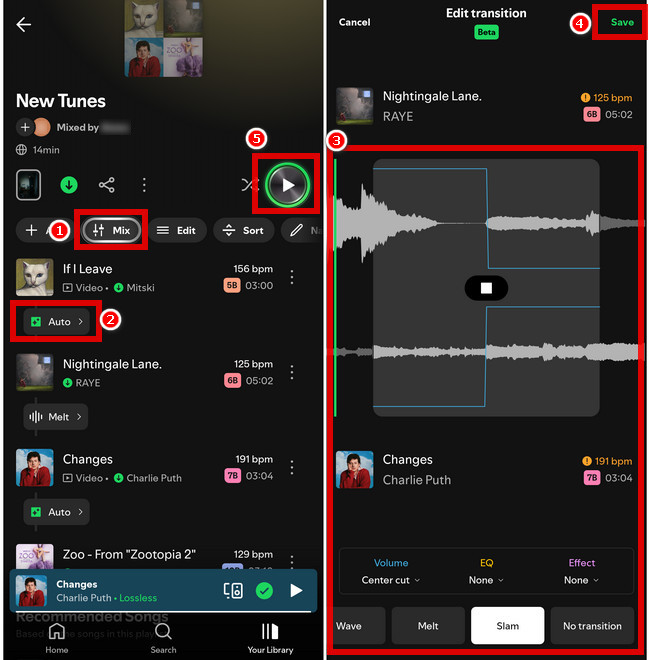
Step 1 Launch Spotify on your phone and open the playlist you created.
Step 2 Tap the "Mix" button.
Step 3 To customize the Mix, tap "Auto". (You can adjust song transitions and customize Volume, EQ, and Effects. If you want to rearrange the song order, simply tap the "Edit" button to make changes.)
Step 4 When complete, tap "Save" in the upper-right corner of the screen.
Step 5 After that, tap the "Play" button.
Tip: The closer the BPM and key are between tracks, the smoother and more seamless the mix will sound.
Want to download MP3 music for free? Check the top 10 best free music downloaders for Android, choosing one of them to get high-quality MP3 songs.
Step 1 Launch Spotify on your computer and open the playlist you created.
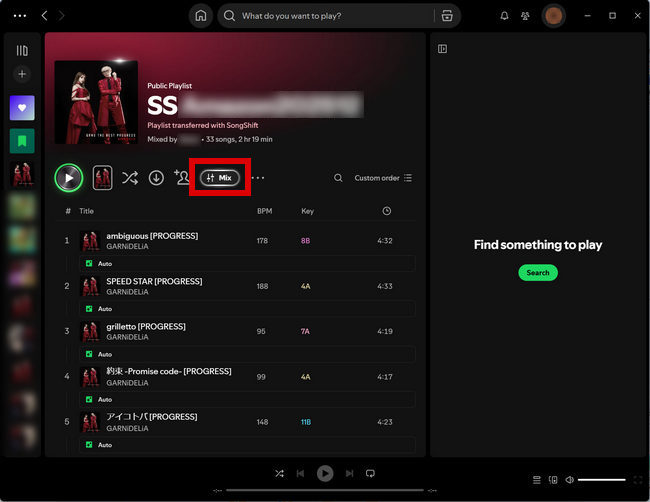
Step 2 Click the "Mix" button.
Note: The "Mix" feature is NOT fully available on desktop yet. When you click the Mix button on a computer, you can view a track's BPM and key, but advanced transition editing and full customization are currently prioritized for mobile devices.
Want Spotify Premium cracked for free? This guide covers the safest way to get Spotify cracked and 10 cracked Spotify options for PC, Mac, and mobile phone.
If you are a Spotify Premium user, you can easily download mixed playlists and listen to them offline. However, once your Premium subscription expires, those mixed playlists may no longer be accessible, and even the songs you previously downloaded for offline listening may disappear. For this reason, a good Spotify downloader is certainly the best choice.
NoteBurner Spotify Music Converter is a good option. It allows you to download songs or playlists from Spotify — such as Daily Mix, Blend playlists, or your own playlists — and save them as local audio files. This way, you can listen to your music without an internet connection or even without a Spotify subscription. You can also transfer the downloaded songs to any audio device for playback.
Note: NoteBurner Spotify Music Converter can only download the original tracks. The mixed playback effect generated by Spotify Mix feature cannot be downloaded directly. That said, you can import the downloaded songs into professional DJ software or other audio editing tools to create your own mixes.


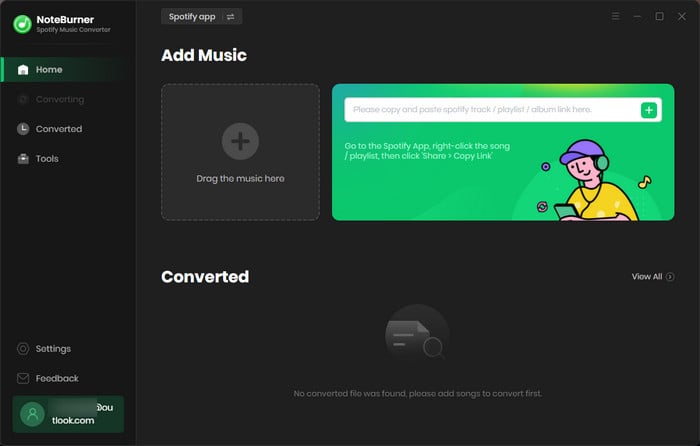
Step 1 Download and launch NoteBurner Spotify Music Converter on your computer.
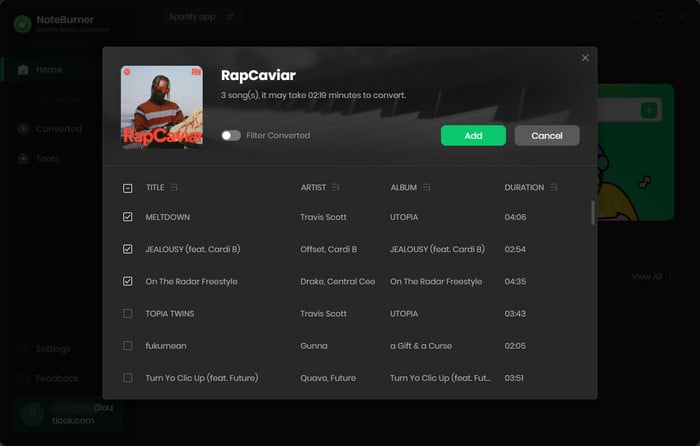
Step 2 Select the playlist, then choose the songs you want to download and click "Add".
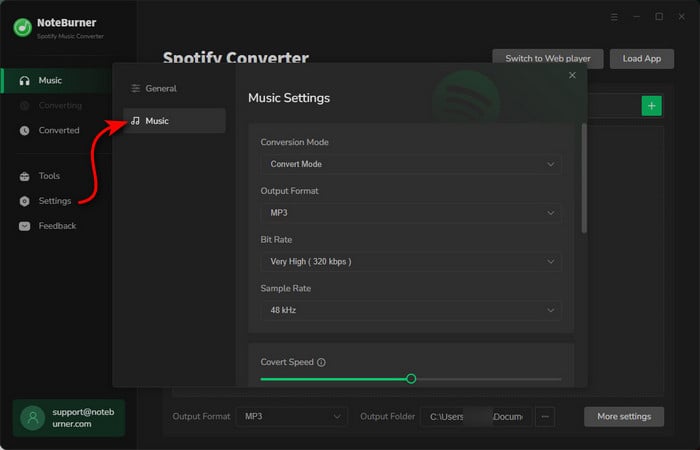
Step 3 Go to the "Settings" window. Choose the output format (like conversion mode, bit rate, etc.), and set the output folder.
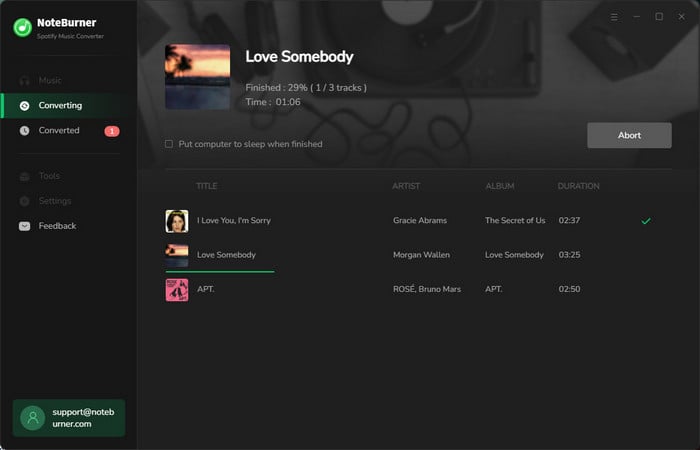
Step 4 Now, everything is set up. Click "Convert" to start downloading the songs you have chosen.
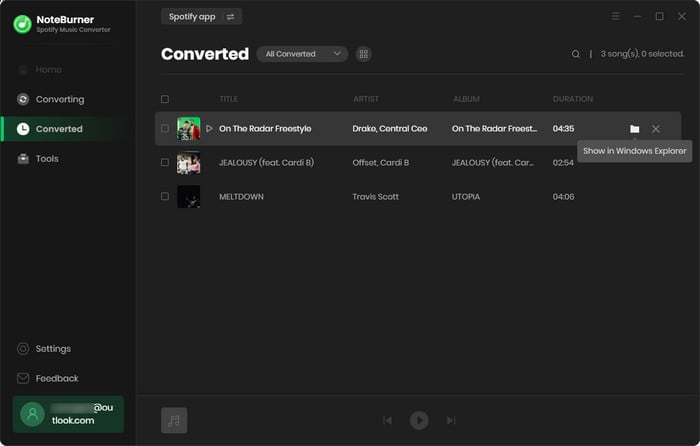
Step 5 After the conversion, click "History" to see the songs you downloaded and hit the "Folder" icon to locate the folder where they were saved.
Disclaimer: For personal/educational use only. 🚫 Do not distribute downloaded music/video for commercial use.
Spotify has added AI DJ mode to bring a more personalized listening experience for its users. Come to this page and learn more about Spotify AI DJ mode.
If the "Mix" button is missing or not working in your playlist, the following reasons might explain the issue:
The Mix button usually only appears in playlists that you created or have permission to edit. If you're trying to use it in an official Spotify playlist or someone else's playlist, the button may not show up.
The Mix feature requires a relatively recent version of Spotify. Make sure your app is updated to the latest version to access all available features.
The Mix feature is designed for sequential playback. If Shuffle is turned on, it can interfere with smooth transitions and prevent Mix from working properly.
The Mix feature may not work when music is played through Spotify Connect on external speakers. Try playing directly on your device. If you want to use external speakers, Bluetooth connections usually work better.
Sometimes the issue is simply a temporary bug. You can try:
Spotify sometimes releases features gradually. The Mix feature may currently be limited to certain users, regions, or test groups, so it might not be available in your account yet.
The Mix feature is ONLY available to Spotify Premium subscribers. Only users with an active Spotify Premium subscription can create or edit mixed playlists with transitions. If you're using a Free account, the Mix button won't appear in the app.
Some tracks may not support Mix transitions due to technical or compatibility limitations. This usually happens when the system can't properly analyze or synchronize the audio. Common reasons include:
Tip: If a transition doesn't work well, try rearranging your playlist so songs with similar tempo, rhythm, or style play next to each other. This can often improve the mixing result.
Yes. When you share a mixed playlist, listeners with Spotify Premium can hear the transitions you created. They may see the transition points, but they can't edit them unless the playlist is set to collaborative mode.
If your Premium subscription ends, you'll lose access to the Mix feature. Your playlists will return to their normal versions without transitions, and you won't be able to create or edit Mix effects. Any downloaded content will also stop working.
Yes, but you need to set it up while you're still online. If you turn on the Mix and download the playlist while connected to the internet, Spotify saves that current mix so you can play it offline later. However, if you turn Mix off while completely offline, you usually won't be able to turn it back on, since Spotify needs to connect to its servers to generate a new mix. So before going offline, make sure the Mix is turned on and the playlist has already been downloaded.
By now, you should have a much clearer understanding of Spotify Mix feature. Why not start creating your own Mix playlists. If you'd like to keep the songs from your playlists permanently or import them into other software or devices, NoteBurner Spotify Music Converter is definitely worth trying. With this tool, you can download and convert Spotify tracks into common audio formats. This allows you to enjoy your music offline anytime and easily import the files into DJ software, media players, or other devices.
Note: The free trial version of NoteBurner Spotify Music Converter enables you to convert the first 1 minute of each song only. You can purchase a license to unlock the full version.



