
By connecting Spotify to your Alexa device, you can play millions of songs, podcasts, and personalized playlists from Spotify with just your voice. Whether you're a Spotify Premium user or a free user, this tutorial will provide comprehensive guidance from basic connection to advanced settings. With this guide, you'll master all the techniques for seamlessly integrating these two platforms, freeing your hands and enjoying a smart music experience.
Before connecting, make sure you have one of the following compatible devices:
This guide works for both Spotify Premium and Free accounts. Key differences:
Required accounts: You need a valid Amazon account and a Spotify account.
After ensuring your devices are compatible and your accounts are ready, you can now follow these steps to link Spotify to Alexa.
Step 1 Open the Alexa app on your iOS or Android device and make sure you are signed in to your Amazon account.
Step 2 Tap More (☰) at the bottom right, then select Settings from the menu.
Step 3 Scroll down to Alexa Preferences and select Music & Podcasts.
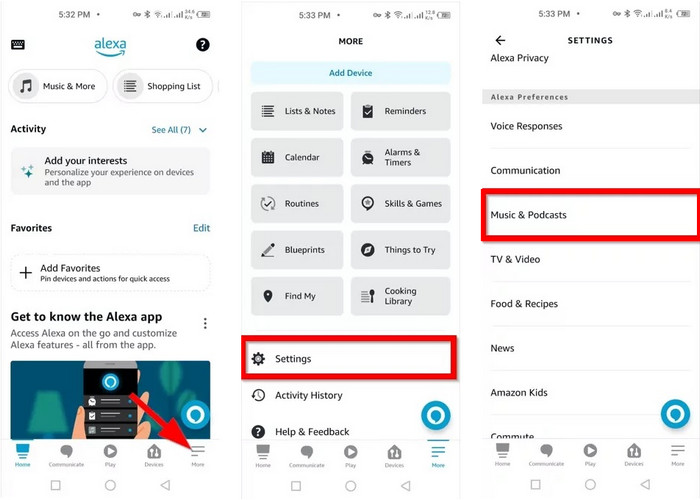
Step 4 In the Services section, click Link New Service. If you have other services linked, this option may appear at the bottom of the list.
Step 5 Find and select Spotify from the available services list, then click Enable to Use.
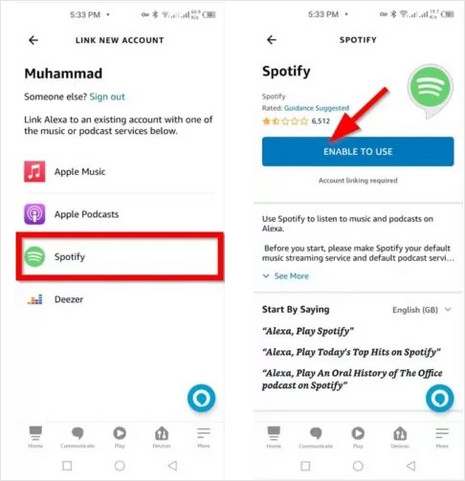
Step 6 You will be redirected to accounts.spotify.com. Log in with your Spotify credentials and click Agree to authorize Alexa to access your Spotify library.
Step 7 Return to the Alexa app. Spotify should now appear in the Linked Services list. You can now say: "Alexa, play relaxing music on Spotify."
Seeking a free Spotify downloader to get Spotify MP3 320 kbps? The page collects several free Spotify to MP3 downloaders, with the best audio quality kept
Once you set Spotify as your default music service, you can skip saying "on Spotify" when giving voice commands.
Steps to Set Spotify as Default:
Step 1 Open the Alexa app. Tap More and go to Settings.
Step 2 Select Music & Podcasts.
Step 3 Tap Your Default Services.
Step 4 Under the Music section, select Spotify and tap Done.

Before setting Spotify as default ❌:
Alexa, play Today's Top Hits on Spotify
After setting Spotify as default ✅:
Alexa, play Today's Top Hits
📌 Tip: According to some users, you might still need to say "on Spotify" to play podcasts smoothly.
If multiple people in your household use Spotify, Alexa can personalize music playback by combining Amazon Household with voice profiles. Each family member is recognized by their voice and linked Amazon profile, allowing Alexa to access the correct Spotify account when they speak. To make this work properly, each user needs to set up their own Amazon profile, voice profile, and Spotify connection.
Before you start, make sure you have:
Quick Setup Steps:
Step 1 Open the Alexa app and go to Settings.
Step 2 Set up a voice profile under Your Profile.
Step 3 Switch to another household member’s Amazon account.
Step 4 Go to Music & Podcasts → Link New Service.
Step 5 Select Spotify and sign in.
Step 6 Repeat for each household member.
📌 Tips: Say "Alexa, switch profiles" if the wrong account is used.
Explore the best Spotify downloader Chrome extensions and top alternatives, including key features, pros, cons, and more stable download options. Learn More →
If you no longer want Alexa to access your Spotify account, you can easily disconnect the two services at any time from the Alexa app. Unlinking Spotify will stop Alexa from playing music, playlists, and podcasts from your Spotify library.
Step 1 Open the Alexa app on your iOS or Android device.
Step 2 Tap More (☰) in the bottom-right corner, then select Settings.
Step 3 Go to Music & Podcasts under Alexa Preferences.
Step 4 Find Spotify in the list of linked services and tap it.
Step 5 Tap Disable Skill or Unlink Account, then confirm the action.
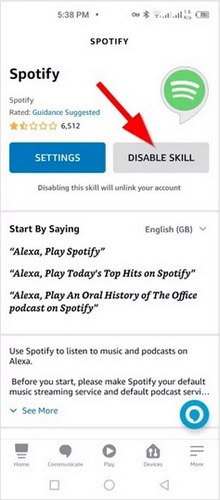
Once disconnected, Alexa will no longer use Spotify for music playback. If Spotify was set as your default music service, Alexa will automatically fall back to another available service, such as Amazon Music. You can reconnect Spotify at any time by linking the service again from Music & Podcasts settings.
After connecting Spotify with Alexa (and setting it as your default music service), you can control music playback completely hands-free using voice commands. Below are practical Alexa voice commands you can use to play music, control playback and more.
Tip: If Spotify is not set as your default music service, remember to say "on Spotify" at the end of your command. For example: "Alexa, play jazz music on Spotify."
Learn 4 reliable ways to download Spotify music as WAV in 2026. Keep high audio quality with safe tools, online conversions, and recording solutions.
Alexa works great for streaming Spotify, but it doesn’t support downloading songs for offline playback outside the Spotify app. If you want more flexibility, such as playing Spotify music offline on MP3 players, USB drives, or non-Alexa speakers, converting Spotify tracks to MP3 is the next step. This is where NoteBurner Spotify Music Converter comes in handy.
NoteBurner Spotify Music Converter lets you save Spotify tracks and playlists in common audio formats such as MP3, AAC, WAV, FLAC, AIFF, and ALAC. It supports batch downloads at 40x faster speeds and keeps ID3 tags intact, including artist information, album data, track numbers, cover artwork, and lyrics. With built-in tools like an ID3 tag editor and audio format converter, it also helps you organize and manage your offline Spotify music library more efficiently.


Add Spotify Music
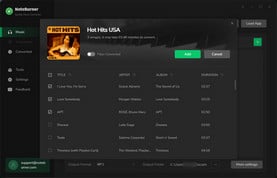
Click the "Add" button in the top-right corner of the interface to add the Spotify music you want to download to NoteBurner.
Set the Output Format
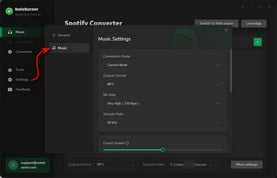
Go to the NoteBurner "Settings" menu by clicking a gear icon at the lower left corner. Choose MP3 as the output format.
Get Spotify Music Downloads
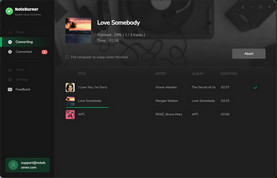
Click the "Convert" button to convert the Spotify album quickly. After conversion, you can click the "History" button to find the MP3 files.
Disclaimer: For personal/educational use only. 🚫 Do not distribute downloaded music/video for commercial use.
A: Yes, absolutely. Both Spotify Free and Spotify Premium accounts can be successfully linked to Alexa. However, there are some key differences in the listening experience. Free users may hear ads and have limited control over song selection, while Premium users enjoy ad-free playback and full on-demand control.
A: Yes, this is one of Alexa’s most convenient features for families. By using Amazon Household together with voice profiles, each person can link their own Spotify account and access their personal playlists and recommendations. For detailed setup steps, refer to Part 4 of this guide.
A: This is a common and easily overlooked issue. Alexa sometimes treats music and podcasts as different content types. Even if Spotify is your default music service, podcast requests may not always route correctly. The simplest fix is to clearly say "on Spotify" when playing podcasts, for example: "Alexa, play this podcast on Spotify."
A: "Discover Weekly" is a personalized Spotify playlist, and phrases like "my" can sometimes confuse voice recognition. Try one of these more reliable commands instead:
A: You can use Alexa’s Multi-Room Music feature to play Spotify across multiple Echo devices simultaneously. Simply create a speaker group in the Alexa app, add your desired devices, and give the group a name. After that, you can say something like: "Alexa, play music on Everywhere".
Select the best Spotify playlist downloader for Android. Easily download Spotify MP3 songs and playlists with the top 8 Spotify APKs and online tools.
Now you’ve got the full picture of how to make Spotify and Alexa work seamlessly together! From checking your devices and accounts, connecting Spotify to Alexa, setting it as your default, to managing multiple accounts, unlinking when needed, and even mastering handy voice commands—you're all set to enjoy a hands-free music experience at home.
Remember, Alexa can do a lot, but a little patience goes a long way, especially with podcasts or personalized playlists. Try experimenting with different voice commands to see how smart and responsive your Alexa can be.
Note: The free trial version of NoteBurner Spotify Music Converter allows you to convert the first 1 minute of each song. You can buy the full version to unlock this limitation and enable all its features.



