
"When did the Spotify algorithm get so shit?"
Have you ever felt frustrated when Spotify keeps replaying the same old songs, or when its music recommendations slowly drift away from what you actually like? If so, you're not alone. Across various music communities, many users say they feel "stuck" in a fixed musical style created by Spotify algorithm, making it harder to discover genuinely new tracks.
If you're looking for ways to reset Spotify algorithm or improve Spotify music recommendations, this guide breaks down how Spotify algorithm really works — and how you can escape algorithm inertia to get music that better matches your current taste. We'll also introduce a practical solution that lets you download music without Spotify Premium, giving you more control over playback and recommendation behavior, so you can take back control of your listening experience.
Before learning how to reset Spotify algorithm, it helps to first understand how Spotify algorithm actually works. Once you know the logic behind it, the steps that follow will make much more sense.
Spotify algorithm isn't "magic". It's driven entirely by data and user behavior. The algorithm constantly analyzes how you interact with music on the platform, including (but not limited to):
At the same time, Spotify analyzes the characteristics of each track, such as mood (happy, sad), tempo, genre, and energy level, to determine what kinds of music best match your preferences. All of these add up over time to build a detailed listening profile, which directly influences your music recommendations — such as Discover Weekly, Daily Mixes, and personalized content on your Home page.
In short, how Spotify algorithm works depends entirely on how you listen. The more you listen and the clearer your interactions are, the better Spotify understands your taste. On the flip side, certain habits can easily "train" the algorithm in the wrong direction.
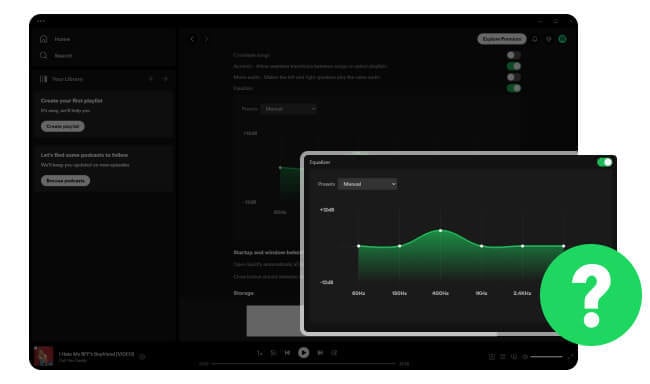
Here you will find the detailed-explain steps to find Spotify Equalizer and the best equalizer settings.
First, a quick clarification: Spotify does not offer a "one-click algorithm reset" feature.
However, with the right actions, you can significantly retrain and improve your Spotify algorithm.
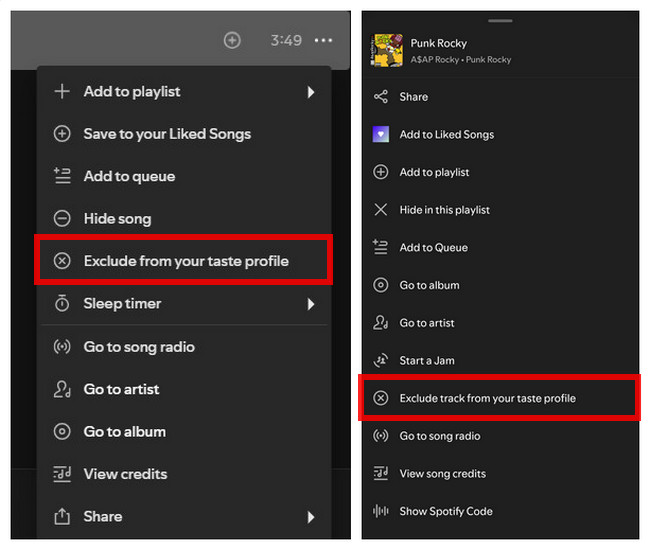
🛠️Steps: Click the three dots on the right > "Exclude from your taste profile".
💡The excluded song or playlist will no longer influence your music recommendations, this applies to both past and future listening data. This is currently one of the most direct and effective ways to influence Spotify algorithm.
🔄How to restore: Simply follow the original steps to restore.
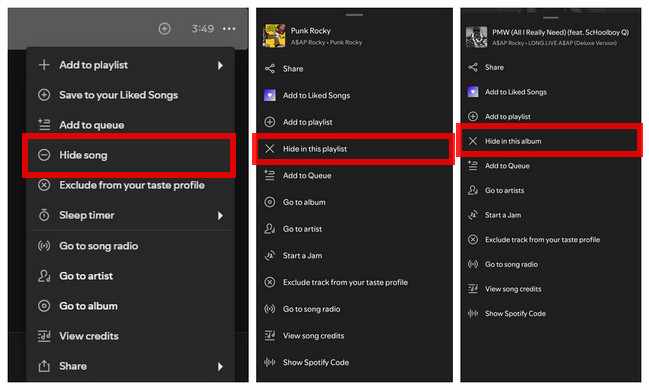
🛠️Steps: Inside a playlist/album, click the three dots next to a song > "Hide in this playlist".
💡The song will be greyed out and automatically skipped whenever it appears in this specific playlist or album for the next 30 days. It does not affect your overall recommendation algorithm. This option is better for temporarily hiding a song, not for long-term algorithm adjustments.
🔄How to restore: Simply follow the original steps to restore.
🛠️Steps: On an artist page, click the three dots > "Don't play this artist".
💡Spotify will stop playing songs from that artist, and their music will gradually disappear from recommendations. While the effect isn't instant, it has a noticeable impact on the Spotify algorithm, especially if you're sure you don't want that artist included at all.
🔄How to restore: Simply follow the original steps to restore.
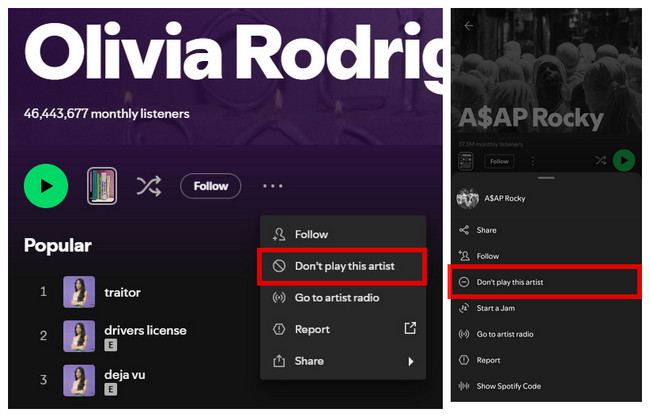
🪧Note: Spotify does not use the same feature names or placements across all platforms or accounts. Due to ongoing A/B testing and differences between desktop and mobile experiences, the same function may appear under different names — or only be available to certain users. These differences affect the interface only, not the actual algorithm behavior.
If your recommendations feel completely off, it's a good idea to do a deeper cleanup:
💡These steps won't fully reset Spotify algorithm, but they can reduce the influence of outdated data on music recommendations.
💡After a few days of consistent, intentional listening, you'll usually start to see Spotify recommendations shift in the direction you want.
Completely delete your account and create a brand-new Spotify account. While this can work, the cost is high:
💡Unless your account is beyond fixing, this option isn't recommended. (Read next part for a better alternative.)
While resetting Spotify algorithm can help improve music recommendations in the short term, it doesn't solve the core issue. If you really want control over your listening experience, the key is to stop relying on the algorithm and take ownership of your music. After all, carefully curated niche or lesser-known tracks can disappear overnight due to licensing changes or platform removals.
The most reliable approach is to download and store the music you truly enjoy. With NoteBurner Spotify Music Converter, you can convert Spotify tracks into MP3, FLAC, and other common formats for offline playback and long-term storage.


Step 1 Download and launch NoteBurner Spotify Music Converter on your computer.
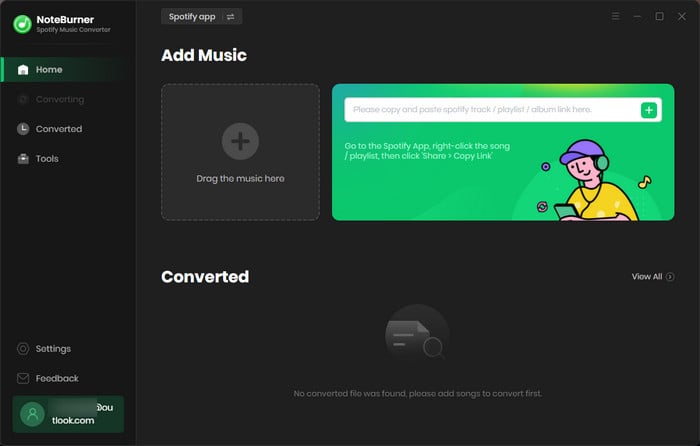
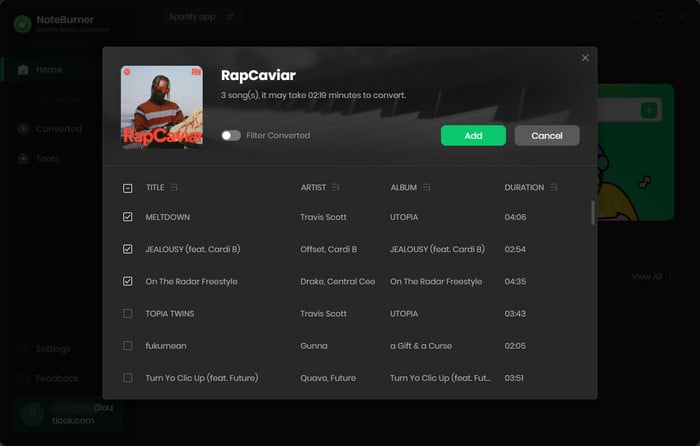
Step 2 Select the playlist/album from your library or you want, then choose the songs you want to download and click "Add".
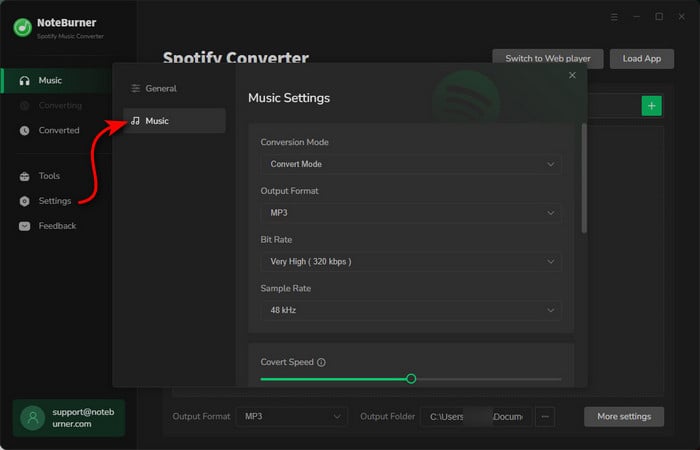
Step 3 Go to the NoteBurner "Settings" menu by clicking a gear icon at the lower left corner. Select your desired output settings (such as conversion mode, output format, bit rate, output folder, etc.).
Step 4 Click the "Convert" button, and your songs will begin downloading.
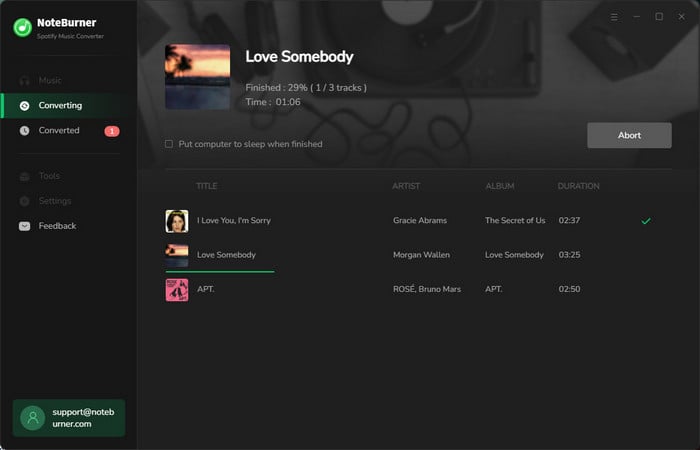
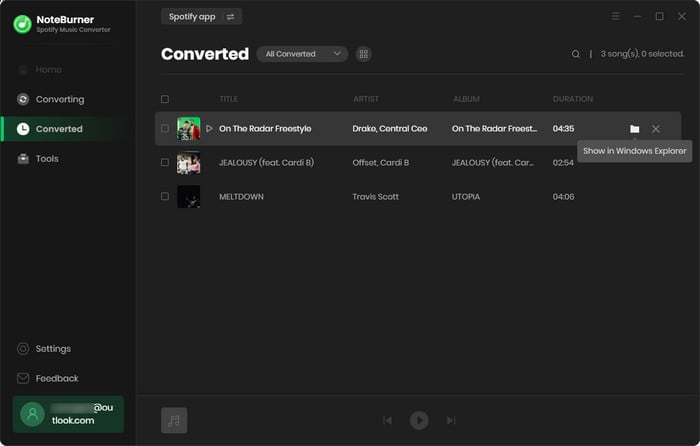
Step 5 After conversion, click "History" to find the songs you downloaded and locate the folder where they were saved.
Disclaimer: For personal/educational use only. 🚫 Do not distribute downloaded music/video for commercial use.
Spotify algorithm is based on your listening history, including what you play, save, skip, and how often you listen to certain tracks. If you accidentally listened to a song all the way through, saved it, or played it multiple times — even once — the algorithm may assume you like it and keep recommending similar songs.
No. Spotify listening history is completely separate from your saved songs, playlists, and albums. Clearing your listening history only affects music recommendations. However, keep in mind that this may temporarily make recommendations less accurate, since the algorithm has less data to work with.
Creating a new account is more of a "last resort" and comes with a high cost. In most cases, it's better to actively reset and retrain the algorithm on your existing account instead.
Usually don't need to do this often. Only consider resetting or improving the algorithm when your recommendations are seriously off, or when your music taste has changed significantly.
This depends on your daily listening behavior and how consistently you adjust it. In most cases, it takes about 2 to 4 weeks of active interaction for recommendations to noticeably improve
As long as you're logged into the same Spotify account, the core algorithm is the same across all devices. Any differences you notice are usually due to listening context or sync delays. For more consistent recommendations, make sure you use the same account on all devices and maintain consistent listening habits.
In short, Spotify music recommendations are designed to keep you listening. It learns your music taste by analyzing what you play, save, and skip. When the recommendations start to feel off, you can retrain the algorithm using the methods mentioned above.
However, the most reliable long-term solution is to use NoteBurner Spotify Music Converter to convert your favorite Spotify tracks into standard audio files and build your own personal, permanent music library. This gives you true ownership of your music, removes streaming platform limitations, and lets you listen offline anytime for a more flexible and unrestricted listening experience.
Note: The free trial version of NoteBurner Spotify Music Converter enables you to convert the first 1 minute of each song only. You can purchase a license to unlock the full version.



