
Do you have a Spotify gift card waiting to be redeemed, but aren't sure where to start? If you've ever searched for "how to redeem a gift card on Spotify", you've probably discovered that the redemption process doesn't always go as smoothly as expected.
In this guide, we'll walk you through exactly how to redeem a Spotify gift card step by step, along with common reasons for redemption failures and their solutions, and share a pro tip on how to keep your Spotify downloads forever.
A Spotify gift card is essentially a prepaid card that lets you add credit to your Spotify account to unlock or extend Spotify Premium. It's a great gift for music lovers — and a smart option for anyone who wants to enjoy Premium without using a credit card or dealing with recurring payments.
Spotify gift cards come with a fixed value or a specific subscription length, commonly for Spotify Premium Individual for 1, 3, 6, or 12 months. Once redeemed, the value is added to your account automatically:
Important things you need to know before using a Spotify gift card
Here you will have over 10 methods to fix Spotify no sound issue. You can even download Spotify MP3 songs at full volume.
| Method | How It Works | Pros | Notes & Warnings |
| Buy Online or In-Store | 1. Online: Buy from Amazon, eBay, or Spotify's official site. Digital codes are sent instantly. 2. In-Store: Available at major supermarkets, electronics stores, chain pharmacies, or music shops. Cards must be activated at checkout. |
Fast, reliable, widely available | Avoid unofficial third-party sellers. Buying outside authorized channels may result in invalid codes, regional restrictions, or scams. |
| Redeem Through Points or Reward Programs | 1. Use credit card points or shopping rewards to redeem Spotify gift cards. 2. Some retailers or banks offer bonus points or free gift cards during holiday promotions. 3. Spotify and partner brands may run campaigns offering gift cards via surveys or contests. |
Can save money if you already earn points | Availability is inconsistent. Truly "free" cards are rare. Always verify legitimacy to avoid scams. |
| Get Gift Cards Through Subscriptions or Bundles | 1. Some mobile carriers or streaming bundles include Spotify gift cards or Premium subscription codes with select plans. 2. Often offered as limited-time promotions. |
Good value when bundled with existing plans | Usually region- and plan-specific. May be delivered as digital codes or free subscription periods rather than physical cards. |

Feel annoying with those Spotify ads while streaming Spotify Music? Here this article will introduce the best way to remove ads from Spotify music free.
Redeeming a Spotify gift card is quick and straightforward. Whether you're using Spotify on desktop or on mobile devices, the process takes just a few minutes.
Step 1 Go to the Spotify Redeem page and log in to your account.
Step 2 Enter the required information on the page, then click "Continue".
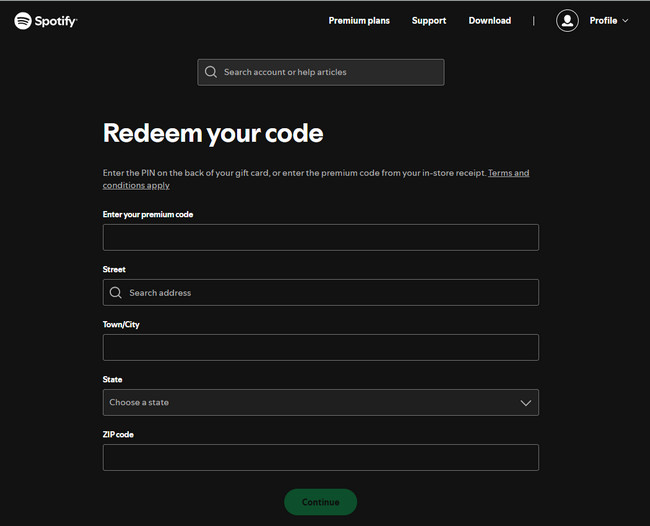
Tips: To redeem a Spotify gift card, you must sign in through a web browser and complete the process on the Spotify Redeem page.
Once your Spotify Premium redeemed with a Spotify gift card expires, any previously downloaded music becomes unavailable. That's because Spotify downloads aren't real local files — they can only be played inside the app while your Premium subscription is active. On Spotify Free, ads will also be added during playback.
If you want long-term, uninterrupted access to your favorite music, the better option is to save tracks locally for personal management and backup. Tools like NoteBurner Spotify Music Converter make this possible by converting Spotify songs, playlists, and podcasts into MP3, AAC, FLAC, or WAV files — so you can build a personal music library that isn't tied to your Premium status.


Step 1 Launch NoteBurner Spotify Music Converter on your computer.
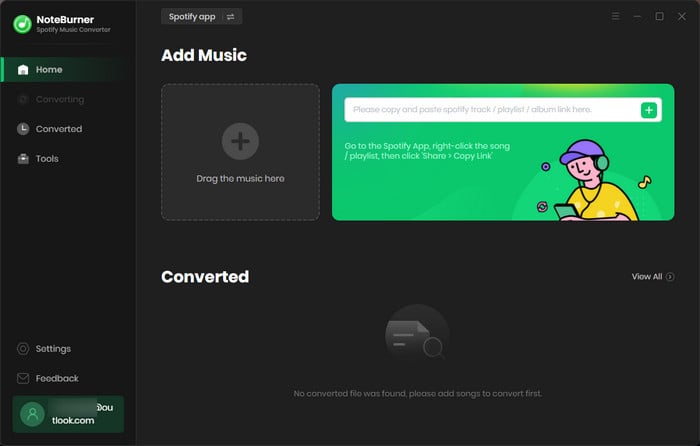
Step 2 Select the playlist/album/podcast you like, then choose the songs you want to download and click "Add".
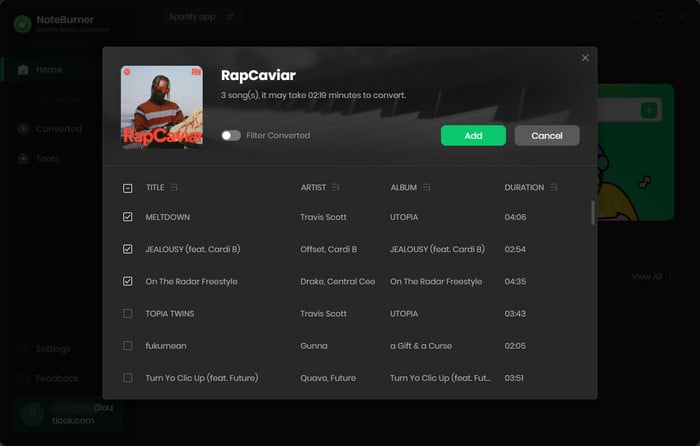
Step 3 Choose your output format (like conversion mode, bit rate, etc.), and set the output folder.
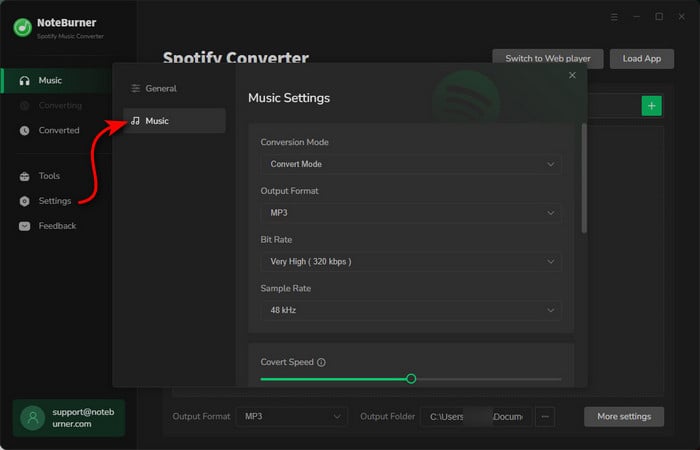
Step 4 Click "Convert" to start downloading the songs you have chosen.
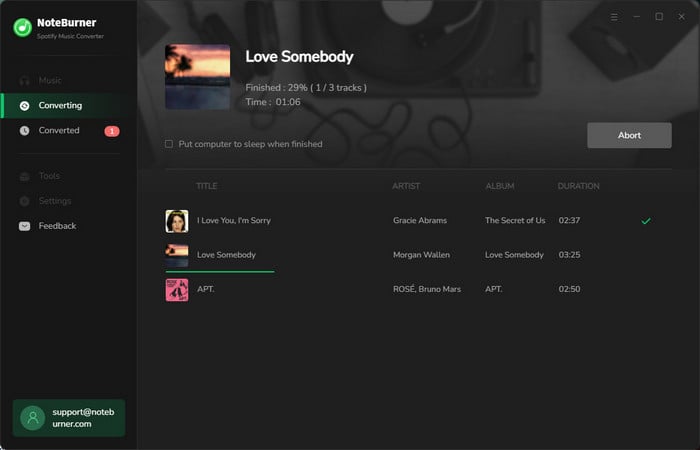
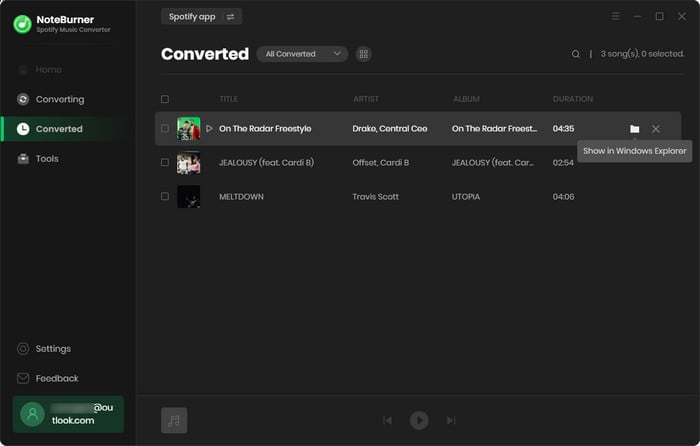
Step 5 After conversion, click "History" to see the songs you downloaded and locate the folder where they were saved.
Disclaimer: For personal/educational use only. 🚫 Do not distribute downloaded music/video for commercial use.
Spotify has added AI DJ mode to bring a more personalized listening experience for its users. Come to this page and learn more about Spotify AI DJ mode.
If you fail to redeem a Spotify gift card, don't panic. In most cases, the issue is caused by common and fixable reasons. Please refer to the table below for step-by-step troubleshooting.
| Reasons | Solutions |
| Region mismatch | Make sure the gift card country matches your Spotify account country. Check and update it at spotify.com/account/profile if needed. |
| Incompatible subscription plan | Cancel Family, Duo, or Student plan, wait until it fully expires. Then redeem the gift card. |
| Gift card code already used | Contact the retailer or platform where the gift card was purchased. |
| Gift card expired | Check the expiration date printed on the card or purchase email. |
| Typing errors | Avoid confusing characters (O vs 0, I vs 1). Copy and paste the code or retype it carefully. |
| Network or cache issues | Clear browser cache and cookies Try another browser or device Switch to a stable network |
| Account flagged or restricted | Turn off VPN, log in from your usual location, and contact Spotify support to verify your account. |
A: Yes! You can redeem multiple Spotify gift cards on the same account. The subscription time will stack, but there is usually a maximum limit (e.g., up to 18 months of total Premium time in advance).
If you're still seeing ads, make sure:
A: Generally, Spotify does not offer refunds for gift cards. If you purchased a gift card from a retailer and it's defective or unused, you'll need to contact the retailer for a possible replacement. Once redeemed, the balance is non-refundable.
A: No. Each Spotify gift card can only be redeemed once on a single account. You can't use the same code on multiple accounts.
A: All offline downloads from Spotify will stop working. Songs saved for offline listening cannot be played unless you renew Premium.
By now, you should have a clearer understanding of how to redeem a gift card on Spotify and what to do if the redemption doesn't go through. However, if you truly want to own your favorite Spotify music and enjoy it offline anytime, NoteBurner Spotify Music Converter is your best choice. It allows you to convert Spotify tracks into universal audio files, making each song a permanent part of your personal collection. You can play them anytime on your phone, tablet, or computer — no Spotify streaming required.
Note: The free trial version of NoteBurner Spotify Music Converter enables you to convert the first 1 minute of each song only. You can purchase a license to unlock the full version.



