
Speaking of online Spotify music downloaders, spotidownloader pops up a lot in search results and claims to convert Spotify music to MP3 for free. Still, the users' feedback online is mixed. If you wonder if spotidownloader.com is actually safe and reliable to use, just dive in. We take the time to test it and offer an in-depth analysis and the safest alternatives to this free Spotify to MP3 converter.
As a common online Spotify to MP3 converter, Spotidownloader.com enables all folks to convert Spotify tracks to MP3 files at no cost. It boasts instant MP3 downloads—all workflows on the web, with no additional software setup or registration. It works similarly to other online Spotify downloaders. By copying and pasting the Spotify track/playlist link into the site's search field, in theory it shows you a downloadable audio file in MP3 or a zip file.

💡 Tips: Want to batch download MP3s from Spotify without any ads? Go for the reliable alternative – NoteBurner Spotify to MP3 Converter.
Before you start, you need to go to an active and valid website of Spotidownloader (https://spotidownloader.com/).
Head-up, though: Be wary of the fake domain if the original site cannot work. And the URL may contain unknown ads and risks, so you should click it to visit with caution.
Step 1 Open the Spotify app or web player and find the song or playlist you want.
Step 2 Right-click the track, select "Share – Copy URL", and paste that link into the input box.
Step 3 Click the Download button and wait a bit while it processes.
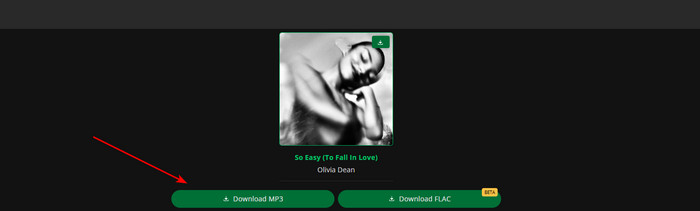
Step 4 Once it’s ready, hit Download MP3 and save the file to your device.
Step 5 When the Spotify to MP3 conversion is done, you can check the converted MP3 file in the download history or local folder.
Looking for 320 kbps high-quality music for your DJ? Come here and you'll get the detailed steps to download MP3s from Spotify at 320 kbps bitrates. Learn More →
Now let's get into the safety part. If you actually used this converter before, you’ve probably noticed it’s not entirely safe. Here is a detailed breakdown based on our hand-on test.
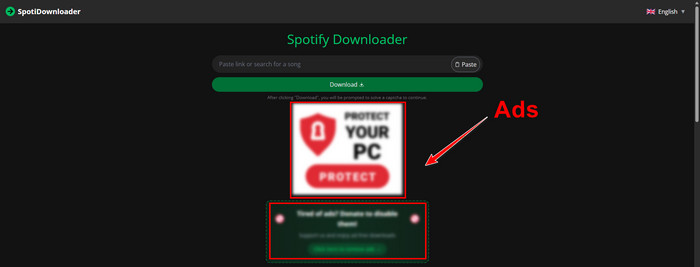
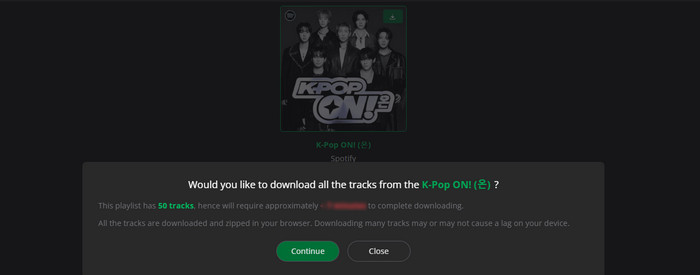
Spotidownloader.com clearly relies on ad revenue; hence, the online interface contains lots of invasive ads. It degrades the whole download experience. Almost every time you hit the download button, you are forced to navigate through redirection. According to our rough calculations, you must go through at least three forced redirects to successfully save a Spotify audio track.
Compared with dedicated Spotify converter software, such a web-based tool crashes more often. Worse, these online tools go offline regularly due to takedown notices. When the original URL stops working, clicking into the fake mirror site puts your device at risk.
Although it doesn't happen often, the similar free MP3 download sites already had cases where accounts were flagged. Since Spotify can detect suspicious behaviour, using this alongside the web player might raise some flags. Just something to be aware of.
The alleged Spotify playlist zip downloads do not always work as expected. A large playlist with more than 20 songs takes a long time to process and sometimes gets stuck halfway through. Even after downloading, the returned ZIP files can be incomplete or include tracks with watermarks.
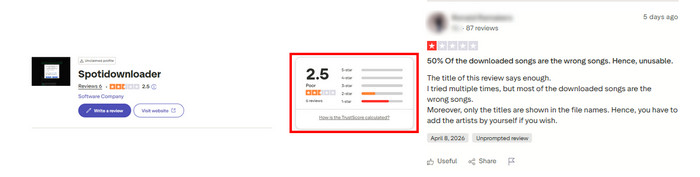
Spotidownloader gains much popularity by its ease of use and free service. Still, it does not receive a high trust score from Trustpilot—only 2.5 out of 5. Many users say that the song is not downloaded correctly.
While Spotidownloader simplifies the process of downloading Spotify music as MP3 files, the safety and download quality are a bit of a concern. You inevitably encounter advert redirects during the process, and downloads can sometimes be slower than expected. So, is there a safer way to batch download Spotify playlists to MP3 in one click? Definitely yes! NoteBurner Spotify to MP3 Converter served as the best alternative to Spotidownloader.
Instead of sketchy online capture like Spotidownloader, NoteBurner Spotify Music Converter is dedicated to saving music, playlists, albums, podcasts, and audiobooks from Spotify in batches at up to 40x speed. By extracting music content on the Spotify app or web player, it later converts Spotify audio tracks to MP3, WAV, FLAC, and more. What's more, it is ideal for an audiophile, as this Spotify downloader retains the sound quality up to 320 kbps and even Spotify Lossless. With your Spotify MP3 downloads, you're free to transfer them to a USB drive for playing on a generic MP3 player, smartwatch, and the like.

Import Spotify Music/Playlist
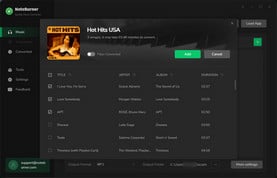
Open the converter. Click the "Add" button to load the Spotify playlist you intend to download.
Choose MP3 as Spotify Output Format
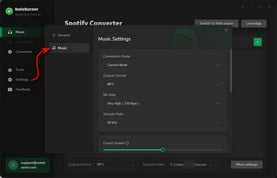
Go to "Settings" to choose MP3 audio quality. Other output settings are also adjustable by your needs.
Batch Convert Spotify Audio to MP3
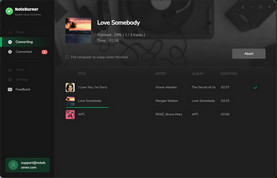
Click the "Convert" button to export Spotify music quickly and go to "History" to find the downloaded MP3 files.
Online Spotify to MP3 downloaders aren't just stopping at Spotidownloader.com. There are a bunch of similar online tools that download MP3s from Spotify – no payment, sign-in, or installation.
🚨 ATTENTION: Again, the Spotify to MP3 websites are not 100% safe. Be cautious with suspicious links, and try not to click on random buttons while using them.
🔗 https://spotidown.me/en1
A web-based Spotify downloader used to convert Spotify songs to MP3 files at no cost. You paste a Spotify link into the search field, and it’ll process the URL and give you a download — usually a single MP3 or a full playlist as a ZIP file. Compared to Spotidownloader.com, it contains fewer pop-up redirects.

Read More: How to Use spotDL 2026
🔗 https://spotimate.app/
Another browser-based Spotify to MP3 converter that keeps things simple. It pulls track data from Spotify and sources the audio from YouTube, so you can grab your music without installing any extra apps or extensions. Since everything runs in your browser, it’s pretty convenient—and yes, it can even work on mobile, as long as your device’s built-in browser supports it.
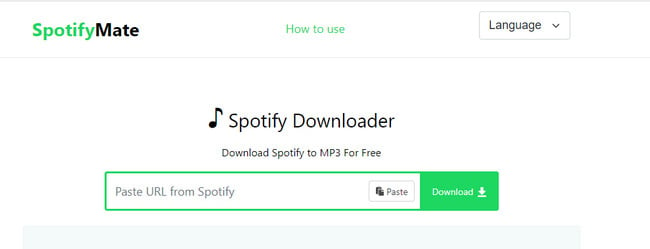
Read More: SpotifyMate Deep Review & ALT to Get Spotify MP3 in 320 kbps
🔗 https://spomp3.com/
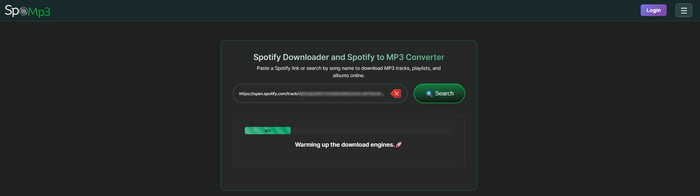
Like other online Spotify audio extractors, SpoMP3 grabs track links from Spotify and converts them for offline use. Surprisingly enough, it not only proceeds with single-track downloads but also lets you save entire playlists or albums as ZIP files. That said, some features need a premium subscription.
The post collects the top 9 free Spotify to MP3 downloaders that are still working in 2026, making it easy to get Spotify MP3 songs in 320 kbps for offline listening.
| Tool | NoteBurner Spotify Music Converter | Spotidownloader |
| Trustpilot Rating | 4.3 (350+ verified reviews) | 2.5 |
| Download Content | Track / playlist / album / podcast / audiobook / radio / music video | Single song / playlist / album |
| Safety | 100% safe (zero ads / malware) | Low (constant pop-ups, redirects) |
| Max Quality | 320kbps & Spotify Lossless | 256–320kbps |
| Output Format | MP3, M4A, AAC, WAV, FLAC, AIFF, ALAC | MP3, Zip (playlist) |
| Download Speed | 40X faster conversion | Moderate (slower for playlists) |
| Availability | Windows / Mac / Android | Online browser |
| Price | Free trial or $9.95/month (Android) | Free |
| Batch Downloads | ✅ | ❌ |
| Keep Metadata |
✅ (fully kept) |
✅ (partial and watermarked) |
| Audio Tools |
✅ Audio Editor, CD Burner, Format Converter, Tag Editor, etc. |
❌ |
| Support & Updates | ✅ | ❌ |
 Winner: NoteBurner Spotify Music Converter
In general, thanks to its sleek, ad-free workflow, true lossless audio quality, complete metadata retention, and a lineup of extra built-in tools, NoteBurner Spotify Music Converter unsuprisingly goes to the priority.
A: It works for short-term use. If you just need a quick, no-install way to convert a track, Spotidownloader can do the trick. But for regular or large-scale use, it falls short—the site may go offline anytime without warning.
A: Not 100% safe. The downloaded Spotify MP3 audio offered by online tools mostly originates from YouTube and other unknown sources. Once downloaded, you had better check the audio details and scan to see if it can be used on your devices safely.
A: Yes. An online Spotify to MP3 converter typically does not require an account. Plus, NoteBurner Spotify Music Converter also supports downloading Spotify to MP3 without Premium.
A: Yes. Just use the dedicated Spotify music converter like NoteBurner; you can export Spotify audio as local files and keep them playable forever.
A: It is advisable to get your browser to block pop-ups. For example:
Chrome: Settings → Privacy & Security → Site Settings → Pop-ups → Blocked
Edge/Safari: similar settings
Alternatively, try installing the ad blocker to filter out most pop-ups and redirect scripts.
Discover the best Spotify ad blockers tested in 2026, they are compatible with Android, iOS, PC, and Mac.
Disclaimer: For personal/educational use only. 🚫 Do not distribute downloaded music/video for commercial use.
With this in-depth review, you now have a good light on Spotidownloader—what it offers, how it works, the potential risks, and some alternatives. Sure, Spotidownloader.com is convenient: just paste a link and let it go. But that convenience comes with a catch—frequent redirects to sketchy ad pages.
For this, you can switch to the safest alternative—NoteBurner Spotify Music Converter. Whether you're using Spotify Free or Premium, it enables you to get MP3 320 kbps from Spotify without any ads.
Note: The free trial version of NoteBurner Spotify Music Converter allows you to convert the first 1 minute of each song. You can buy the full version to unlock this limitation and enable all its features.



