
SpotiDown is one of the online tools people find when they want to save Spotify songs as MP3 files. Users often search for SpotiDown, Spotify downloader SpotiDown, SpotiDown MP3, or SpotiDown online Spotify downloader because the promise sounds simple: paste a Spotify link, click download, and get an MP3 file.
But is SpotiDown safe? Does the SpotiDown download process still work in 2026? Can it handle playlists? And if it fails, what is the best SpotiDown alternative? This review keeps the answer simple and practical.
Quick Answer: SpotiDown may be useful for quick single-song MP3 downloads, but users should be careful with confusing domains, playlist limits, possible ads, uncertain audio quality, and legal risks. For stable downloads of Spotify playlists, albums, and podcasts, with full control over output formats, NoteBurner Spotify Music Converter is the safer long-term choice.
SpotiDown is a browser-based Spotify downloader. Instead of installing software, users copy a Spotify song, album, or playlist link, paste it into the SpotiDown website, and try to download the result as an MP3 file.
SpotiDown is built for quick use. You do not need to create an account, and the main workflow usually does not ask for your Spotify password.
Still, SpotiDown is not an official Spotify tool. Spotify Premium allows offline listening inside the Spotify app, but those files stay inside Spotify. SpotiDown is different because it tries to create separate MP3 files outside the Spotify app. That difference is exactly why safety, quality, and legal questions matter.
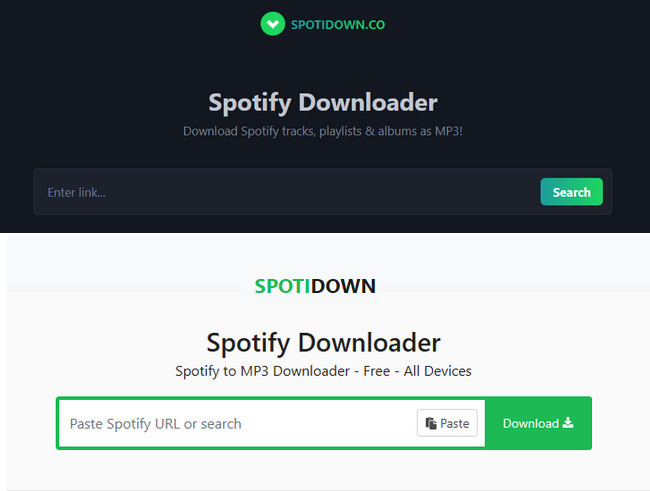
When searching for SpotiDown, you may see both spotidown.app and spotidown.co. They look similar, but the pages are not exactly the same. Here is a quick comparison before you paste a Spotify link.
| Feature | spotidown.app | spotidown.co |
| Page design | Light theme | Dark theme |
| Main use | Tracks, albums, playlists | Tracks, albums, playlists |
| Output shown | MP3; ZIP for playlists/albums | MP3; ZIP for playlists/albums |
| Audio quality claim | No clear 320kbps claim | Claims 320kbps MP3 |
| Login required | No | No |
| Download limit | Limited | Full playlists/albums limited after 5 tracks |
| Song details | Title, album, cover art | Cover art, year, album info |
| Podcast support | ❌ Claimed / tested failed | ❌ Not supported |
| Languages | Multiple languages | English only |
| Pricing shown | Free | Free |
Our advice: Treat both pages as unofficial online Spotify downloaders. Do not enter your Spotify password, do not install extra apps, and be careful with any button that opens unrelated pages. The feature claims may look similar on the surface, but the real difference shows up when you test audio quality, playlist downloads, redirects, and file details.
The basic SpotiDown download process is simple:
Step 1 Open Spotify and find the song, album, or playlist you want.
Step 2 Click Share and copy the Spotify link.
Step 3 Open SpotiDown in your browser and paste the Spotify link into the search box.
Step 4 Click the download button and save the MP3 file if the result looks correct.
We tested both SpotiDown.app and SpotiDown.co in 2026 on Chrome (Windows) and mobile Safari, using a 20-song playlist, individual tracks, and a podcast episode. Here's what actually happened.
| Best For | Quick single-song downloads, no-install convenience |
| Not Good For | Playlists, podcasts, audio quality, clean file libraries |
| Biggest Surprise | That "320kbps" label is misleading. The audio actually comes from YouTube, not Spotify. |
| Better Alternative | NoteBurner Spotify Music Converter for stable playlist and album downloads |
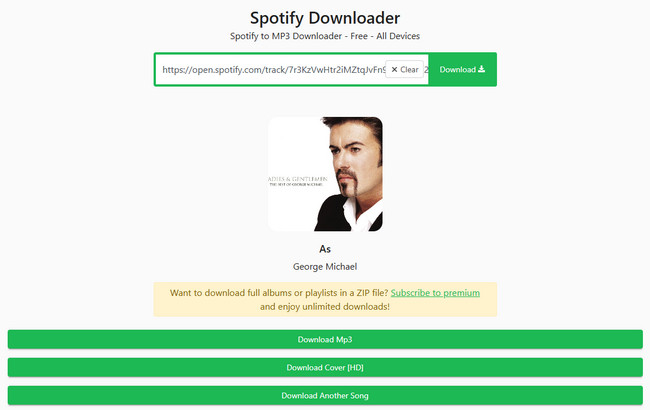
Single-track downloads are straightforward. Paste a Spotify link, click download, and you're done. Both platforms preserve basic ID3 tags including title, artist, and album art, and no Spotify login is required. For a one-off SpotiDown MP3 download, the convenience is easy to understand.
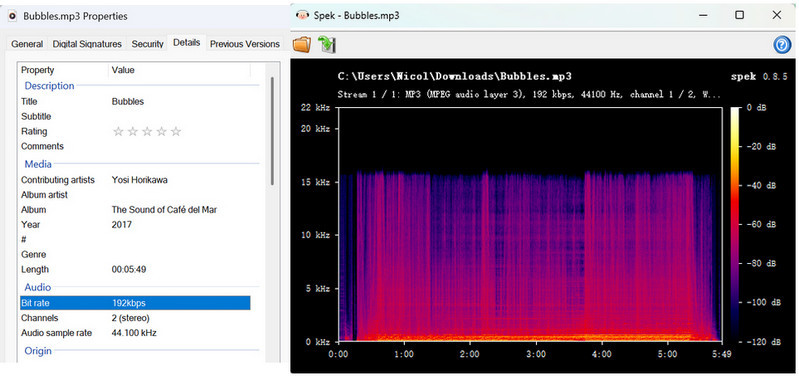
In our test, the downloaded MP3 was 192 kbps, not 320 kbps, and Spek showed a clear high-frequency cutoff at around 16 kHz. This means the file we tested did not deliver the advertised 320 kbps bitrate, and simply re-encoding lower-quality audio at a higher bitrate cannot restore audio detail that has already been lost.
The moment you try to download a full playlist, one of these prompts appears:
"We offer free album/playlist downloads for up to 5 tracks. For full albums or playlists with more than 5 tracks, subscribe to premium."

"Donate to unlock SpotiDown premium & download playlists with up to 2666 tracks at 50x faster download speed."
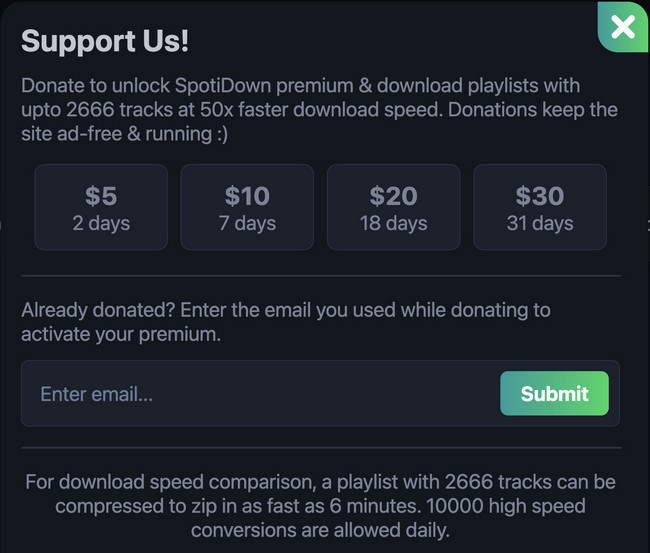
Free users get 5 tracks. Everything beyond that means either downloading each remaining song one by one, or paying around $20 per month for a subscription. At $20 a month, that adds up fast—paying once for a desktop tool ends up cheaper if you download regularly.
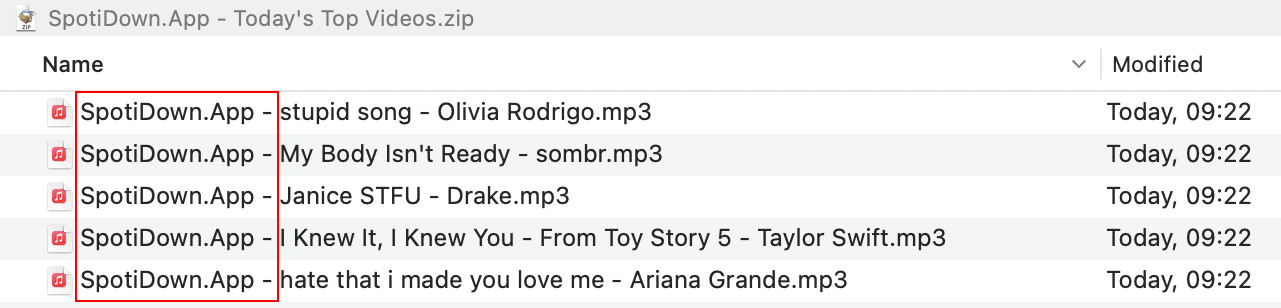
Downloaded files are automatically renamed with a branded prefix, for example: SpotiDown.App - Blinding Lights - The Weeknd.mp3. The internal metadata stays intact, but if you download a 100-song SpotiDown playlist, you are looking at manually renaming 100 files to keep your library clean. Most reviews skip over this, but it adds up quickly.
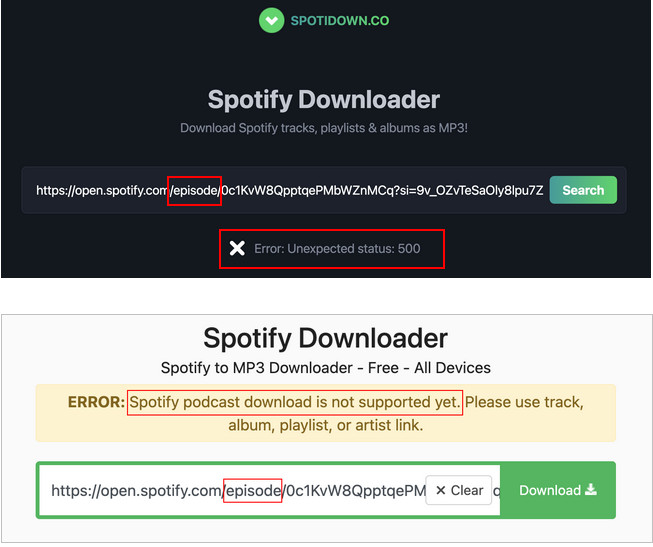
SpotiDown.app returns Error: Unexpected status: 500 when attempting a podcast download. SpotiDown.co gives a clearer message: "Spotify podcast download is not supported yet. Please use track, album, playlist, or artist link." If podcasts are part of your regular offline listening, SpotiDown is not the right tool.
| Category | Score | Notes |
| Ease of Use | 5/5 | Simple copy-paste workflow, no login needed |
| Audio Quality | 2/5 | YouTube-sourced audio, not true Spotify quality |
| Playlist Downloads | 2/5 | 5-track free limit with a paywall beyond that |
| File Naming | 3/5 | Watermarked filenames on every downloaded track |
| Podcast Support | 0/5 | Not supported on .app or .co |
| Overall | 2.5/5 | Works for single songs, falls short for everything else |
Verdict: SpotiDown gets the job done for a quick single-song download. But for playlists, podcasts, or anyone who cares about audio quality and clean file organization, the experience is frustrating. The freemium paywall makes the 'free tool' label feel like a stretch. NoteBurner is the more reliable choice for serious offline listening.
SpotiDown is not an official Spotify tool. It does not require your Spotify password, which reduces one common risk, but there are still safety and legal issues worth checking before use.
Searching "SpotiDown" returns at least three domains (.app, .co, .com) run by different operators. The .com version showed broken scripts and aggressive pop-ups during our test.
During testing, download clicks triggered ad redirects before the file saved, and redirects may interrupt the process or make the download feel less trustworthy.
SpotiDown.app charges around $20 per month for full playlist access. Similar-looking domains have been observed running separate payment pages with no clear refund policy.
SpotiDown is not licensed by Spotify. Spotify's User Guidelines, which are incorporated into its Terms and Conditions of Use, place restrictions on how Service content may be used outside the official Spotify apps. These restrictions apply to any third-party download method, including desktop software. Whether a specific use is lawful also depends on your country's rules on private copying and on what you do with the files afterwards.
If SpotiDown fails, limits your playlist, or gives you the wrong audio version, it may be time to compare other Spotify downloader options. The tools below are rated by stability, output control, playlist support, ease of use, and overall download experience.
| Tool | Type | Best For | Main Advantage | Rating |
| NoteBurner Spotify Music Converter | Desktop | Stable playlist, album, podcast, and music conversion | Multiple file types, batch conversion, clean song details | 4.9/5 |
| TuneFab Spotify Music Converter | Desktop | Users who want another desktop converter option | Format flexibility and batch workflow | 4.7/5 |
| spotDL | Open-source | Technical users who do not mind command-line setup | Free and customizable, but less beginner-friendly | 4.3/5 |
| SpotifyMate | Online | Quick single-track downloads | No installation | 4.1/5 |
| SpotMate | Online | Occasional browser-based Spotify downloads | Simple paste-and-download workflow | 4.0/5 |
| 🔗Website: https://www.noteburner.com/sp-music-converter-windows.html | |||||
| Content Type | Playlists | Albums | Podcasts | Audiobooks | Spotify Radio |
| Support |  |
|
|
|
|
SpotiDown is convenient when it works, but users have little control when the site fails, redirects, limits playlists, or returns the wrong YouTube-sourced version. That is where a desktop converter makes more sense.
NoteBurner Spotify Music Converter gives users a more controlled workflow for saving Spotify songs, albums, playlists, podcasts, and audiobooks. Because each track is matched to the exact Spotify item you selected, you get the studio version you actually picked — not a live take, a remix, or a music-video rip with intro effects. It supports MP3, AAC, WAV, FLAC, AIFF, and ALAC, while keeping song details such as title, artist, album, and cover art.

Step 1 Open NoteBurner and drag and drop your Spotify playlists to it.
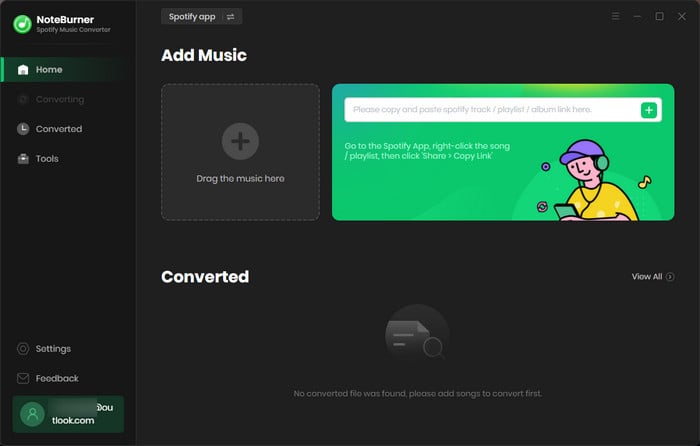
Step 2 Click on the "Settings" button and choose MP3 output format, etc.
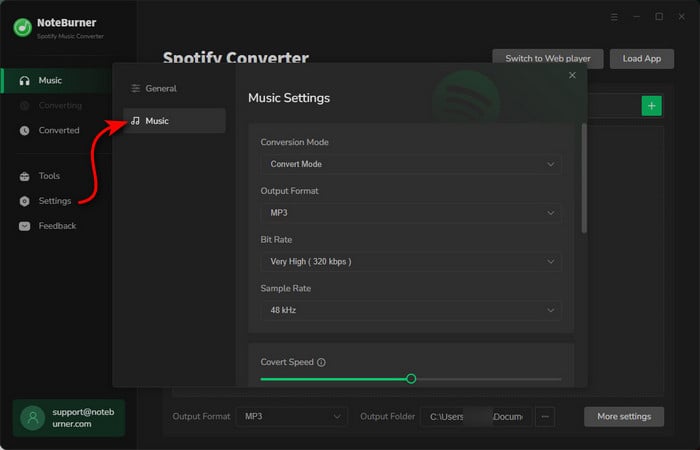
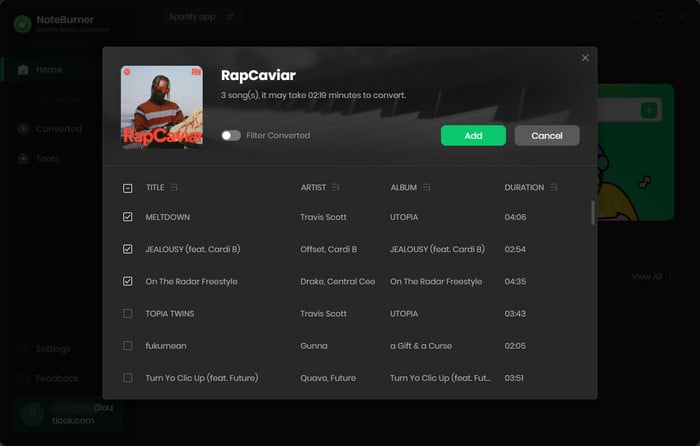
Step 3 Now, find the album or playlist you want to download and click on its title. Then, just hit the "Add" button in NoteBurner, and it will load all the songs into the download list.
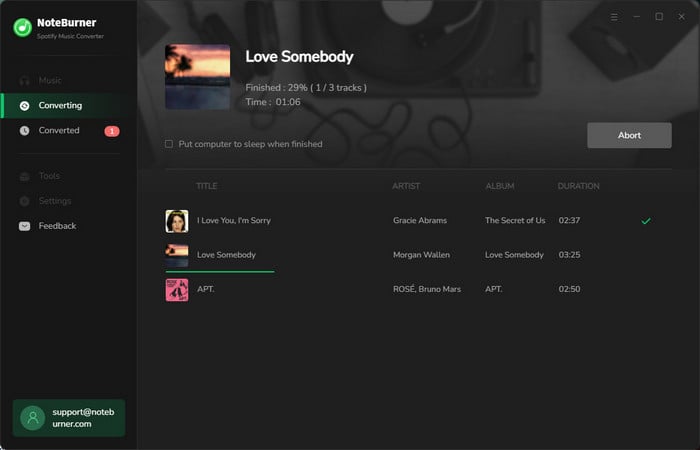
Step 4 Hit the "Convert" button to download Spotify playlists to MP3, in up to 320kbps. Once it's done, you'll find them saved on your computer.
| NoteBurner Spotify Music Converter | SpotiDown Downloader | |
| Tool Type | Desktop converter | Online downloader |
| Best For | Download Spotify playlists and albums in batch | Quick single-track MP3 download |
| Download Source | Spotify Web Player and Spotify App | YouTube Download |
| Output Audio Quality | Up to 320kbps, adjustable sample rate | Labeled 320kbps, but re-encoded from YouTube (~192kbps typical) |
| Output Format | MP3/AAC/FLAC/WAV/AIFF/ALAC | Mainly MP3 |
| Batch Download |  | Claimed, but may vary |
| Personalized Settings | |  |
| Keep ID3 tags | title, artist, album, artwork, track number, disc number, year | title, artist, album |
| Ads-Free | | |
| Language Support | 48 languages | 1 language |
| Support & Updates | | |
🏆NoteBurner Spotify Music Converter. It is the better choice if you want stable Spotify playlist downloads, cleaner song details, and better output control.
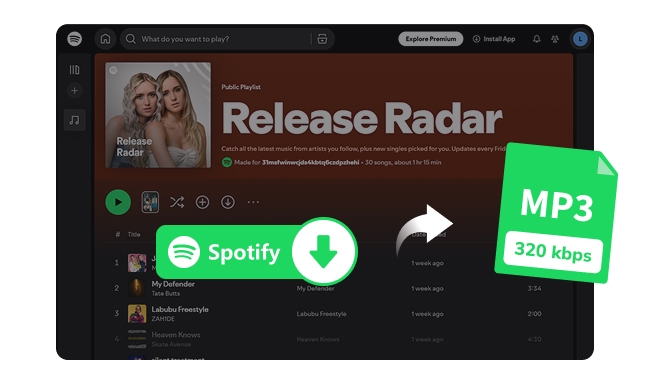
The post collects the top 9 free Spotify to MP3 downloaders that are still working in 2026, making it easy to get Spotify MP3 songs in 320 kbps for offline listening.
A: SpotiDown does not usually ask for your Spotify password, which lowers one obvious risk. Still, it is an unofficial online downloader, so users should watch for redirects, lookalike domains, broken downloads, and buttons that open unrelated pages. Avoid installing anything extra or entering payment details on suspicious pages.
A: SpotiDown is not an official Spotify tool. Whether it is legal depends on your country, the content, and how you use downloaded files. Avoid redistributing downloaded music, and check Spotify’s terms and your local rules before saving copyrighted content outside the official app.
A: SpotiDown may fail because of server issues, Spotify link parsing errors, playlist size limits, browser conflicts, ad blockers, redirects, or domain changes. Try testing with one single-track link first. If that works but playlists fail, the issue is likely related to playlist handling rather than your browser.
A: SpotiDown may process some playlist links, but full playlist downloads are much less reliable than single-track downloads. In our test, free playlist downloads were limited after a few tracks, and larger playlists quickly became inconvenient to manage.
A: Not exactly. SpotiDown may label files as 320kbps, but the audio is sourced from YouTube rather than Spotify. That means the result may be a re-encoded track, a music video version, a live recording, or a remix instead of the original Spotify version.
A: If you only need one song occasionally, SpotiDown may be enough. If you want batch playlist downloads, podcast support, cleaner filenames, better output control, and an ad-free desktop workflow, NoteBurner Spotify Music Converter is the better long-term option.
Disclaimer: For personal/educational use only. Do not distribute downloaded music/video for commercial use.
If you only need a quick single-song MP3 once in a while, SpotiDown can still get the job done. But it comes with real trade-offs: YouTube-sourced audio instead of true Spotify quality, a 5-track limit for playlist downloads, watermarked filenames, no podcast support, confusing domains, and possible ad redirects.
For a safer long-term solution, NoteBurner Spotify Music Converter is the more practical pick — especially if you want to save full playlists, albums, podcasts, or audiobooks for offline listening. It supports batch downloads, keeps audio quality up to 320kbps, preserves song details like artist, album, and cover art, and runs ad-free with no filename watermarks. That means more control over output quality, cleaner file organization, and a more reliable Spotify downloading experience. You can try it free before committing.



