By Annie Cale
Free MP3 download sites always serve as an instant solution for downloading MP3 tracks. BigMP3 is one of those sites that get the job done with minimal effort. In this guide, we'll break down how to free download MP3 audio from BigMP3, whether it's safe to use, and what the safest alternative is.
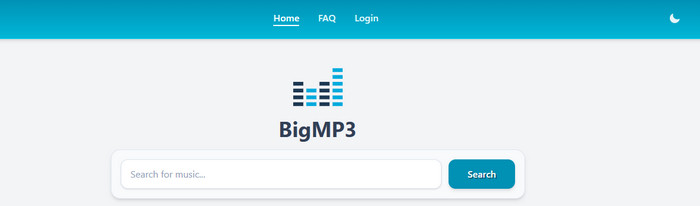
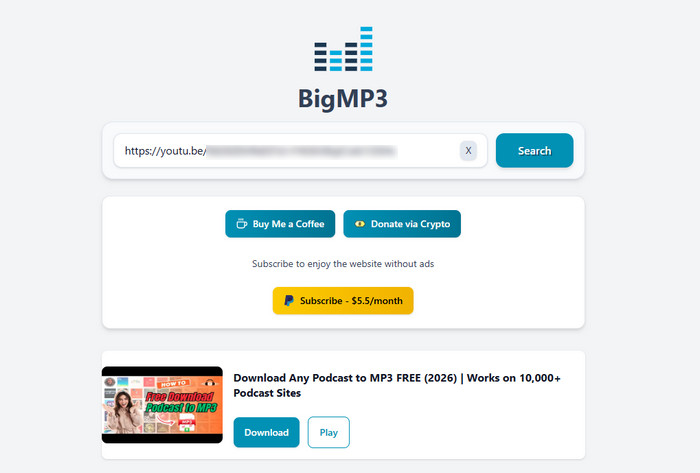
BigMP3 boasts itself as a web-based free MP3 downloader that saves any MP3 music directly to your device, with no account required and no cost. It typically matches the audio & video from YouTube, then allows you to preview the media or download it as MP3/MP4 files. The operation is friendly for even beginners. With a few clicks, select a format, and the download will start automatically.
While BigMP3 is easy to use, the safety and stability are a bit of a concern. There are a variety of issues that are hard to ignore.
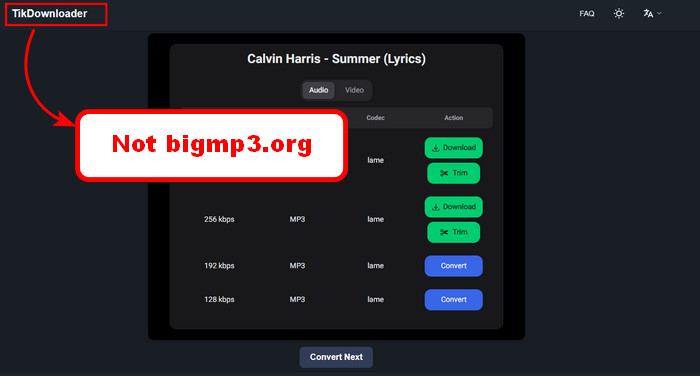
The whole download process is not 100% smooth. Since the website is ad-sponsored, it always loops you through the redirect page every time you're attempting to download the media. Plus, the actual download doesn’t even run on bigmp3.org itself. You click what looks like the right button, and suddenly you’re on an entirely different site.
This applies to most free MP3 download sites, but it’s still worth saying. Not everything you download is necessarily legal, especially if it’s protected music and you’re using it beyond personal use.
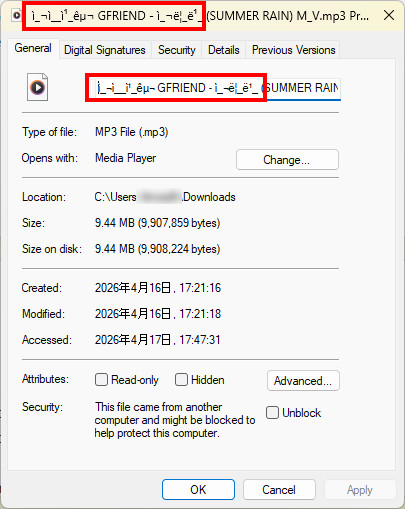
The sound quality of MP3 is one part. It usually matches the MP3 songs from YouTube videos, so don’t expect true 320 kbps quality. The ID3 tags are another part. It only keeps English-version metadata, but anything else can show up as unreadable.
🎯 Tips: Tired of sketchy ads and poor audio quality? Switch to a safer alternative—NoteBurner Music One—to download high-quality MP3s from any music platform.
Here's how to use BigMP3 to download MP3 audio at no cost.
It is advisable to enable an ad blocker before visiting bigmp3.org. Be cautious of any prompts to ask for your personal information or any page it redirects you to.
Step 1 Open the YouTube web player and copy the video you want to download as MP3.
Step 2 Back to the BigMP3 homepage, paste the link into the search engine. Alternatively, you can enter the music tile or keywords to let the converter load.
Step 3 Select the desired song from the search result. Click the "Download" button.
Step 4 Once ready, click MP3 320kbps for your output audio, then wait for the process.
Step 5 After successful conversion, you can see the converted MP3 file in the download history or local folder.
Learn how to download free music from CNVMP3 and discover the best alternatives for high-quality YouTube MP3 downloads in 2026. Learn More →
So, what's the safest alternative of BigMP3? NoteBurner Any MP3 Music Downloader unsurprisingly goes to the top pick.
NoteBurner Any MP3 Downloader (typically known as NoteBurner Music One) enables all music enthusiasts to download high-quality MP3 songs from Spotify, YouTube Music, Apple Music, SoundCloud, and any other music sites. Typically, it grabs full playlists or albums in one go. Apart from MP3, you can also let it convert music to lossless FLAC, WAV, AIFF, and others, with original audio quality and ID3 tags kept. What's more, it also integrates a free full suite of audio tools—CD burner, format converter, tag editor, etc.
Add Streaming Songs or Playlists
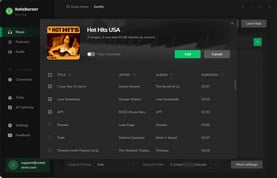
Launch NoteBurner and choose the music platform. Find and open the playlist on a music site, then click "Add" to load MP3 songs to NoteBurner.
Chose MP3 320kbps Output
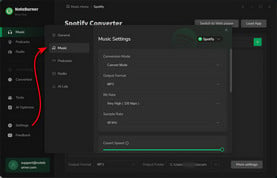
Click the "Settings" button to choose MP3 output format and 320kbps output quality.
Convert MP3 Music with No Ads
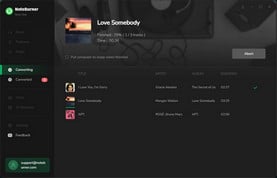
Click the "Convert" button to start downloading MP3 songs. Once done, you can go to History to find all MP3 output files.
The table below will show you sorts of differences between NoteBurner Music One and BigMP3.
| Feature | 🏆NoteBurner Music One
|
BigMP3.org
|
| Safety | 100% safe (no ads / redirect) | Low - include risky pop ups, redirects |
| Download Source | YouTube, Spotify, Apple Music, and all other platforms | YouTube |
| Download Format | MP3, AAC, WAV, FLAC, AIFF, and ALAC | MP3 only |
| Video Quality | Up to 4K (Music Video) | / |
| Audio Quality | 320 kbps High Quality | Inconsistent |
| ID3 Tags | Fully preserved (title, artist, artwork, album, year, track num, etc.) |
Basic (title, artist) |
| Download Speed | 10x faster | fast |
| Batch Downloads | ✅ |
❌ |
| Built-in Search | ✅ | ✅ |
| Music Webplayer | ✅ | ❌ |
| Support & Updates | ✅ | ❌ |
| Free audio tools | ✅ (Audio Editor, CD Burner, Format Converter, Tag Editor, etc.) |
❌ |
 Winner: NoteBurner Any MP3 Downloader
Honestly, NoteBurner Any MP3 Downloader takes the crown for its ad-free workflow, high-quality MP3 downloads, and additional audio editing bonus.
One reason is that the website may have a temporary outage that makes the Download button do nothing. The other is probably due to the ad blocker conflicts. Sometimes, disabling ads with the third-party tool blocks the downloader itself.
Not consistently. YouTube-sourced music downloads often degrade the actual audio quality. For example, the alleged 320kbps is labeled as 320kbps files but contain lower-quality audio. To keep 320kbps for MP3, just go for NoteBurner Music One.
Yes. By converting music to local MP3 files, users can transfer these music files to the USB flash drive.
Here you'll learn Spotify ReVanced's features, risks, and the best safe alternatives for ad-free, offline streaming Spotify songs. Learn More →
Disclaimer: All tools are for personal/educational use only. 🚫 Do not distribute downloaded music/video for commercial use.
By simple input and search on BigMP3, you can discover and download your desired audio to MP3. But in real use, it’s a bit of a gamble. The frequent ad redirects disrupt the download process, not good for large batch playlist downloads. That’s where something like NoteBurner Music One comes in as a workaround. It smoothly downloads any streaming music to MP3 320 kbps, with no random redirects mid-download, and it handles full playlists at a lightning speed.
Note: The free trial version of NoteBurner Music One allows you to convert the first 1 minute of each song. You can buy the full version to unlock the limitation.