
 By
By
If you've ever tried to play an Audible audiobook outside the app, you've probably run into the same issue - files won't open, downloads won't transfer, and you don't fully control your library. That’s because Audible titles are saved in AAX format, which isn’t supported by most devices. To fix this, many users choose to convert AAX files into MP3 so they can listen freely on any device.
After testing a range of tools based on speed, output quality, and ease of use, a few clearly stand out. NoteBurner Music One, Epubor Audible Converter, and Libation are among the best options in 2026, with NoteBurner offering the most balanced experience for most users. Whether you’re looking for a faster paid tool or a simple free option, this guide covers both.
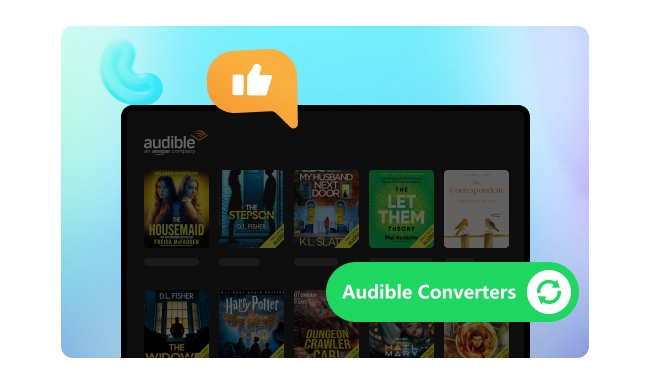
Audible audiobooks are stored in DRM-protected AA and AAX formats, which are encrypted and locked inside the Audible app. This means you can’t play them freely on most other devices without conversion.
According to Audible, downloaded audiobooks are protected and can only be played within authorized apps and devices.
On top of that, many users are frustrated by the limitations built into Audible’s membership system.
1️⃣ No true file ownership:
Even after downloading, Audible audiobooks are not standard audio files. They remain tied to your account and app access.
2️⃣ Locked file format (AA/AAX):
Downloaded audiobooks are encrypted and cannot be directly played on MP3 players, car stereos, or other non-Audible devices.
3️⃣ No direct MP3 export:
Audible does not provide an official way to convert or download audiobooks as MP3 files.
4️⃣ Access depends on subscription:
Titles from the Plus Catalog become unavailable once your subscription ends.
5️⃣ Credit system limitations
Most users only receive 1–2 credits per month, and unused credits may expire after 12 months.
6️⃣ Regional availability restrictions
Some audiobooks are restricted based on your location or marketplace.
Converting AAX to MP3 removes these restrictions by turning them into a universal format — a process that also removes Audible DRM. This allows you to keep, organize, and play your audiobooks freely on any device, including MP3 players, car audio systems, smartphones, and computers.
| Audible Restrictions | MP3 Freedom |
| ❌ Locked to the Audible app | ✅ Play on any device you own |
| ❌ Credits may expire | ✅ Keep your audiobooks forever |
| ❌ Subscription required | ✅ No subscription needed |
| ❌ Region-restricted | ✅ Listen anywhere, no regional limits |
| ❌ Lose Plus Catalog access | ✅ Keep all your titles even after canceling |
We tested these tools using multiple audiobooks, including long titles over 10 hours, to see how they perform in real use. Here are the results.
Best for: Users seeking the fastest, most reliable Audible to MP3 conversion with complete library control.
Compatible OS: Windows and macOS
Recommend level: ⭐⭐⭐⭐⭐
Trustpilot Rating: 4.3 out of 5 stars (based on 360+ reviews)
Official website: https://www.noteburner.com/noteburner-music-one.html
NoteBurner Music One is an all-in-one AAX to MP3 converter designed for users who want fast, reliable, and high-quality audiobook conversion. It supports MP3, M4A, and M4B output at up to 300× speed, preserving original audio quality, chapter markers, and full ID3 metadata. Using its embedded Audible web player, it automatically detects and converts your purchased titles once you log into your Audible account. Alternatively, you can import local AA/AAX files without signing in and access the converter via "Tools > AA/AAX Converter".
Beyond Audible conversion, NoteBurner functions as a complete streaming audio recorder, supporting Spotify, Apple Music, Amazon Music, Tidal, SoundCloud, and YouTube Music. With built-in features like an Audio Editor, Tag Editor, and Vocal Remover, you can manage, edit, and improve your audio library all in one place—saving time and keeping everything organized.
If you're looking for the best way to convert Audible to MP3, this guide shows how to convert Audible AAX to MP3 step by step.
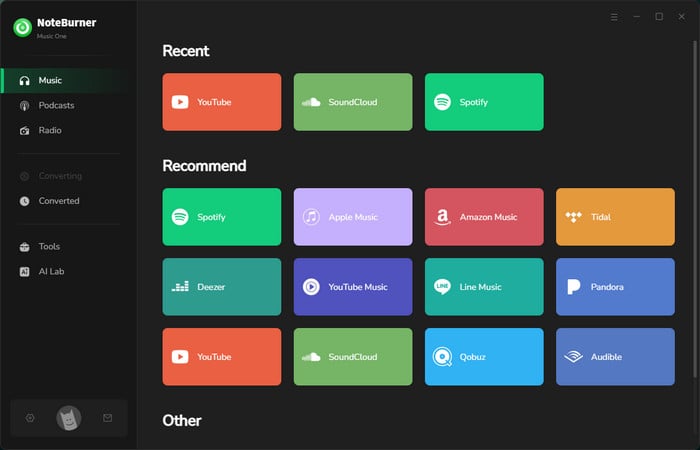
Step 1 Choose Audible
Download and open NoteBurner Music One, you'll see the main interface as below. Simply choose the "Audible" module.
Step 2 Customize Output Settings
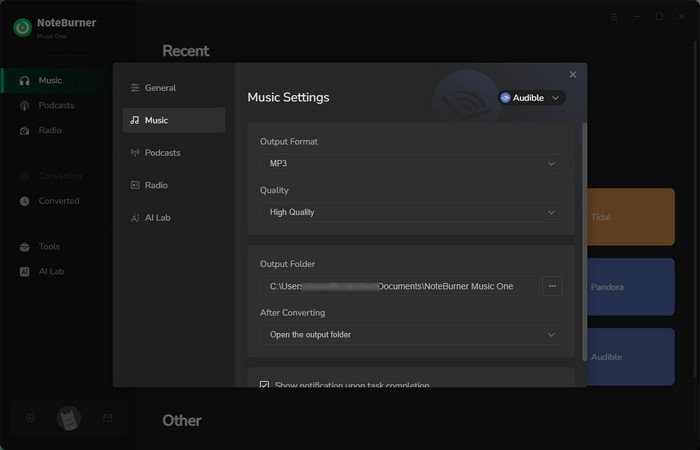
Go to the "Settings" window on NoteBurner, and choose "MP3" as the output format. Here you can choose the "Output Format", "Output Quality", "Output Folder", "Split by chapters", etc.
Step 3 Add Audible Books You Want to Download
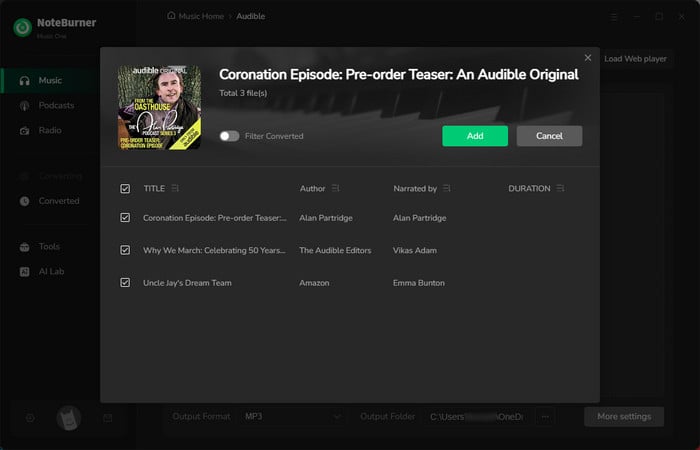
Open your favorite audiobooks on the Audible web player, and click the "Add" button to download Audible books directly to your computer. You will see a pop-up window, you can add all audiobooks you want to download.
Step 4 Convert AAX to MP3
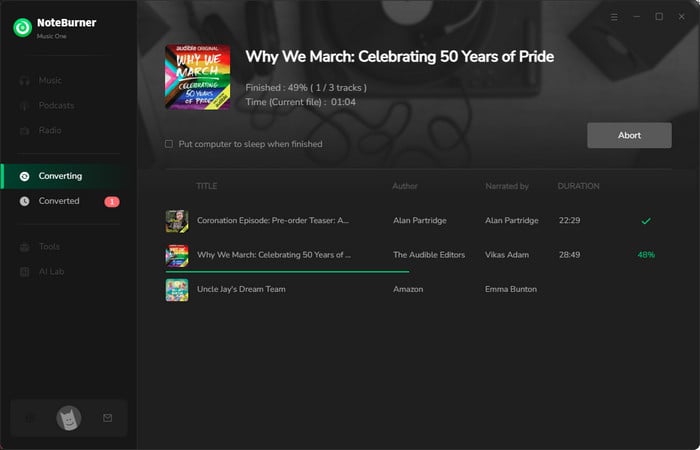
Tap on "Convert" to start converting Audible to MP3 without quality loss. This Audible to MP3 converter preserves original audio quality.
Step 5 Find Your Downloaded Audible MP3 Files
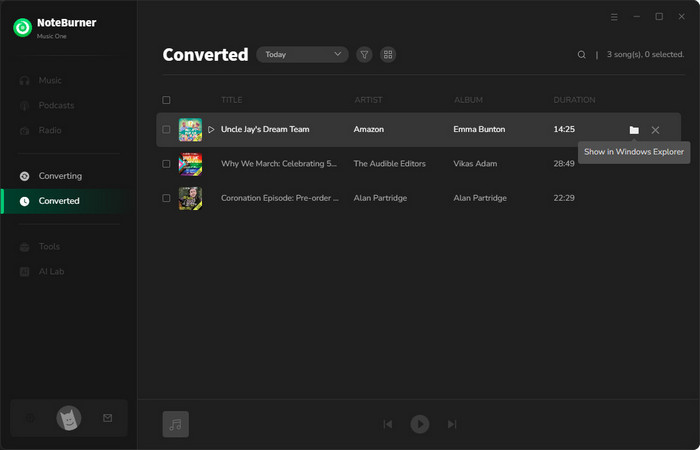
Once converted, you can browse the well-downloaded audiobooks by directly going to "Converted > Folder".
Now that you've successfully downloaded Audible audiobooks to your computer, you can enjoy them offline or transfer them to other devices for playback.
Best for: Users who want a desktop tool that combines Audible library management and conversion, especially for batch syncing and large audiobook libraries.
Compatible OS: Windows, macOS, and Linux
Recommend level: ⭐⭐⭐⭐
Trustpilot Rating: 0 (no review)
Official website: https://openaudible.org/
OpenAudible is a desktop Audible audiobook manager that combines library syncing, batch downloads, and MP3/M4B conversion. Its interface is focused on managing large collections, letting you organize, download, and convert audiobooks in one place.
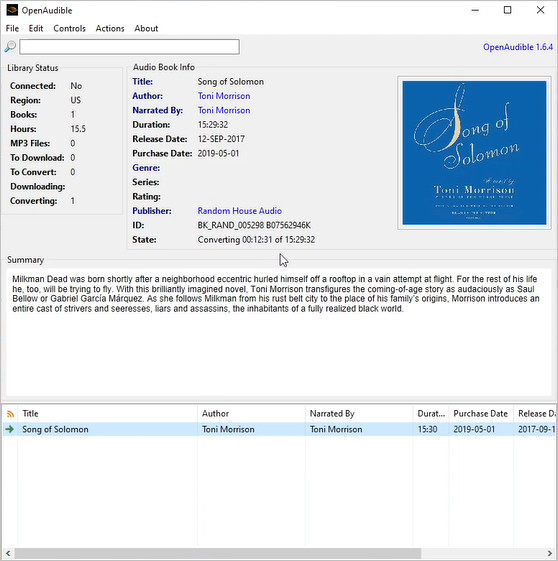
How to Use OpenAudible — Official Video Tutorial
Take advantage of several methods to get Audible student discount, later enjoy Audible Premium audiobooks at a discounted price.
Best for: Users who want quick Audible audiobook conversion without extra tools, supporting both local AAX files and direct library access.
Compatible OS: Works on Windows, macOS, and Linux.
Recommend level: ⭐⭐⭐⭐
Trustpilot Rating: 4.6 out of 5 stars (based on 1.3k reviews)
Official website: https://www.epubor.com/audible-converter.html
Epubor Audible Converter is a fast, beginner-friendly Audible to MP3 converter. You can add files by dragging them into the software or manually importing .AAX/.AA files. Logging into your Audible account allows the software to automatically detect purchased titles for direct conversion. It outputs MP3, M4B, or MP4 while preserving bitrate, codec, and metadata, and supports up to 60× conversion speed with chapter splitting.
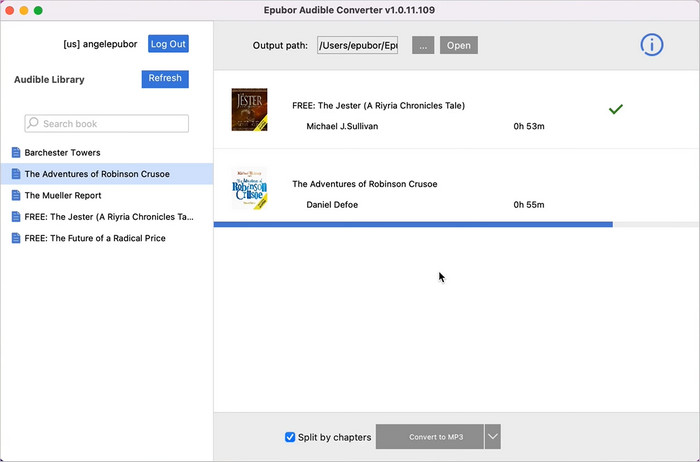
Step-by-Step Tutorial: How to Convert AAX to MP3 with Epubor Audible Converter?
Best for: Users with large Audible libraries seeking a free, open-source solution for downloading, organizing, and batch converting audiobooks.
Compatible OS: Works on Windows, macOS, and Linux.
Recommend level: ⭐⭐⭐
Trustpilot Rating: 0 (no review)
Official website: https://github.com/rmcrackan/Libation
Libation is an open-source Audible to MP3 converter and library manager. It can sync your Audible account, download entire collections, and batch convert to DRM-free MP3 or M4B. The interface is functional and lightweight, making it practical for large libraries even though it’s less polished than paid tools. Many Reddit users like Libation for free batch conversion, though setup can be tricky for beginners.
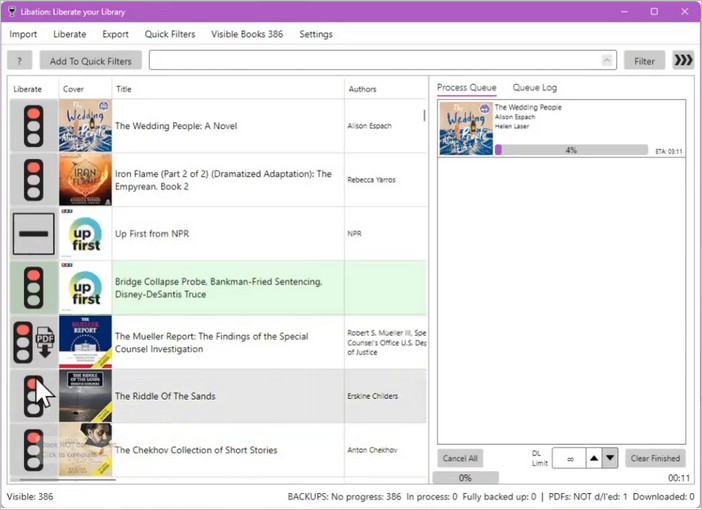
For a full installation guide, see the official Libation documentation
Best for: Users who need a quick, one-time Audible conversion without installing software.
Compatible OS: Web-based, available on all operating systems.
Recommend level: ⭐⭐⭐
Trustpilot Rating: 0 (no review)
Official website: https://audible-tools.kamsker.at/
AAXtoMP3 is a browser-based Audible AAX to MP3 converter that requires no installation. You upload your AAX file and get a converted MP3 online. It’s convenient for quick, one-off conversions, though file size limits, slower processing, and privacy considerations make it less suitable for frequent or large-scale use.
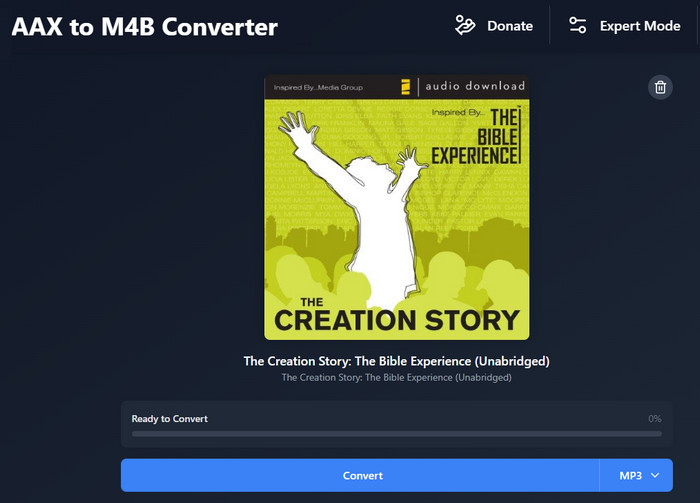
How to Use AAXtoMP3: Simply visit the site, upload your AAX file, select an output format, and the converted file downloads automatically.
Best for: Users who want a simple, low-cost Audible converter for batch processing without extra tools.
Compatible OS: Windows and macOS
Recommend level: ⭐⭐⭐
Trustpilot Rating: no reviews
Official website: https://www.any-audiobook-converter.com/
Any Audiobook Converter is a lightweight desktop tool for converting Audible AA/AAX files to MP3 or M4A. It supports batch conversion and basic output customization, making it simple and low-cost for users who don’t need advanced features or full library management.
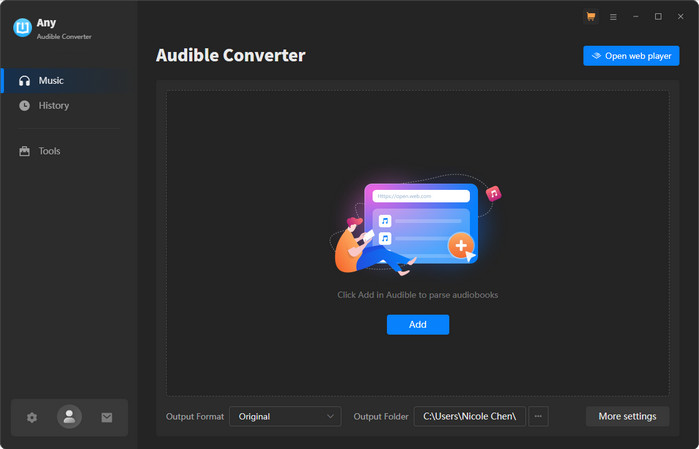
Step-by-Step Tutorial: How to Convert AAX to MP3 using Any Audible Converter?
Best for: users who want a free Audible converter and are comfortable handling manual setup and DRM removal.
Compatible OS: Windows and macOS
Recommend level: ⭐⭐⭐
Trustpilot Rating: 0 (no review)
Official website: https://github.com/rmcrackan/inAudible
InAudible is a free, unofficial Audible to MP3 converter built on FFmpeg. It supports common output formats like MP3 and M4B, preserving chapters and metadata where possible. Setup is manual and requires handling activation bytes for DRM removal. The most widely used versions date back to 2017–2018 and are no longer actively maintained, making them better suited for advanced users who can troubleshoot technical issues.
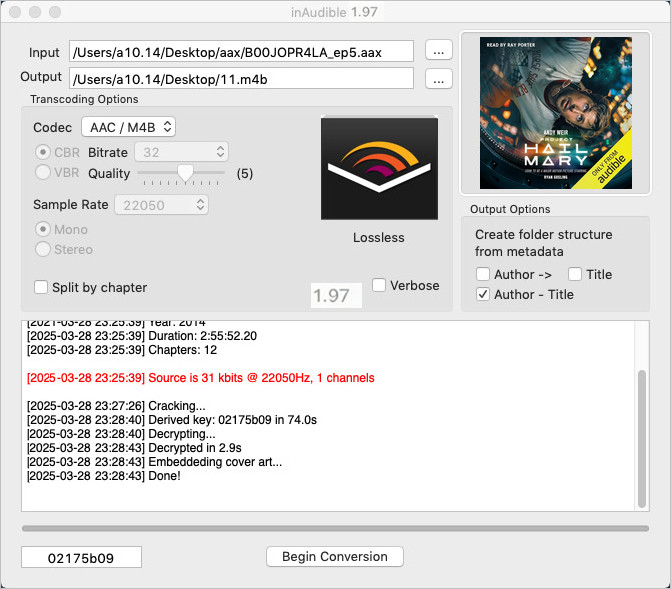
Based on recurring questions from Reddit, Quora, and YouTube comments in 2025–2026, here are the most common issues users run into:
1. ❌ "My audiobook turned into one long MP3 with no chapters."
This is one of the most frequent complaints, especially with online converters. Without chapters, navigating long audiobooks becomes frustrating.
2. ❌ "My MP3 won’t play on my car / MP3 player"
This is usually a format or bitrate issue. Here are some quick fixes:
3. "Do I need an activation code just to convert one book?"
Many free tools like InAudible require manual extraction of Audible activation bytes, which is confusing for most users.
4. "The free version only converted 1 minute."
Trial limitations are common, but not always clearly explained. Here’s a quick breakdown:
| Tool | Free Trial Limit |
|---|---|
| NoteBurner Music One | First 1 minute per book |
| OpenAudible | Paid only |
| Epubor Audible Converter | First 1/3 of each book |
| Libation | 100% free |
| Any Audible Converter | First 1 minute per book |
| InAudible | 100% free |
This Audible converter comparison makes it easy to see which tool fits your needs.
| Tool | Price | Test Time (10h audiobook) |
Remove DRM | Output Format | Batch Conversion | Split by Chapter | Keep ID3 Tags | Platform |
|---|---|---|---|---|---|---|---|---|
| NoteBurner Music One | Free & Paid | ~2 min | ✔ | MP3, M4A, M4B | ✔ | ✔ | ✔ | Win/Mac |
| OpenAudible | Paid only | ~6 min | ✔ | MP3, M4B | ✔ | ✔ | ✔ | Win/Mac/Linux |
| Epubor Audible Converter | Free & Paid | ~10 min | ✔ | MP3, M4B | ✔ | ✔ | ✔ | Win/Mac |
| Libation | Free | 20 – 60 min | ✔ | MP3, M4B | ✔ | ✔ | ✔ | Win/Mac/Linux |
| AAXtoMP3 | Free | 30 min – 2 hr | ~ Limited | MP3, M4B | ❌ | ❌ | ❌ | Browser |
| Any Audible Converter | Free & Paid | ~2 min | ✔ | MP3, M4A, M4B | ✔ | ✔ | ✔ | Win/Mac |
| InAudible | Free | 10 – 30 min | ✔ | MP3, M4B, FLAC, OGG, Opus, WAV | ✔(Win only) | ✔ | ✔ | Win/Mac |
* Test results based on a 10-hour audiobook on Windows 11 (i5 processor). Actual time may vary by device.
Not sure which tool to choose? Here’s a quick guide based on your needs:
Yes. Audible files in AA or AAX format can be converted to MP3 using a dedicated desktop AAX to MP3 converter. The process removes DRM locally and outputs standard audio files you can play on any device.
The best way to convert AAX to MP3 without quality loss is using a desktop AAX to MP3 converter like NoteBurner or Epubor, which preserves original bitrate and avoids re-encoding.
Most online AAX to MP3 converter tools have limitations with DRM-protected files and require uploading audiobooks, which raises privacy concerns for many users. A desktop converter is generally safer since everything is processed locally.
Tools like NoteBurner, Epubor, OpenAudible, and Libation can split Audible chapters and preserve metadata such as cover art and ID3 tags. M4B format works best, while MP3 support depends on the device.
A free Audible to MP3 converter like Libation is enough for basic use. However, paid tools offer a faster, smoother experience for larger libraries.
Among popular tools, NoteBurner is one of the most beginner-friendly AAX to MP3 converters. It connects directly to your account, removing the need for manual file handling and making the conversion process simple and fast.
Disclaimer: All tools are for personal/educational use only. 🚫 To avoid legal issues, do not distribute downloaded audiobooks for commercial use.
In 2026, choosing the right AAX to MP3 converter starts with one key challenge: dealing with DRM-protected AA/AAX files. If you want the fastest, most beginner-friendly experience with high-quality output and full chapter support, NoteBurner Music One is the easiest place to start. For larger libraries or batch conversion, tools like Epubor offer more flexibility, while free options like Libation work well for occasional use. Ultimately, converting your Audible books to MP3 gives you full control — letting you listen anywhere, organize your files freely, and keep your audiobooks accessible long after your subscription ends.
Note: The free trial version of NoteBurner Music One is limited to convert the first 1 minute of each song. You can buy the full version to unlock the limitation.



