
 By
By
The MP3 tracks of Beatport are good for casual DJs, storage-saving, and offline playback on any portable device. On this page, we'll walk you through how to download Beatport music to MP3 files using both official and alternative methods. Just dive in.
| Tool | Download Source | Quality | Format | Cost | Ads-Free, Safe | Free Toolbox | Highlights |
| Beatport Official Purchases | Beatport | 320kbps for MP3 | MP3/WAV/AIFF/FLAC | $1 and above for each track | ✔️ | ❌ | Trusted Beatport MP3 purchase and download |
| NoteBurner Music One | Beatport & Any Music Platform | 320kbps - Lossless FLAC 24bit (for major service) | MP3/FLAC/AAC/WAV/AIFF/ALAC | Free trial / Paid | ✔️ | ✔️ | Ad-free beatport to MP3 converter |
| TubeRipper | Beatport, YouTube | 256kbps | MP3, M4A, WAV, OGG, FLAC | Free | ❌ | ❌ | Online free Beatport downloads |
| Beatport Downloader Telegram Bot | Beatport | 128-256kbps | MP3 | Free | ❌ | ❌ | Mobile-first quick grabs |
NoteBurner Music One stands out with its all-in-one features, including Beatport downloads in up to 320kbps MP3, unlimited audio recording, an ad-free experience, and no Premium account required. It lets you keep your favorite Beatport tracks as local MP3 files without paying for each track.
Entrance: https://www.beatport.com//
The straightforward option, unsurprisingly, goes to the official track purchase from the Beatport Store. Users can add the desired audio track to the cart and proceed with the payment. The track typically costs $1 and above, with MP3, WAV, AIFF, and ALAC available for download.
Step 1 Head over to https://www.beatport.com/, then log in to the Beatport free or Premium account. (The platform supports music purchase via a Free account).
Step 2 Find the track via the search bar or filter by genre, chart, or label. It is feasible to preview a 2-minute snippet before buying.
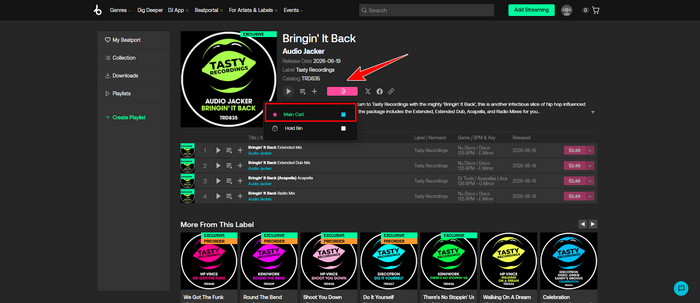
Step 3 Click the shopping cart icon next to the track and add it to the Main Cart.
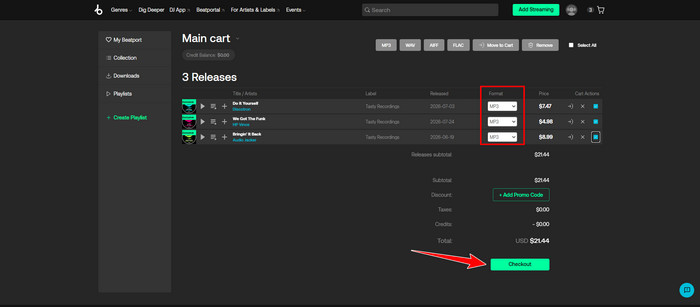
Step 4 Select MP3 as your preferred format or other formats if needed. Later, tick the tracks and confirm "checkout".
Step 5 Once purchased, go to Collection on the left sidebar. Download the tracks to your computer as MP3, and listen offline at ease.
Entrance: https://www.noteburner.com/noteburner-music-one.html
If you're looking to save Beatport tracks to high-quality MP3s without adverts and pay-by-track, then NoteBurner Music One offers an alternative solution.
NoteBurner Music One integrates an easy-to-use Beatport music recorder, flexibly captures audio tracks from Beatport, and exports them to MP3 at 320 kbps. Beyond MP3, it records Beatport music to WAV, FLAC, ALAC, and more formats, while preserving important ID3 tags like title, artist, album and so on. After recording, you can also edit the audio tracks using the built-in tools.

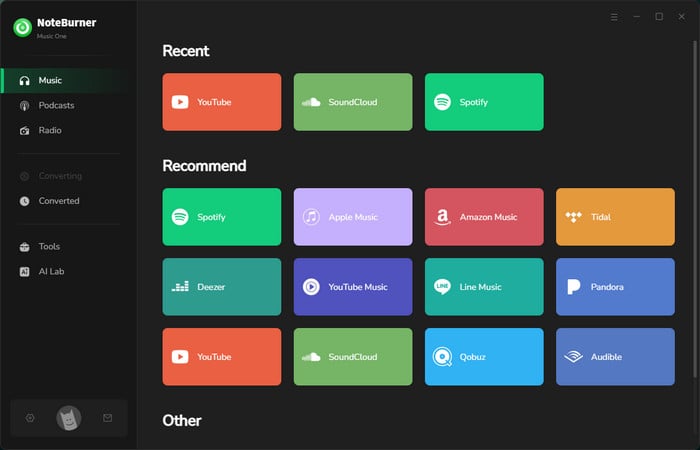
Step 1 Download and launch NoteBurner Music One. In the music tab, click Beatport, and the web player will pop up.
Step 2 Find the "Record" icon in the lower right corner and choose MP3 as the download format of Beatport. You can also adjust other recording settings as your need. Later, click on "Start Recording", and NoteBurner will simultaneously capture Beatport music.
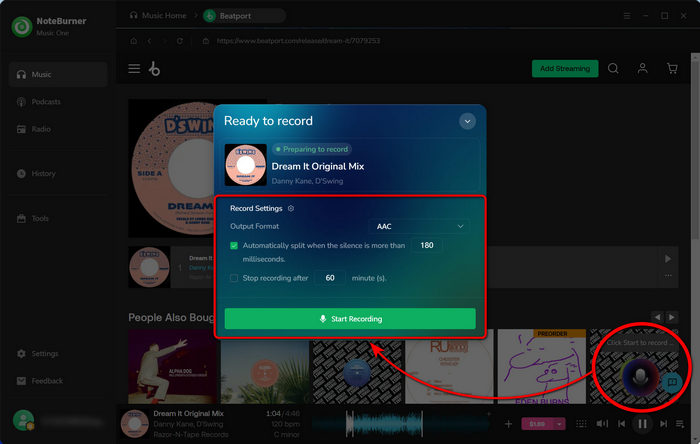
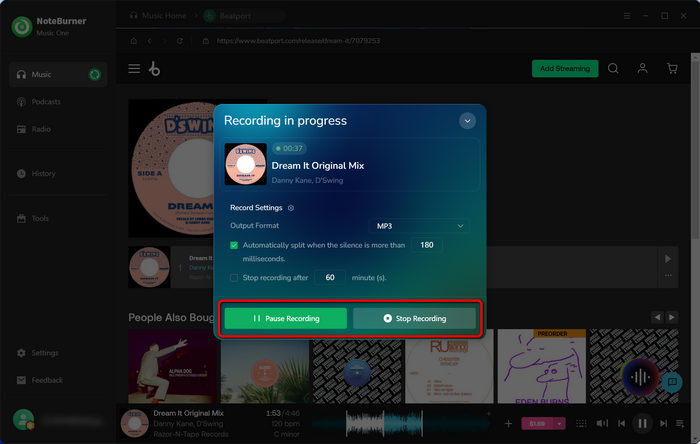
Step 3 Click the "Stop Recording" button, then NoteBurner finalizes the current recording and saves Beatport music as local MP3 files. (The current recording process will be paused temporarily if you choose "Pause Recording").
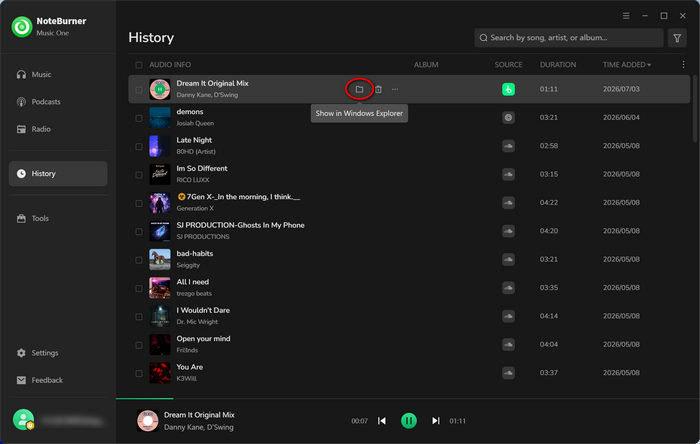
Step 4 Open the History tab on the left sidebar. Hover over the folder icon next to any track and click it to locate your Beatport MP3 downloads.
Entrance: https://tuberipper.net/73/site/beatport
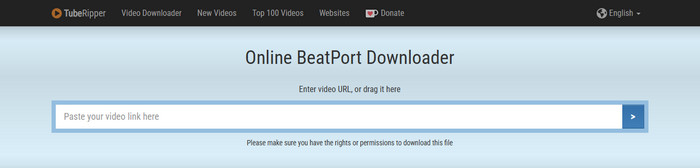
The online Beatport music downloader, TubeRipper, is used for converting Beatport track links into local MP3 files at no cost. As with other online tools, you just paste the target Beatport URL into the converter and let it do the rest. Naturally, the whole process runs through the browser, so there is no need for any app setup or registration.
Step 1 Open your Beatport site, navigate to the track you intend to download, and get its URL.
Step 2 Input the track link into the search field of TubeRipper, then it will extract the link and show you a downloadable file.
Step 2 Find the downloaded MP3 files in the local folder.
Entrance: https://t.me/beatport_downloader_bot
Beatport Downloader Telegram Bot (@beatport_downloader_bot) is another workaround for saving Beatport music as MP3. Not just for chatting, it is capable of searching, streaming, and downloading desired media to your device as local files. Simply put, Telegram users type the track name or link, and soon after, the bot replies with audio previews and downloadable options.
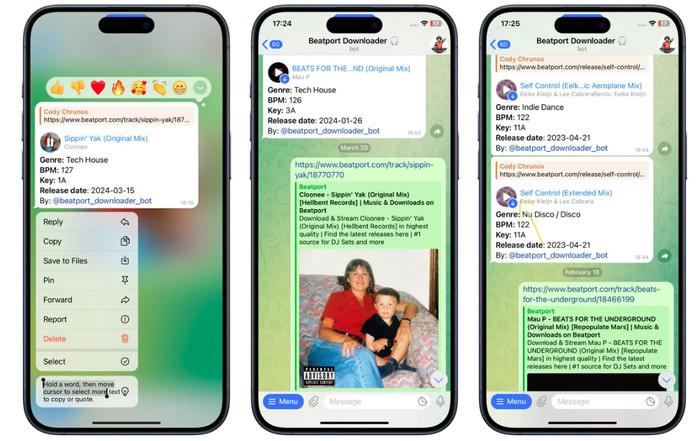
Step 1 Search for the bot (@beatport_downloader_bot) on the Telegram app.
Step 2 Enter "/Start" to open a new chat window, then copy and paste the music link into the box. The bot will process your link.
Step 3 When the Beatport downloader bot replies with a download option, you can choose the output format and quality (if provided).
Step 4 Once done, the MP3 files are stored directly in your Downloads or Telegram folder.
The page offers a list of the best 8 YouTube to MP3 Telegram bots that actually work in 2026, as well as the best alternatives.
A: Not officially, because music track downloads typically require payment. For a cost-effective solution, you can use NoteBurner Music One to record Beatport as MP3 via a free account. Alternatively, just choose the free online tool or other alternatives.
A: Not really 100%. Most Beatport download sites are ad-sponsored. Clicking the alleged Download button may redirect you to unknown sites. So you should use them with caution-enable the ad-blocker or turn down the redirected page in time.
A: Usually, free Beatport users are allowed to re-download each purchased track up to 20 times, whereas Premium ones have more depending on the terms. To skip the hassle of re-downloads, just go for NoteBurner Music One way to keep Beatport music forever.
A: Once your tracks are saved as MP3 files on your computer, it’s pretty simple: just plug in your USB drive, open it in File Explorer, and drag-and-drop the music files into the folder you want.
Disclaimer: For personal/educational use only. 🚫 Do not distribute downloaded music/video for commercial use.
Buying from the official Beatport store is the most direct one, but it costs $1–$3 per track and sums up more for massive music downloads. If you want free Beatport MP3 music, you have three other routes: an online Beatport converter, a Beatport downloader Telegram bot, and NoteBurner Beatport to MP3 Recorder. Just pick the one based on your needs.
Note: The free trial version of NoteBurner Beatport Music Converter is limited to convert the first 1 minute of each song. You can buy the full version to unlock the limitation.




