
NoteBurner Spotify Music Converter is among the most popular music converters for downloading songs, playlists, and albums to MP3 from Spotify. But does it actually work as it's claimed? Is it worth purchasing and using? To give an honest review to users who plan to use it, I put it to real tests — download speed, audio quality, metadata, security, and more. Plus, for a more comprehensive enquiry of the Spotify converter, add a test on NoteBurner's alternatives. Let's dive in.
Music lovers seeking fast, batch MP3/FLAC output from Spotify with no ads. Solid for both Spotify Free & Premium users.
High-quality audio output, full metadata, high user acceptance, built-in extra tools, etc.
The free tier is limited to 1 minute for each track.
Beats competitors among different features.
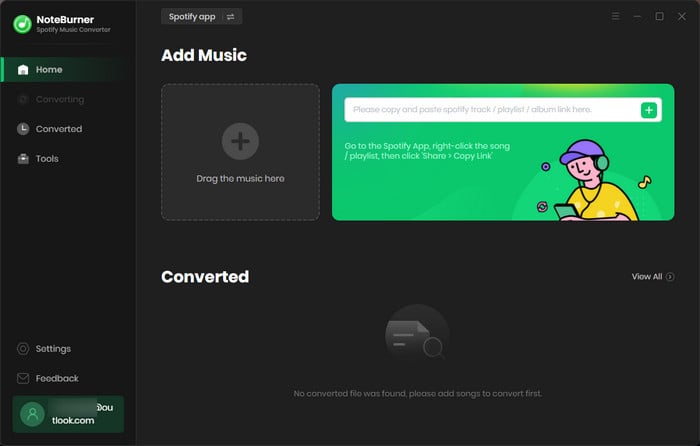
NoteBurner Spotify Music Converter is a dedicated tool for converting Spotify tracks and other audio media into common formats, such as MP3, FLAC, WAV and others. It works flexibly with the embedded Spotify web player (and even the Spotify app), then exports your desired Spotify audio with original quality and full metadata inserted into every file. Beyond the converter itself, NoteBurner packs a handful of audio utilities that most competitors charge separately for or don't offer at all.
| Items | Detail |
|---|---|
| Supported Platforms | Windows 8-11; macOS 11-27; Android 8.0+ |
| Download Content | Singles, playlists, albums, podcasts, audiobooks, selected video media |
| Audio Formats | MP3, FLAC, AAC, WAV, AIFF, ALAC |
| Video Output | MP4 (Spotify music videos, video podcasts) |
| Max Quality | 320kbps MP3; Lossless 24-bit FLAC (Premium required) |
| Conversion Speed | Up to 40x (depend on network) |
| Batch / Playlist Support | ✅Full playlists and albums |
| Keep ID3 Metadata | ✅ Title, artist, album, track no., disc no., year, cover art, lyrics |
| Free audio tools | ✅ Tag editor, format converter, audio editor, CD burner, Export to iTunes |
| Free Trial | ✅ 1-minute conversion per track |
| Cost | $44.95/year; $89.90 lifetime |
🔍 Source Note: Product information comes from the official NoteBurner website, last updated in October 2026.
| Test Environment | Details |
|---|---|
| Operating Systems | Dell Windows 11 Intel Core i7 |
| Installation Version | V2.6.4 - Download and install from the official website |
| Tested Content | Playlist - Today’s Top Hits (50 tracks) |
| Output Settings |
· Conversion Source: Spotify Web Player · Output Format: MP3 · Bit rate: 320kbps · Conversion Mode:Intelligent Mode |
| Speed Measurement | Clock app (total conversion time) |
| Quality & Tag | Verify the final audio quality via the Spek, see the ID3 tags & artwork via Mp3tag |
| Security check | Scamadviser for website; Microsoft Defender for software |
| Spotify Account | Use a Spotify Free account to verify the "no Premium required" claim |
Step 1. First up, download and install NoteBurner Spotify Music Converter on the computer. The interface pops up a Spotify web player; here you can sign in to the account.
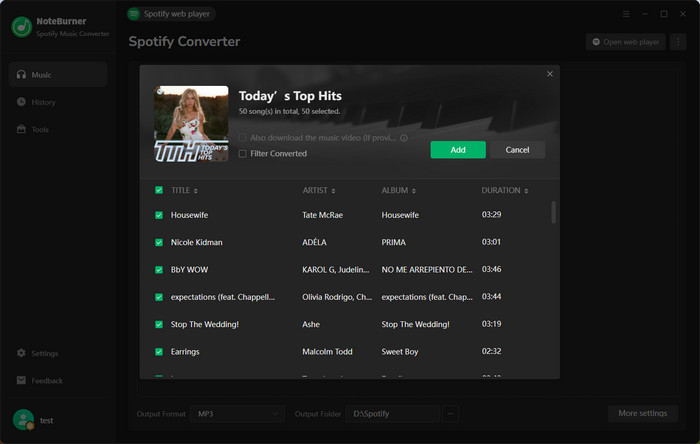
Step 2. On the web player, open the Spotify playlist or album. Simply drag it into NoteBurner, or click on an add icon in the lower right corner to load the playlist. Check all songs and click Add.
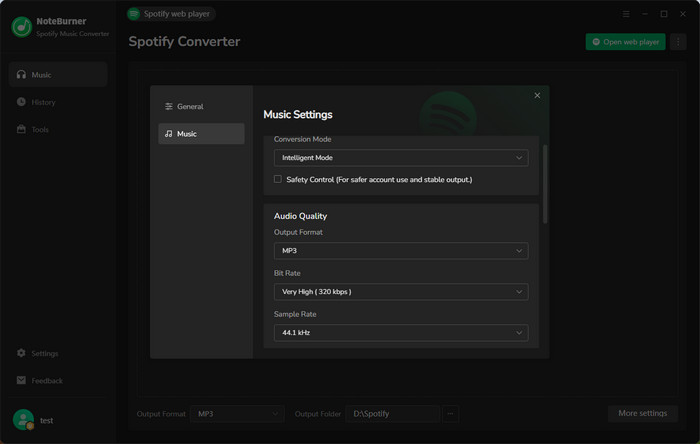
Step 2. Click on Settings, and select MP3 (or other desired formats) as the audio format and 320 kbps as the output bitrate. To easily organize the downloaded files, it's suggested to create a new folder and select it as the output path.
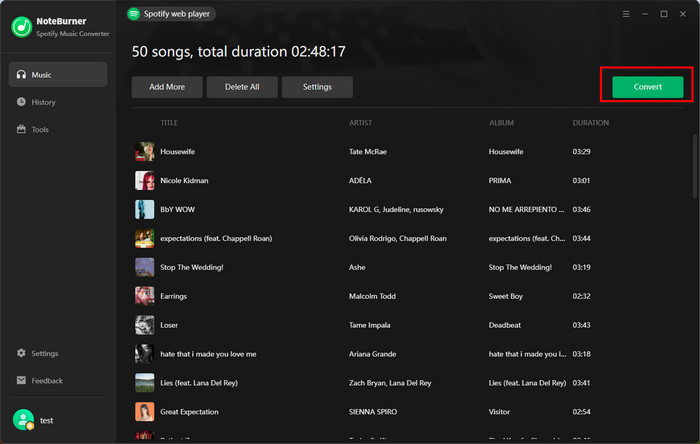
Step 3. Now click on the Convert button to start the process; Here I ran Windows Clock to measure the total time required to complete the 50-track playlist.
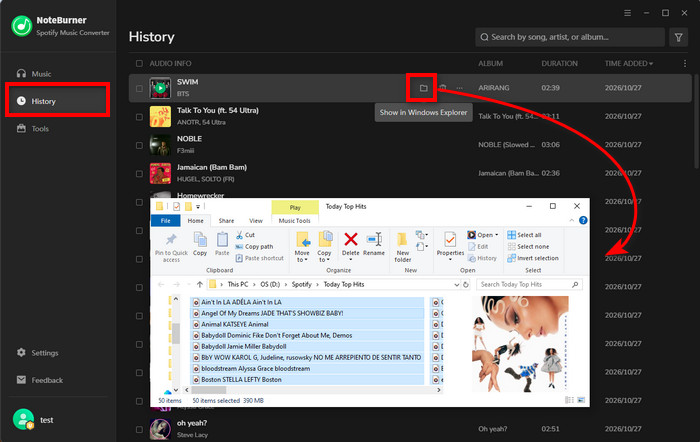
Step 4. When all songs are converted, browse all Spotify audio in the History tab. Clicking a folder icon next to the song, you can locate the real output file.
| What I Tested | Key Findings | Rating |
| Installation & UI | Quick setup; Ad-free, navigable UI for beginners |
⭐⭐⭐⭐⭐ (5/5) |
| Success rate (50-track Playlist) | 100%-50/50 | ⭐⭐⭐⭐⭐ (5/5) |
| Batch Conversion Speed | 50 tracks in 7m 58s (~9.6s/track) | ⭐⭐⭐⭐☆ (4.5/5) |
| Audio Quality | MP3 output at 320 kbps | ⭐⭐⭐⭐☆ (4.5/5) |
| Metadata | All selected metadata retained, including artwork and tags | ⭐⭐⭐⭐⭐ (5/5) |
| Extra features | Handy tag editor, CD burner, and audio editor | ⭐⭐⭐⭐☆ (4.5/5) |
| Security | Website: 100/100 Scamadviser Trust Score, installer: no threats detected |
⭐⭐⭐⭐☆ (4.5/5) |
| Overall Score: ★★★★☆ (4.5/5) | ||
NoteBurner Spotify music converter performs well in the batch conversion test. While using a normal Wi-Fi connection, it roughly processes each track within 10 seconds. I don't encounter crashes, interruptions, or failed conversions afterwards.
Test Result: 50 songs (total duration: 2h 48 minutes) completed in 7m 58s with zero conversion failures.
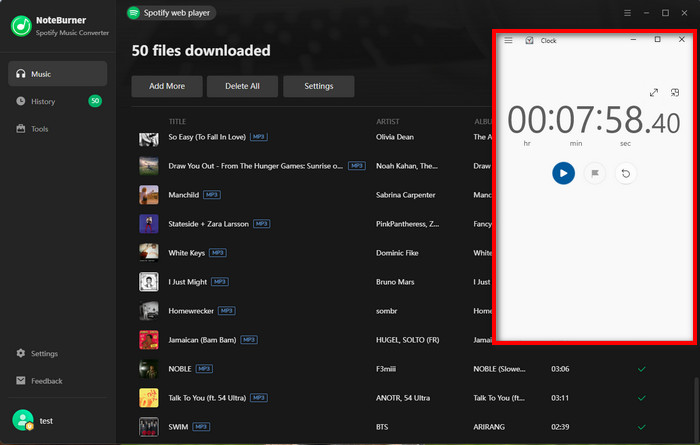
Tester's note: Actual download time will still be subject to network conditions and audio size..
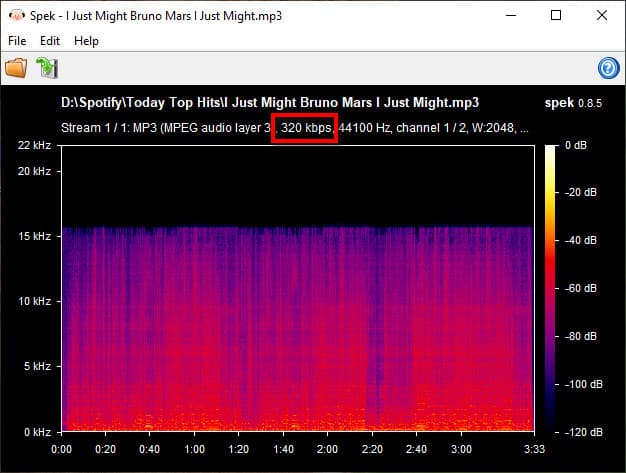
NoteBurner successfully converted all tracks to MP3 at 320 kbps, as confirmed by the output file properties. Notably, this doesn't necessarily mean the audio matches Spotify Premium's 320 kbps quality. My test used a Spotify Free account; it provides lower sound quality than Premium. Some official cases claim to deliver authentic 320 kbps and lossless FLAC output if using a premium account.
Observed: MP3 in 320kbps, but a cutoff in the source audio by the Spek spectrum.
Still good for: Everyday listening. No obvious quality issues during offline playback.
Get the detailed steps to download MP3s from Spotify at 320 kbps bitrates.
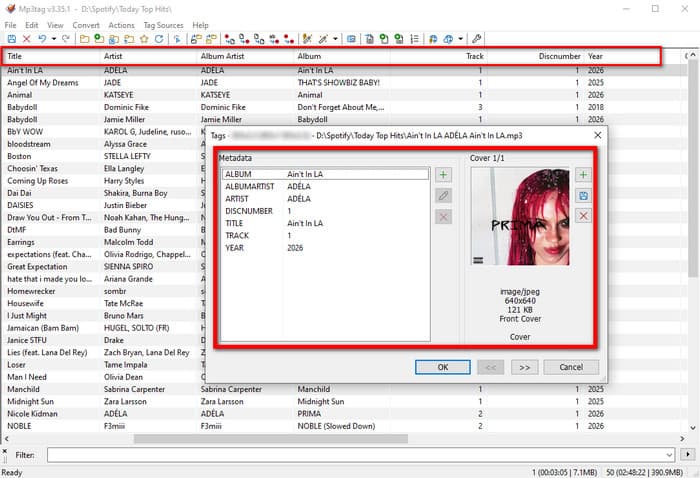
It works as promised in the output metadata settings. Like the original Spotify information, all tested tracks are embedded automatically with correct titles, artists, album names, release years, disc numbers, and cover images. Plus, it can save the Spotify track lyrics as a separate LRC or txt file when they are available.
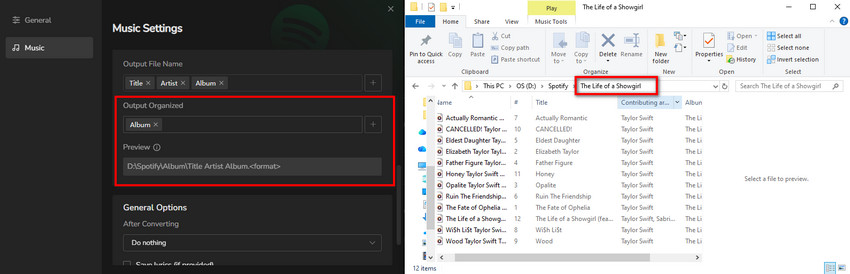
This converter is capable of sorting out the output file by album, playlist, artist, genre, year, and others. I tested "playlist" and "album" separately. They are saved according to the designated sorting, such as the "Today's Top Hits" playlist and "The Life of a Showgirl" album.
Apart from Spotify conversion, this Spotify converter is built with several audio tools without extra charge. I tried four of them to see how useful they are in everyday situations.
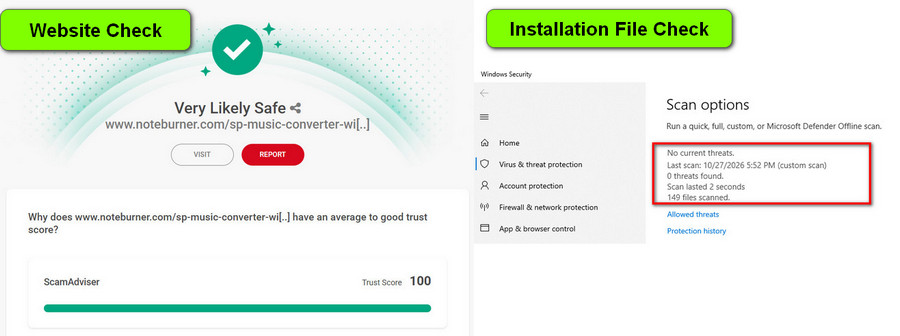
During testing, neither the NoteBurner website nor the software interface showed ads, pop-ups, or random nagging. To evaluate if NoteBurner is actually safe, I checked the site’s reputation and scanned the Windows installer.
Website check: 100/100 TrustCore on ScamAdviser, classified as "Very Likely Safe".
Installation scan: Microsoft Defender detected no threats in the Windows installer.
NoteBurner itself is a legitimate software, but it’s worth respecting Spotify’s terms of use as they restrict unauthorised copying and redistribution. Keep any downloaded tracks strictly for personal, non-commercial listening—though that alone doesn’t necessarily make downloading them compliant with Spotify’s terms. Don’t share, sell, or upload copyrighted tracks without permission.
✅Trustpilot Score: 4.4/5 (from 350+ verified reviews)
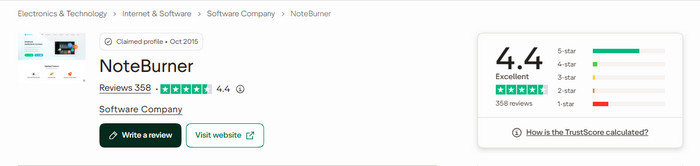
"Supports me to be able to download music that I’ve already paid for, so I can mix it with djay software. This means I can finally use them with my USB decks, a fantastic purchase!"
"The setup on Windows was straightforward and didn’t require a lot of tweaking. I mainly use it with Spotify playlists and albums, and the conversion process has generally been reliable."
"It’s a great product to download music online on a fly . Most DJ’s need this to download any music from any app with ease . Saves a ton of time ."
Actually, there is a wide range of Spotify converters on the market that do the same job. To see how NoteBurner Spotify music converter compares, I sifted through four popular desktop alternatives—MusicFab, DRmare, ViWizard, and TuneFab. And measured their feature claims, pricing, limitations, and the like.
| FEATURE | NOTEBURNER | MUSICFAB | DRMARE | VIWIZARD | TUNEFAB |
|---|---|---|---|---|---|
| Speed | Max 40x speed | 20x (Avertisted) | 15x (Avertisted) | 15x (Avertisted) | 35x (Avertisted) |
| Max MP3 quality | 320kbps | 320kbps | 320kbps | 320kbps | 320kbps |
| FLAC / lossless | ✔ | ✔ | ✔ | ✔ | ✔ |
| Android App | ✔ | ❌ | ❌ | ❌ | ❌ |
| Output Organized | Playlis/Artist/Album/Genre/Year/Disc No. | Playlis/Artist/Album | Artist, album | Playlis/Artist/Album | Playlis/Artist/Album |
| Metadata | Full-verified in our test | Basic tags | Basic tags | Basic tags | Basic tags |
| Bundled extra tools | ✔ 4 free tools included | None | Simple Tag editor | None | Tag editor |
| Trustpilot rating | 4.4/5 - 360+ reviews | 4.0/5 | 4.5/5 | 4.3/5 | 3.9/5 |
| Free Trial Limit | 1 min/track | 3 full tracks | 1 min/track | 1 min/track | 3 full tracks |
| Approx. annual price | $44.95/Year | $69.99/Year | $44.95 | $49.95 | $79.95/Year |
| Best for | Fast playlist conversion, wide compatibility | Direct downloads and full-song trials | Spotify downloads, metadata editing, | Spotify playlist conversion and offline playback | Fast Spotify music capture and output |
💡 Comparison Disclosure: NoteBurner's results are based on real-world testing, while information about the four alternatives was gathered from their official websites and publicly available reviews, last checked in October 2026.
MusicFab pitches downloads at up to 20× speed and lets you try three full songs before paying. Nice trial. But reviews from other people suggest the real-world speed doesn’t match it.
NoteBurner stands out with free audio tools that MusicFab doesn’t offer, plus a dedicated Android app. In this testing, it processed 50 tracks in just 7 minutes and 58 seconds. That said, I didn’t test MusicFab under the same conditions, so this isn’t a direct speed comparison.
On the basics, these two are close. Both handle batch conversion and keep track metadata intact. The difference is organization. NoteBurner sorts your files into folders by 6 options, and that works the way. It also comes with five built-in audio utilities, which is handy if you’re sitting on a big offline library that needs some cleanup.
ViWizard advertises conversion speeds of up to 15×, NoteBurner’s advertised max is 40×. NoteBurner also adds extras such as CD burning, one-click transfers to iTunes, and audio editing.
Despite speed aside, price is where TuneFab gets harder to justify. Its yearly plan costs more than NoteBurner’s and the other tools here, and its user ratings come in lower than NoteBurner’s.
Not really. New users get a free trial that converts the first minute of each song, during which they can verify if the downloads meet their needs. After that, you pay: $44.94 for a 1-year plan or $89.90 for a lifetime license.
Yes. It is available for both free and premium accounts. The free account is for simple audio conversion. If you care much about the sound quality, a premium account is better.
Yes. There’s a NoteBurner Spotify Downloader APK for Android, so you can convert tracks and save them straight to your phone for offline listening.
Two common suspects: an outdated version of the app, or a pile-up of cache on your computer or in the app. Update first, then clear the cache. If neither helps, NoteBurner’s FAQ guide covers more causes and fixes.
Disclaimer: For personal/educational use only. 🚫 Do not distribute downloaded music/video for commercial use.
Through this hands-on test, one genuine conclusion: NoteBurner does what it says it does, it seems safe to use, and the process is clean. It’s not perfect, though, so you take into account your real needs before using it.
Buy it if: You desire to convert Spotify favorites to MP3 or FLAC in one click, with lossless quality, organized output, and complete metadata.
Skip it if: You only need to download Spotify singles for free and are not picky about sound quality, download speed, stability, and others.



