

NoteBurner LINE Music Converter FAQs
Q1. How to register NoteBurner LINE Music Converter?
Please refer to this guide to register NoteBurner program effortlessly: How to register NoteBurner LINE Music Converter.
Q2. What to do if registration fails?
1. Please make sure you are running the right program. Please download the latest version of NoteBurner through Download Center.
2. This registration code can only be used on one device. If it’s already activated on another device, please sign out of or deactivate that device first, then try again.
3. Should the problem persist, please contact us by e-mail at [email protected] for help.
Q3. Why am I limited to converting the first 1 minute of each audio?
It's the limitation of the trial version. To unlock the restriction, please purchase a license. If you already bought a license, please register the program to get access to the full version.
Q4. Do I need the Line Music desktop application installed on my computer?
No, the program can convert the music directly from the built-in web player. No other application needs to be installed.
Q5. What's the difference among the two subscription plans - 12 months, and lifetime?
There are 2 types of subscription plans for your choice (12-month/ lifetime). Your plan will determine how long you can use the program to convert the full track from Line Music. Each license can be used on one device only.
The license for 12-month plans IS auto-renew. If you don't need it anymore, you can cancel the auto-renewal at any time.
Q6. How do I organize the output audio files by Artist, Album, and otherS?
Open NoteBurner Amazon Music Recorder and click the Settings icon. Under the Output Organized, you can choose to organize your converted files by Artist, Album, Playlist, Genre, Year, or Disc Number. If you don't select any options, all converted songs will be saved in the same folder.
Q7. Does NoteBurner support to convert Line Music songs on Android?
Yes, NoteBurner supports converting Line Music songs on Android devices. Simply install the NoteBurner apk on your Android device, log in to your Line Music account, browse and select songs or playlists, then convert them to MP3, AAC, FLAC, or WAV formats. Then you can download and save Line Music tracks directly to your phone.
Solution 1. Make sure you are properly signed in to your music account and that your subscription is active and working normally.
Solution 2. Check for updates: Make sure you are using the latest version of NoteBurner Line Music Converter. Go to Menu and select Check for Updates to see if a newer version is available.
Solution 3. Clear the Cache
Basic Cache Cleaning: Go to NoteBurner's Menu > Clear Cache.

Complete Cache Removal:
For Windows PC:
1. Open the following folder: C:\Users\USERNAME\AppData\Roaming\ Find the folder for the corresponding program.
2. Delete the program folder.
3. Restart the program and try again.
For Mac:
1. Open Finder.
2. From the top menu bar, select Go > Go to Folder..., or press Command + Shift + G.
3. Enter the following path: ~/Library/Application Support/
4. Find the folder for the corresponding program, delete the program folder, then restart the program and try again.
Solution 4. Check for updates: Make sure you are using the latest version of your NoteBurner program. Go to Menu and select Check for Updates to see if a newer version is available.
Solution 5. Check whether your current IP address or region is subject to any restrictions. If you’re using a VPN, try turning it off or switching to a different server/region, then try again.
If the issue can't be fixed by the recommended solutions above, please send us the following information by e-mail at [email protected].
- What's your Windows OS or macOS?
- What's the output format and settings you chose?
- Does the problem happen to a certain audio file or to all audio files?
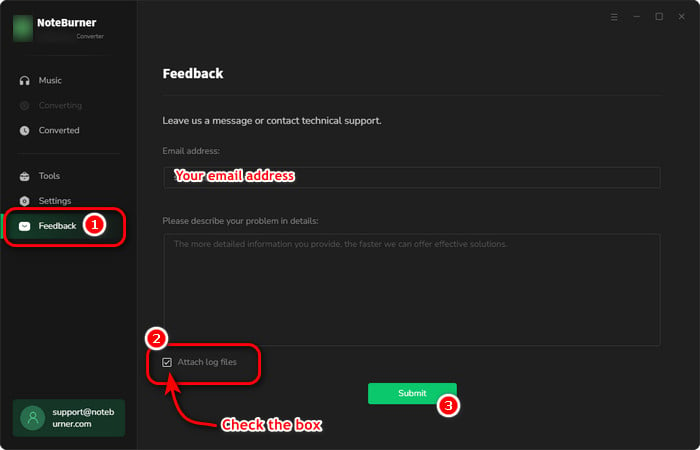
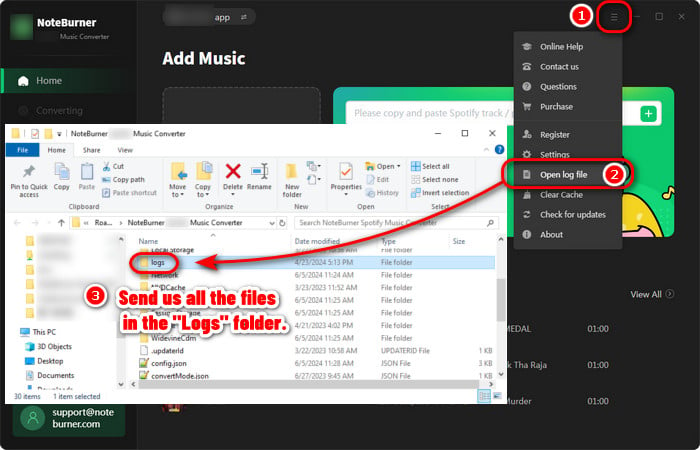
- Please send us the log files of NoteBurner:
- Method 1: You can directly send us the Feedback with the logs attached.
- Method 2: You can find them by going to NoteBurner Spotify Music Converter, Menu > Open Log File, and manually send us all the log files in the pop-up folder.
- NoteBurner Music One
- Spotify Music Converter Windows
- Spotify Music Converter for Mac
- Apple Music Converter Windows
- Apple Music Converter for Mac
- Amazon Music Converter for Windows
- Amazon Music Converter for Mac
- Tidal Music Converter for Windows
- Tidal Music Converter for Mac
- YouTube Music Converter for Windows
- YouTube Music Converter for Mac
- Deezer Music Converter for Windows
- Deezer Music Converter for Mac
- Line Music Converter for Windows
- Line Music Converter for Mac
- Download Center
- NoteBurner Store
