

NoteBurner Deezer Music Converter FAQs
Q1. How to register NoteBurner Deezer Music Converter?
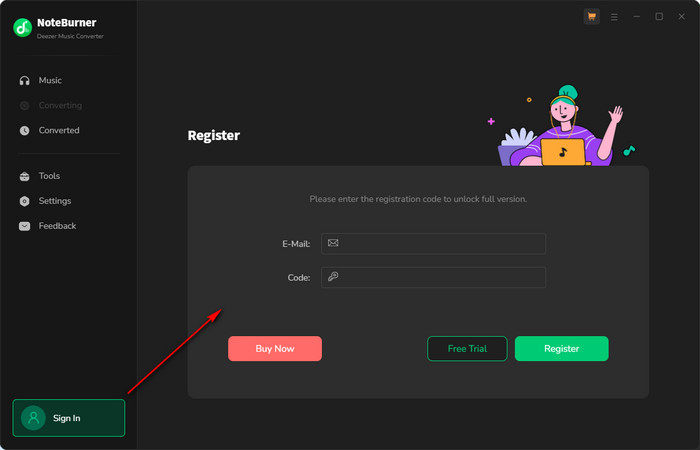
Install the latest version of NoteBurner Deezer Music Converter on your computer. Then launch NoteBurner. Directly click the "Sign In" icon (on the bottom left), and there will be a registration popup dialog, where you can copy and paste the registration email and license code as below.
Q2. Registration Failed. What Should I Do?
1. Please make sure you are running the right program. Please download the latest version of NoteBurner through the Download Center.
2. The registration entry is case-sensitive. Please make sure you do not insert any blanks before or after the registration email and license code.
3. The registration code can only be used on one device. If it’s already activated on another device, please sign out of or deactivate that device first, then try again.
4. Should the problem persist, please contact us by e-mail at [email protected] for help.
Q3. Why am I limited to converting the first 1 minute of each audio?
The trial version is limited to convert the first 1 minute of each song. To unlock the restriction, please purchase a license. If you already bought a license, please register the program to get access to the full version.
Q4. What kind of music does NoteBurner Deezer Music Converter support converting and exporting to?
NoteBurner Deezer Music Converter supports converting Deezer music, albums, playlists, and podcasts to MP3/AAC/WAV/FLAC/AIFF/ALAC.
Q5. Can I organize the output audio files by Artist, Album, and other categories?
Yes. Open NoteBurner Amazon Music Recorder and click the Settings icon. Locate to Output Organized, you can choose to organize your converted files by Artist, Album, Playlist, Genre, Year, or Disc Number. If you don't select any options, all converted songs will be saved in the same folder.
Solution 1. Make sure you are properly signed in to your music account and that your subscription is active and working normally.
Solution 2. Check for updates: Make sure you are using the latest version of NoteBurner Deezer Music Converter. Go to Menu and select Check for Updates to see if a newer version is available.
Solution 3. Clear the Cache
Basic Cache Cleaning: Go to NoteBurner's Menu > Clear Cache.

Complete Cache Removal:
For Windows PC:
1. Open the following folder: C:\Users\USERNAME\AppData\Roaming\ Find the folder for the corresponding program.
2. Delete the program folder.
3. Restart the program and try again.
For Mac:
1. Open Finder.
2. From the top menu bar, select Go > Go to Folder..., or press Command + Shift + G.
3. Enter the following path: ~/Library/Application Support/
4. Find the folder for the corresponding program, delete the program folder, then restart the program and try again.
Solution 4. Check for updates: Make sure you are using the latest version of your NoteBurner program. Go to Menu and select Check for Updates to see if a newer version is available.
Solution 5. Check whether your current IP address or region is subject to any restrictions. If you’re using a VPN, try turning it off or switching to a different server/region, then try again.
If the issue can't be fixed by the recommended solutions above, please send us the following information by e-mail at [email protected].
- What's your Windows OS or macOS?
- Which stream music service did you choose to convert?
- What's the output format and settings you chose?
- Does the problem happen to a certain audio file or all audio files?
- Please send us the log files of NoteBurner:
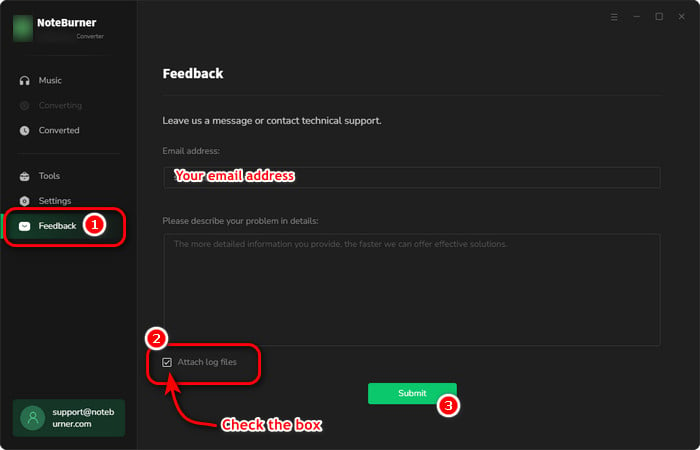
- Method 1: You can directly send us the Feedback with the logs attached.
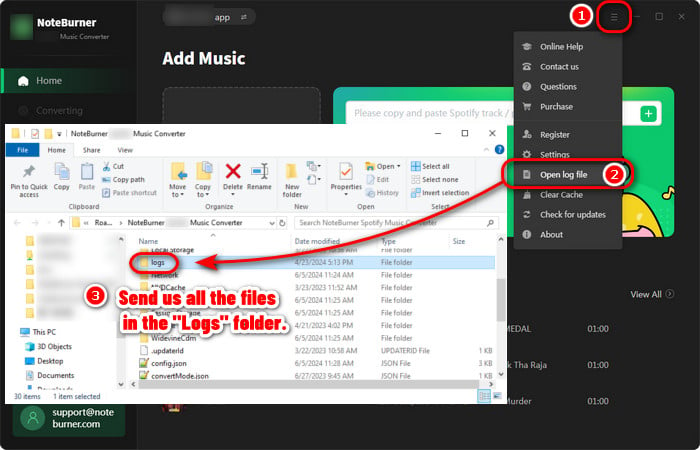
- Method 2: You can find them by going to NoteBurner Spotify Music Converter, Menu > Open Log File, and manually send us all the log files in the pop-up folder.
- NoteBurner Music One
- Spotify Music Converter Windows
- Spotify Music Converter for Mac
- Apple Music Converter Windows
- Apple Music Converter for Mac
- Amazon Music Converter for Windows
- Amazon Music Converter for Mac
- TIDAL Music Converter for Windows
- TIDAL Music Converter for Mac
- YouTube Music Converter for Windows
- YouTube Music Converter for Mac
- Deezer Music Converter for Windows
- Deezer Music Converter for Mac
- LINE Music Converter for Windows
- LINE Music Converter for Mac
- Download Center
- NoteBurner Store
