
YouTube Music puts a diverse collection of music and videos at your fingertips—whether you’re using Android or iPhone. Well then, what if you download YouTube to MP3? It's not a simple task at your end.
Worry not. The page breaks down the top 5 methods to convert YouTube to MP3 on iPhone, covering the simple workflow, features, and the honest pros and cons of a few popular YouTube to MP3 converters for iPhone. Just dive in.
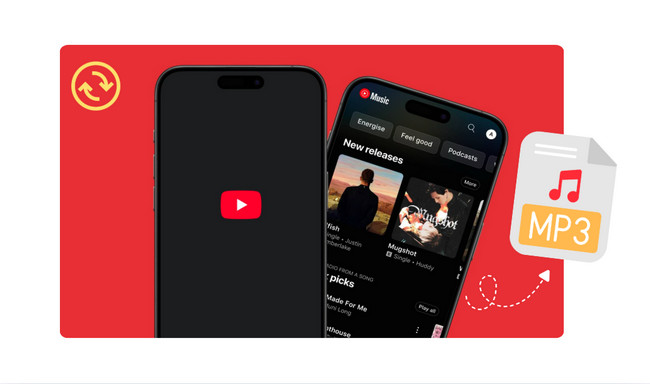
Typically, the Premium subscribers are allowed to stream ad-free songs and download YouTube Music for offline listening on the iPhone.
Step 1Install the YouTube Music app from the App Store. Open the app and log in to your music account on the iPhone.
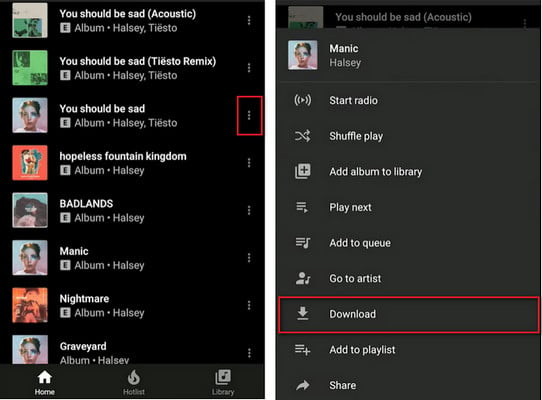
Step 2Open your desired song or playlist on YouTube Music, then tap the three-dot icon and tap the "Download" button.
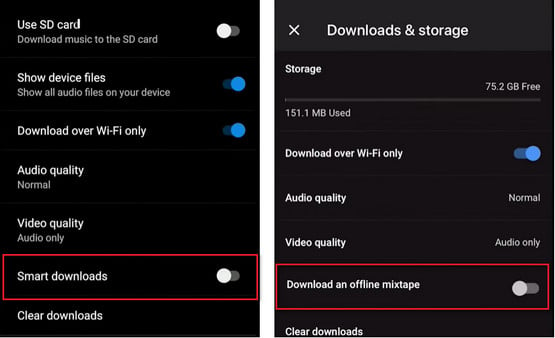
Step 3Tap your profile icon in the upper right corner, and navigate to "Download" > "Settings."
Step 4In the Settings menu, you can turn on "Download an offline mixtape" on an iOS device. Now you can listen to YouTube Music offline during the active subscription period.
Getting straight-up YouTube MP3 files is not as simple as imagined. But that's fine using a YouTube to MP3 converter. Below is a curated list of a handful of tools that will still work in 2026.
A heads-up, though: some tools are not completely safe; be wary of advertisements and pop-ups, and use them appropriately.
NoteBurner YouTube Music to MP3 Converter does well in batch downloading songs, playlists, and music videos from YouTube & YouTube Music to MP3 at up to 10x speed while retaining all metadata. Beyond MP3, this dedicated tool effortlessly converts YouTube Music to FLAC, WAV, ALAC, and the like. What's more, users can easily download YouTube Music locally for readily transferring to their iPhone, Android, MP3 player, and more devices—even without a YouTube Premium account.
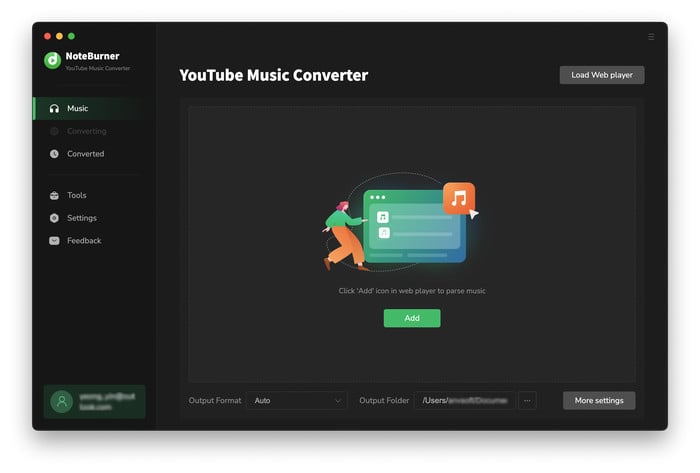
Step 1 Download and launch NoteBurner YouTube Music Converter, find the song or playlist on the built-in YouTube Music web player. Click on the "+" button to load tracks.
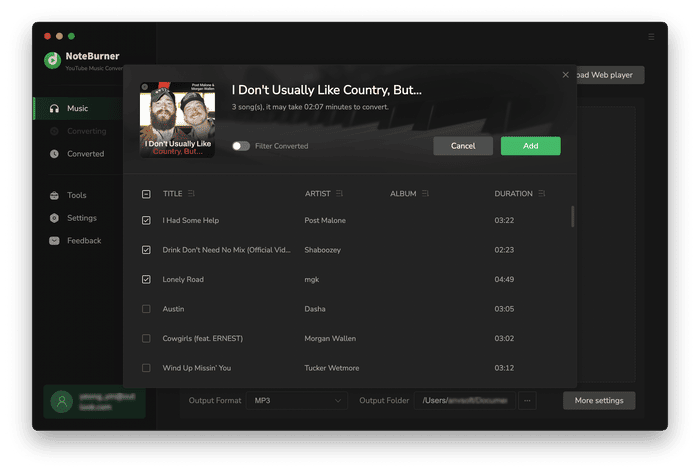
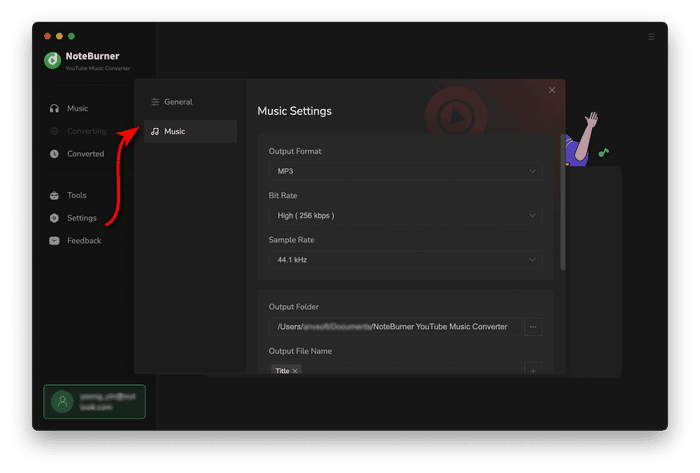
Step 2 Click a gear icon to open Settings, choose MP3 as the YouTube audio format, then choose 320kbps output quality. You can also pick the output folder and others.
Step 3 Click the "Convert" button to activate YouTube Music to MP3 conversion. Once done, navigate to NoteBurner's History area to check all of the YouTube MP3 audio.
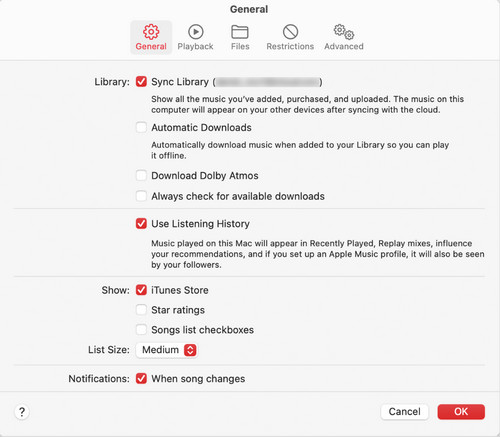
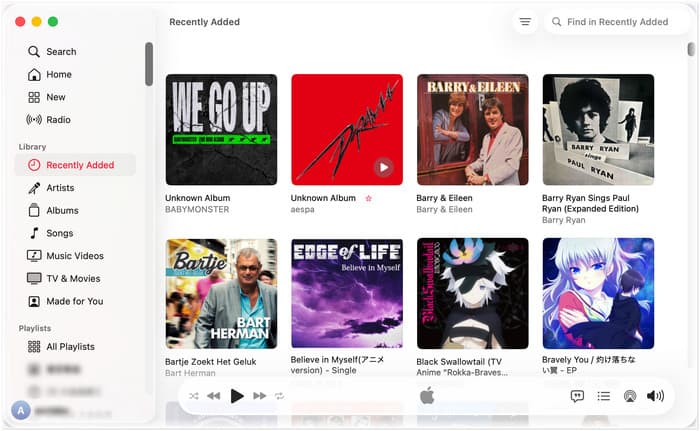
Step 4 On your Mac, open Music app, and go to Preferences > General. Here, ensure Sync Library is enabled.
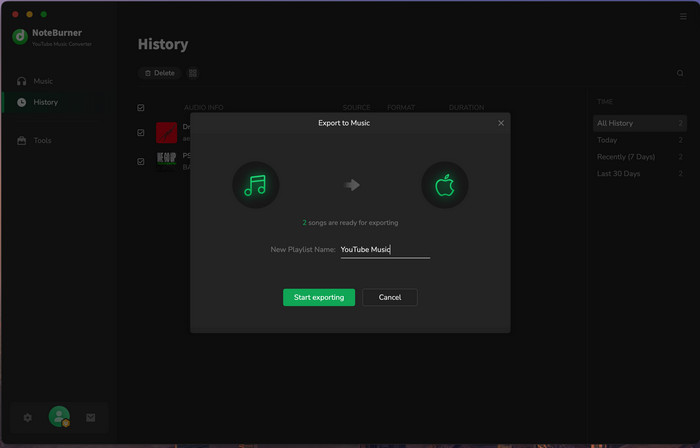
Step 5 Back to the NoteBurner's History tab, click the square-shaped edit icon, and then select "Export to Music". Enter the name of your new YouTube Music playlist and click "Start exporting."
Step 6 Once imported, click "Launch Music" and you can see all imported YouTube Music in your Music library (marked with a cloud icon).
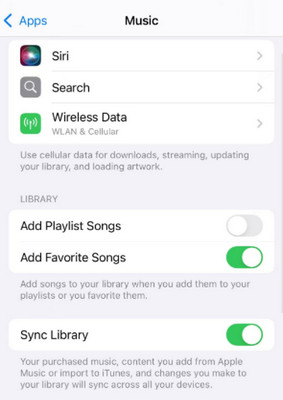
Step 7 Now open your iPhone and go to "Settings > Apps > Music." Then turn on "Sync Library"; the YouTube Music playlist will soon automatically sync to your iPhone. To listen to music offline, just tap a cloud icon to download songs.
Bravo! You're free to listen to YouTube MP3 songs on your iPhone and even iPad anytime, anywhere.
Tips: If the auto-sync on your iPhone does not work, you can alternatively sync your music using a USB connection.
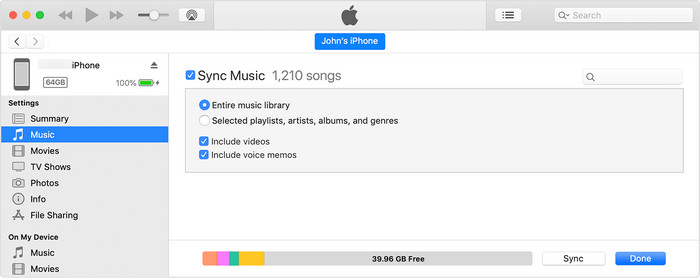
1. Connect your iPhone to Music on your Mac.
2. Click your iPhone device name on the left sidebar.
3. Choose Music > Sync Music > Sync Entire Music Library, then click Done.
Online free YouTube to MP3 download sites are served as the easiest workarounds if you prefer saving YouTube Music to MP3 without installing dedicated apps and creating accounts.
Known as a web-based YouTube to MP3 converter, Ytmp3 downloads YouTube music videos to MP3—totally free of charge. It works directly on the iPhone's browser (such as Safari) and automatically recognizes the pasted YouTube link. By simple processing, it later takes a few minutes to save the YouTube content as local MP3 files.
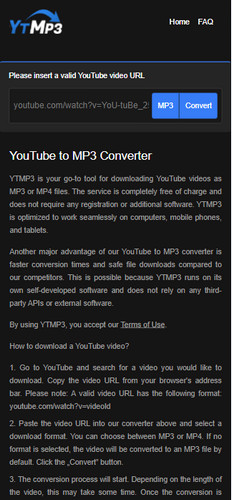
Step 1 Head over to the YouTube website or YouTube app on your iPhone, and get the URL of the song or video you desire to download.
Step 2 Paste the link into the converter's search box. Click Convert and wait for the video to be initiated.
Step 3 Once ready, click on the Download button. Later, YTMP3 Converter will convert the YouTube video into an MP3 audio file.
y2down.cc acts as another free online YouTube music downloader for iPhone. Naturally, it skips the effort of installing a third-party application like other online tools. Users are allowed to download YouTube music to MP3 and YouTube videos to MP4 with lossless quality kept.
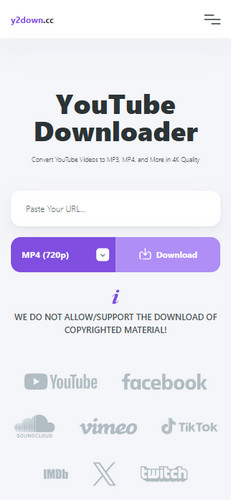
Step 1 Open the YouTube song or video you intend to download on the YouTube web player or app.
Step 2 Obtain the YouTube link and paste it into the search bar of y2down.
Step 3 Select MP3 as the output format in the search field, and click on the Download button to load the YouTube content.
Step 4 Click the Download button to confirm MP3 conversion again. Soon after you'll find YouTube MP3 files in the iPhone's local storage.
The post recommends 15+ best free YouTube Music Downloaders after carefully testing, which are still working in 2026.
TubeMate acts as a free YouTube to MP3 downloader app for Android and iPhone. It is capable of capturing music and video from YouTube and other streaming platforms, and then downloading them to your iOS device. On top of that, it is built with free tools for customizing your local photos and videos.
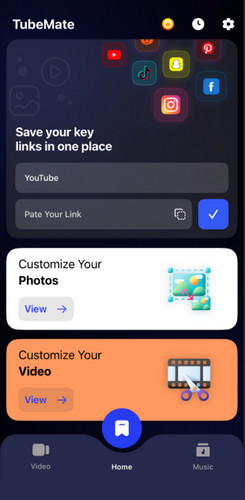
Step 1 Get TubeMate on the App Store.
Step 2 Search for the video you want, and copy and paste the link into the app.
Step 3 Tap the Check icon next to the search box, then wait for the download process.
Step 4 Find the file in your iPhone's Music folder.
Explore everything you want to know about ReVanced YouTube Music APK and how to get it working so you can enjoy YouTube Music without Premium.
The Telegram YouTube bot is aimed at downloading YouTube MP3s to an iPhone via Telegram. For instance, YouTube Audio Download (@YtbAudioBot) operates as a chat assistant. To function, the AI bot accepts YouTube links and returns MP3 files. But notably, the actual audio quality and metadata integrity may vary.
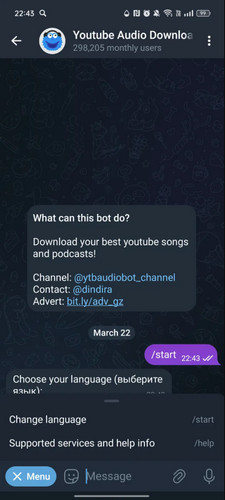
Step 1 Install Telegram on your iPhone, and search for @YtbAudioBot (or other free Telegram bots to download YouTube songs).
Step 2 Touch the target bot and and enter "Start". Then put the copied YouTube Music link into the chatting box.
Step 3 When you send the link, the bot will process it and reply with downloadable MP3 files.
Step 4 Hit on the link to download YouTube audio to your device.
✨ Want to batch download YouTube playlists to MP3 for playing on your iPhone anytime? Go for the top-tier NoteBurner YouTube Music to MP3 Converter—safe, rapid, high-quality MP3 outputs.
Explain everything you need to know and shows you how to use these YouTube telegram bots to download YouTube to MP3 for free!
The iOS Shortcuts app packs lots of intriguing and practical functionalities. Surprisingly enough, it offers a convenient way to download YouTube videos and convert them to MP3 format directly on your iPhone. To handle conversion tasks, users can add pre-made YouTube to MP3 shortcuts like Yas Download or create a custom shortcut.
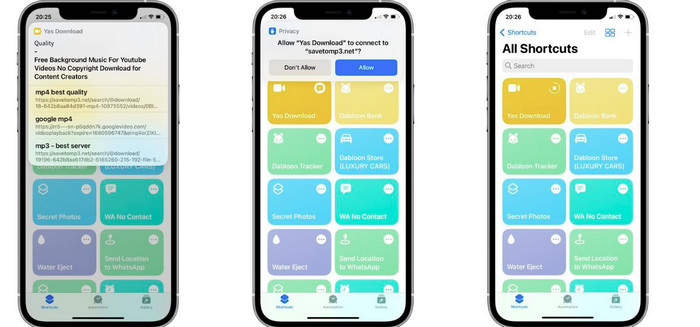
Step 1 Get the Yas Download shortcut from a trusted shortcut repository, then add it to the iOS Shortcuts app.
Step 2 Open the YouTube app on your iPhone, navigate to your favorite video, and tap Share → Copy Link.
Step 3 Tap Yas Download on your Shortcuts list. This YouTube to MP3 shortcut will automatically recognize the previously copied link.
Step 4 Multiple download options appear after processing. Select "MP3" to download the video as an MP3 file.
Step 5 Done. Check the file in the "Downloads" folder on your iOS device.
See also: How to Use YouTube Music as iPhone Ringtone?
| Feature | ⭐ NoteBurner YouTube Music Converter | Online YouTube to MP3 Converter | TubeMate | @YtbAudioBot | Yas Download Shortcut |
|---|---|---|---|---|---|
| Type | Desktop App | Browser-based Converter | Mobile App | Telegram Bot | iOS Shortcut |
| Output Format | MP3, MP4, AAC, WAV, FLAC, AIFF, ALAC | MP3, MP4 (varies) | MP3, MP4 | MP3 | MP3, MP4 |
| Audio Quality | Up to 320 kbps | 128–320 kbps | 320 kbps | 256 kbps | 128–256 kbps |
| ID3 Tags | Fully Preserved | Basic Tags (with watermark) | Incomplete | Basic | Basic |
| Free to Use | No, with free trial available | Yes | Paid Version Required | Yes | Yes |
| Ease of Use | Very Easy | Easy | Mildly Difficult | Easy | Difficult |
| Batch Download | ✔ | ✖ | ✖ | ✖ | ✖ |
| Built-in Player | ✔ | ✖ | ✔ | ✖ | ✖ |
| No Ads | ✔ | ✖ | ✖ | ✔ | ✔ |
| Extra Audio Tools |
✔ (Format converter, Tag editor, CD burner, etc.) |
✖ | ✖ | ✖ | ✖ |
| User Experience | ★★★★★ | ★★★ | ★★★ | ★★★ | ★★★★ |
In our test, NoteBurner YouTube Music Downloader ranks as a top pick for downloading YouTube to MP3 files. Unlike other YouTube to MP3 converters, NoteBurner packs a variety of advantages into one place—ad-free downloads, 320 kbps MP3 outputs, astounding conversion speeds, exclusive audio tools and the like.
No. All content from YouTube is encrypted as a protected format, with no direct option to download YouTube music or videos as MP3. For this, you need to take advantage of third-party tools.
Not 100% safe. Some free online tools may show excessive ads, pop-ups, or redirect to malicious pages.
Yes. With NoteBurner YouTube to MP3 converter, you can download YouTube Music songs once and keep MP3 downloads playable on any device.
Disclaimer: All tools are for personal/educational use only. 🚫 To avoid legal issues, do not distribute downloaded music/video for commercial use.
In this article, we share the best 5 methods to convert your YouTube audio and video to MP3 formats on iPhone. The converter tools in the last four methods will suffice for someone just want something easy to download individual YouTube MP3 audio on iPhone. But be aware of ad presence and unknown links, as well as potential slower download times. If you're after something faster, more stable, and capable of downloading YouTube playlists in bulk with original sound quality, then NoteBurner YouTube to MP3 converter is the best solution.
Note: The free trial version of NoteBurner YouTube Music Converter allows you to convert the first 1 minute of each song. You can buy the full version to unlock this limitation and enable all its features.



