
Explore everything you want to know about ReVanced YouTube Music APK and how to get it working so you can enjoy YouTube Music without Premium.
A quick reality check up front: Free YouTube Music accounts come with ad interruptions and other limitations. Only by upgrading to the Premium tier can users listen to ad-free YouTube Music songs and use any other exclusive features. For a cost-saving alternative, some folks may be into the APK gamble—ReVanced YouTube Music. But how does it actually run, and is it safe? Read this review to learn how the YouTube Music ReVanced APK unlocks YouTube Music Premium for free, along with the step-by-step install guide, review, and safest alternative in 2026.
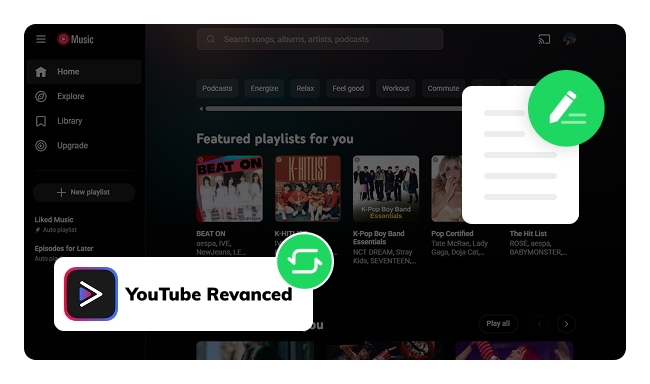
YouTube Music ReVanced APK (Android Package Kit) is known as a cracked and modified version of the YouTube Music app. Designed to offer premium-like features, it gives ad-free playback, background play, offline downloads, and more—all for free. Typically, ReVanced YouTube Music adopts the YouTube-style UI model so that users can access the app just like real YouTube Music. Notably, since it is an unofficial YouTube Music Premium APK, the package installation and subsequent patch updates are sourced from third-party providers.
A heads-up, though: Some ReVanced APK download sources aren’t authorized. Make sure you verify the source before getting the YouTube Music ReVanced APK—modded APKs are always a bit of a gamble.
Well then, how do YouTube Music Premium and ReVanced YouTube Music differ from one another? Despite their similarities, there are nonetheless key differences.
|
YouTube Music Premium |
ReVanced YouTube Music |
|
| Cost | $11.99/mo for Individual (varies by region and plans) |
FREE |
| Source | YouTube Official | Third-party APK Distributor |
| Ad-free streaming | ✔ | ✔ |
| Background play | ✔ | ✔ |
| Music downloads | ✔ | ✔ |
| Unlimited skips & on-demand playback | ✔ | ✔ |
| High quality audio | ✔ | It varies |
| Web Browser | ✔ | ❌ |
| Compatibility | Android, iOS, Web, Smart TV, etc. | Android Only |
| Uptime | 100% Working | Breaks occasionally |
If you don't want to pay for YouTube Music Premium every month, but still want to listen to your music without internet. Here this page will help you how to download YouTube Music songs without Premium.
Overall, user experiences with ReVanced YouTube Music are mixed. Below are authentic user quotes collected from the r/revancedapp community on Reddit.
🔥 Pro tips: Looking to enjoy high-quality, ad-free YouTube Music with no need for a YouTube Premium subscription and no risks? Try this YouTube Music ReVanced APK safe alternative - NoteBurner YouTube Music Converter.
This article shows details on how to get the YouTube Music Premium APK Mod from various sources.
🛡️ A safer alternative (high trustcore and get verified)
NoteBurner YouTube Music Converter serves as the safest alternative to ReVanced YouTube Music, allowing users to download high-quality YouTube songs for offline listening, with no ads and no need for risky ReVanced files. Just move to the next part.
Here you'll learn Spotify ReVanced's features, risks, and the best safe alternatives for ad-free, offline streaming Spotify songs. Learn More →
✅Official Entrance: https://www.noteburner.com/youtube-music-converter-windows.html
✅ Stability & Security: High (Security verified, Free from Ads & Malware)
✅ TrustScore: 4.4 / 5 in Trustpilot [Excellent]
✅ Support OS: Windows PC/Mac
✅ Best for: Downloading songs, playlists and music videos from YouTube Music without Premium
ReVanced YouTube Music APK does unlock YouTube Music Premium features for free, like ad-free streaming, unlimited skips, and personalized settings. But it is not 100% foolproof. As such, we'll show two more dependable and effective workarounds.
The fan-trusted and highly rated NoteBurner YouTube Music Downloader works with both YouTube Music Free and Premium accounts. It effortlessly converts YouTube Music playlists, albums and podcasts as plain MP3, AAC, FLAC, WAV, and more formats at up to 10x speed, while preserving the original audio outputs and full ID tags.
With this YouTube Music converter, you can keep your YouTube Music collection forever and put it on mobile phone or any of your devices — even if your YouTube Music Premium subscription expires.
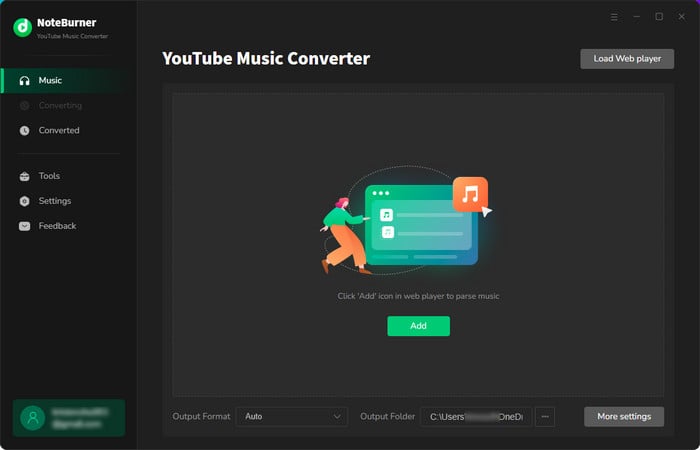

Step 1 Install and launch NoteBurner YouTube Music Converter on your PC or Mac, then sign in to your YouTube Music account in the built-in web player (Free or Premium supported).
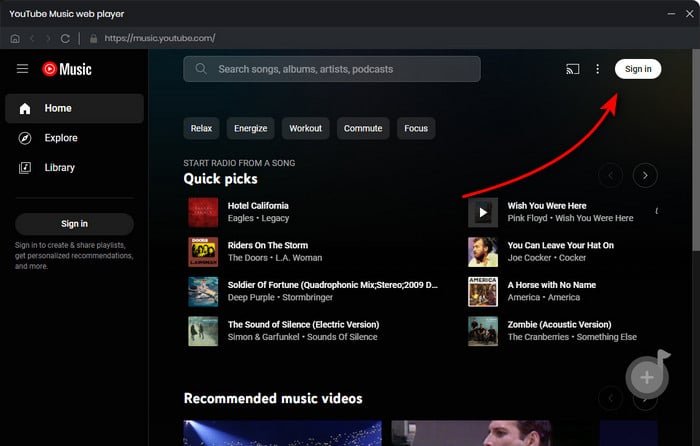
Step 2 Open the Settings window, then select your desired output format, output quality and so on. Here we start with an example of MP3.
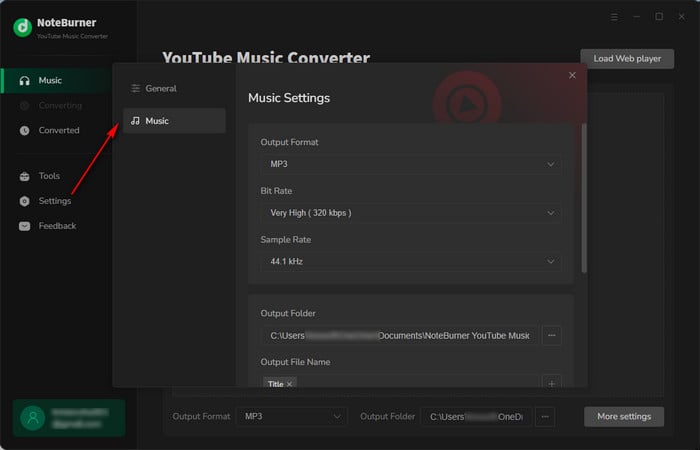
Step 3 On the YouTube Music web player, browse the track or playlist you like and click the "Add" icon at the bottom right corner.
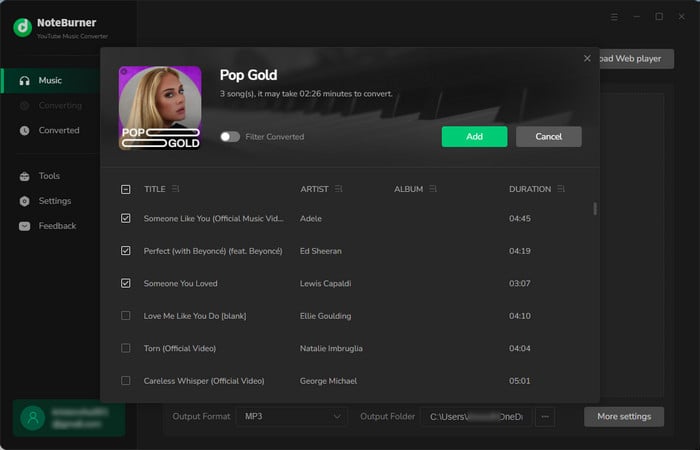
Step 4 After adding the playlist to NoteBurner, click Convert to start downloading the music to your computer.
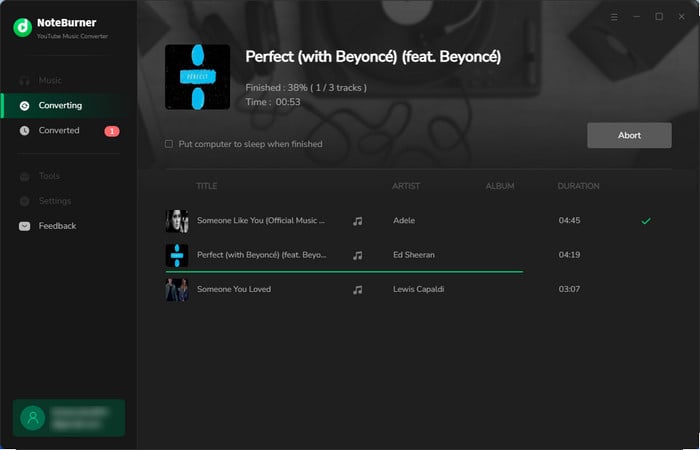
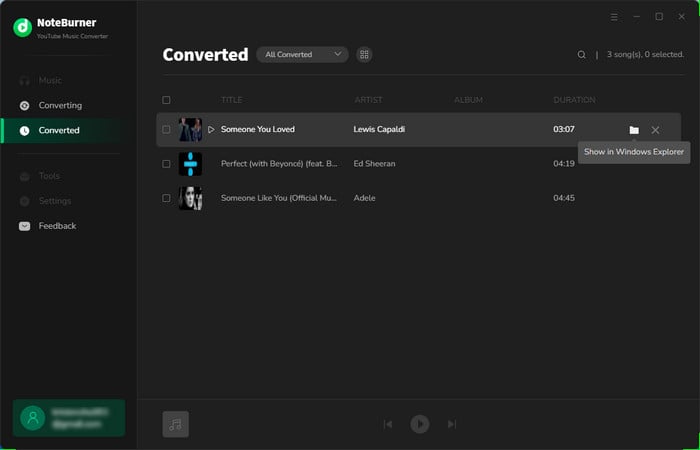
Step 5 Go to the "History" tab, and you'll find the download history of all your offline YouTube Music tracks.
This article unveils the top 10 YouTube Music playlist downloaders, catering to diverse preferences and devices.
| Feature | NoteBurner YouTube Music Converter | ReVanced YouTube Music |
|---|---|---|
| Operating System | Windows, Mac | Android only |
| Supported Format | MP3/AAC/FLAC/WAV/AIFF/ALAC | MP4/M4A |
| Download Speed | Up to 10X faster | Standard |
| Output Quality | 320kbps for audio, 4K for music video | Lossy |
| Safety | 100% safe (zero ads / malware) | May come with malware & redirects |
| Batch Downloads | ✔️ | ❌ |
| ID3 Tags Retained | ✔️ (full tags, artwork included) | ✔️ |
| Customize Quality | ✔️ | ❌ |
| Free Audio Tools | ✔️ (format converter, CD burner, ID3 tags editor, etc.) | ❌ |
 Winner: NoteBurner YouTube Music Converter
In all candor, NoteBurner is the superior choice over ReVanced YouTube Music if you value simplicity, security, adaptability, and support. With it, you may download 320 kbps MP3s from YouTube & YouTube Music, and it can manage bulk downloads at lightning speed.
A: Yes. It cracked YouTube Premium, and you don't need a payment. But you do have to install it manually via APK.
A: No. The ReVanced YouTube is running on Android only. iOS is way more locked down unless you jailbreak, and even then, it’s a hassle.
A: No. The music downloads are cached on the app only. If you uninstall the YouTube mod apk, these files may get removed and be unavailable anymore. To keep YouTube Music downloads forever, NoteBurner YouTube Music Converter is a nice solution.
Disclaimer: All tools are for personal/educational use only. 🚫 Do not distribute downloaded music/video for commercial use.
Note: The free trial version of NoteBurner YouTube Music Downloader allows you to convert the first 1 minute of each song. You can buy the full version to unlock this limitation and enable all its features.



