
 By Annie Cale
Looking for a reliable Audius downloader to save music for offline listening? Audius lets artists enable downloads for certain tracks, but not every song is available to download directly. If you want to download Audius music as MP3 or save tracks as local audio files, you may need an alternative solution.
In this guide, we've rounded up 5 Audius music downloaders, including free online tools, a Chrome extension, an open-source downloader, and desktop software. We'll compare their features, supported formats, playlist download capabilities, and limitations to help you find the best option.
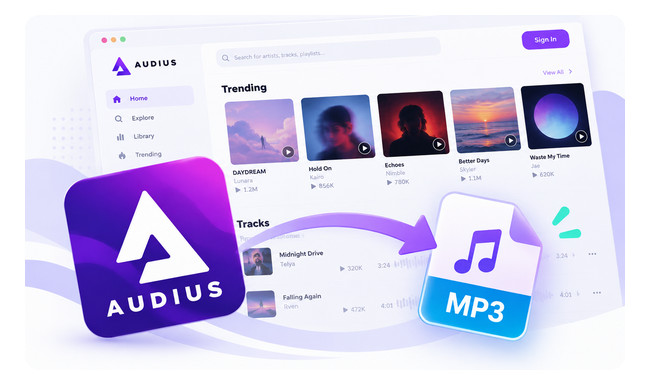
Yes, but it depends on the artist's download settings. Audius allows artists to offer downloadable tracks, with access limited to the public, followers, or eligible Premium supporters. If downloads are enabled and you meet the access requirements, you can save the available audio files directly from Audius.
Audius also offers offline listening through its iOS and Android apps. You can make your favorite tracks, albums, and playlists available offline, but this doesn't give you separate MP3 files to transfer or play outside the Audius app.
The limitation? Not every Audius track is available for direct download, and the built-in offline feature doesn't meet everyone's needs. If you want to download Audius music as MP3, organize local audio files, or explore playlist downloading options, the following five Audius downloaders offer different approaches.
Also download music from SoundCloud? Compare free SoundCloud playlist downloaders, their MP3 output options, and playlist limitations. Learn More →
Which Audius downloader best fits your needs? We compared five tools based on price, download method, audio formats, playlist support, metadata, and ease of use. Here's a quick overview of their strengths and limitations before we look at each tool in detail.
| Audius Downloader | Price | Download Method | Multiple Songs | Audio Output | ID3 Tags | Ease of Use |
|---|---|---|---|---|---|---|
| 🏅 NoteBurner Music One | Free Trial / Paid | Desktop Recording | ✅ Continuous Recording |
MP3 up to 320 kbps AAC, FLAC, WAV, AIFF, ALAC |
Limited | Easy |
| YTSave | Free | Online URL Downloader | ❌ Playlist Download Failed |
MP3, 320 kbps Limited high-frequency detail |
❌ | Easy |
| TTOK | 1 Free URL / Day | Online URL Downloader | Limited by Free Quota | MP4 (Audio Only) | Not Tested | Easy |
| Audio Downloader Prime | Free | Chrome Extension | ❌ No Playlist Detection |
MP3, 320 kbps Limited high-frequency detail |
❌ | Easy |
| MusicDL | Free / Open Source | CLI / Web Interface | ✅ | MP3, FLAC, M4A, Opus* | Supported* | Advanced |
After the quick comparison, let's take a closer look at each of the five Audius downloaders. We'll cover their main features, how they performed in our tests, and the pros and cons you should know before choosing one.
If batch recording, high-quality MP3 output, and reliability are your priorities, NoteBurner Music One is a practical option. It lets you handle multiple songs in one session, automatically separate tracks, and set a timer to stop recording without having to monitor the process. With its built-in browser, you can access Audius directly in Music One and save music in MP3, AAC, FLAC, WAV, AIFF, or ALAC formats. MP3 output supports up to 320 kbps, with adjustable audio settings. Besides Audius, Music One also works with Spotify, Apple Music, YouTube Music, SoundCloud, and other streaming services, making it useful for managing music from different platforms.

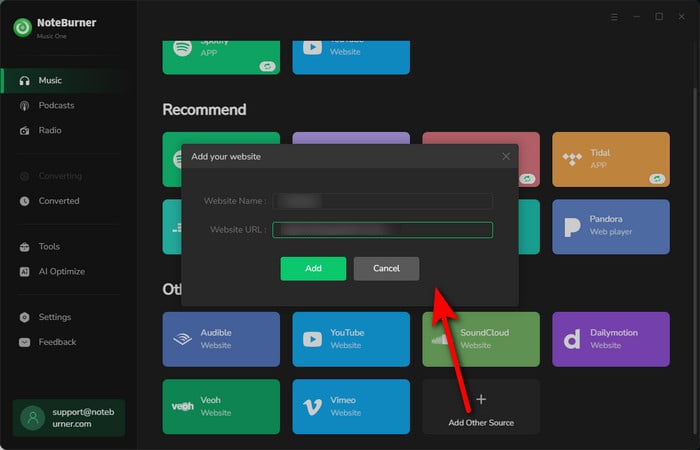
Step 1 Launch NoteBurner Music One and click Add Source. Enter https://audius.co/ to open Audius in the built-in browser. Then find the song or playlist you want to download.
Step 2 Click Record to access the settings. Select MP3 as the output format and choose your preferred audio quality, up to 320 kbps. You can also enable automatic track splitting and set a recording timer if you're saving multiple songs.
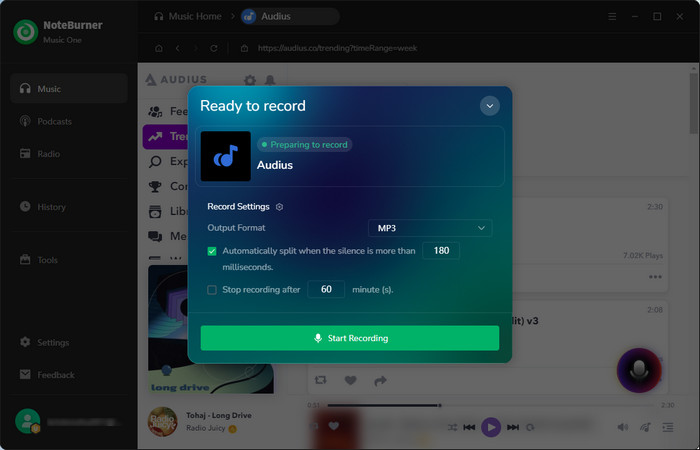
Step 3 Click Start Recording and play your Audius music. Music One captures the audio as it plays, with automatic splitting available to separate detectable track changes. When recording finishes, go to History to find your saved Audius audio files.
✅ Multiple Audio Formats
You can save Audius music in MP3, AAC, FLAC, WAV, AIFF, or ALAC, making the files compatible with different players and devices.
✅ Up to 320 kbps MP3 Output
Music One supports 320 kbps MP3 encoding, though the actual sound quality still depends on the original Audius stream.
✅ Batch Recording and Automatic Track Splitting
You can capture multiple songs in one session, while automatic track splitting helps save them as separate files.
✅ Built-in Browser
You can browse and play Audius music directly inside Music One without switching between your browser and a recording program.
✅ Supports Multiple Music Platforms
Besides Audius, Music One supports various streaming services, so you don't need a different tool for every music platform.
❌ Limited Automatic ID3 Metadata
Since Music One uses a recording method, it does not automatically add ID3 tags such as the artist, album, and cover art. You may need to use MusicBrainz Picard to automatically add the missing metadata in bulk.
❌ Not Completely Free
NoteBurner Music One offers a free trial, allowing you to explore its features and see if it works for you before subscribing. The free trial lets you test the software but limits each recording to the first minute. As an all-in-one music downloader, it supports music downloads from multiple popular streaming platforms, making it more than just a Audius downloader. With a yearly subscription, the cost averages out to just about $0.22 per day.
Looking for a free recording option? You can also explore these free music recording and editing tools. Learn More →
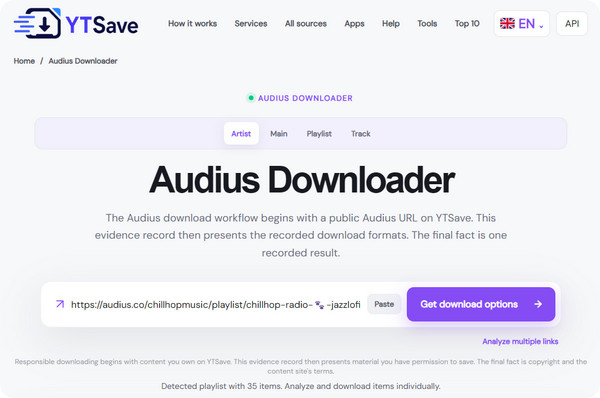
If you only need to download a few Audius tracks without installing software, YTSave is a convenient free online Audius downloader. To use it, simply copy a song URL from Audius, paste it into YTSave, and click Get Download Options. Once the track is processed, select an available audio format and save the file to your device.
YTSave also accepts Audius playlist links, but there's an important difference between recognizing a playlist and downloading it. In our test, the tool identified the playlist URL but did not provide a working playlist download option. It's therefore better suited to downloading individual songs.
✅ Free and Easy to Use
YTSave works directly in your browser, with no software installation or account required. Just paste an Audius song link to check the available download options.
✅ Supports Direct Song Links
In our test, YTSave recognized the Audius track URL and provided a download option, making it useful for saving individual songs.
❌ Playlist Downloads Didn't Work
Although YTSave advertises playlist support, our test found that it could recognize an Audius playlist but not download its tracks. There was no usable playlist download option.
❌ Missing ID3 Tags and Unorganized File Names
The downloaded audio did not retain song metadata or album artwork, so you may need to add these details manually. Besides, the downloaded file name included random letters and numbers, making it less convenient to organize a larger music library.
❌ Questionable Audio Quality
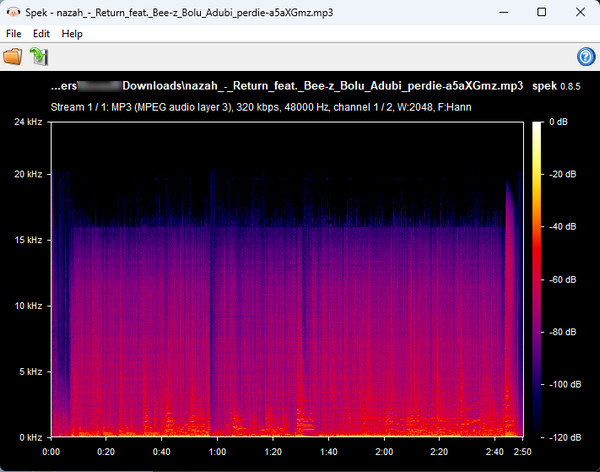
Although the downloaded file was encoded at 320 kbps MP3, our spectrogram analysis showed a noticeable frequency cutoff around 16 kHz. This suggests the source audio may have undergone additional compression.
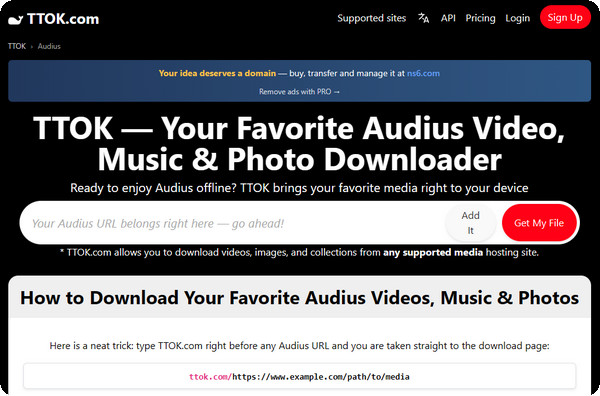
If you want to save more than just music from Audius, TTOK is another online Audius downloader worth trying. It supports different types of media, including audio, video, and images. To get started, copy an Audius URL, paste it into TTOK, and click Get My File. Once the content is processed, choose an available download option and save it to your device.
However, TTOK has some important restrictions. While the website advertises MP3 downloads, our free-version test produced an MP4 file containing audio without any visible video. The free service also allowed only one URL download per day, making it less practical for downloading multiple Audius songs.
✅ Supports Different Media Types
TTOK can process Audius audio and image content, offering more flexibility than a downloader focused only on songs.
✅ No Installation Required
You can use TTOK directly in your browser by pasting an Audius URL, without installing additional software.
❌ Only One Free Download per Day
In our test, the free version limited downloads to one URL per day. Additional downloads require waiting for the limit to reset or upgrading.
❌ Audio Downloaded as MP4 Instead of MP3
Although TTOK advertises MP3 support, our downloaded Audius song was saved as an MP4 file with audio but no video. This may be inconvenient if you specifically need MP3 files for your music player.
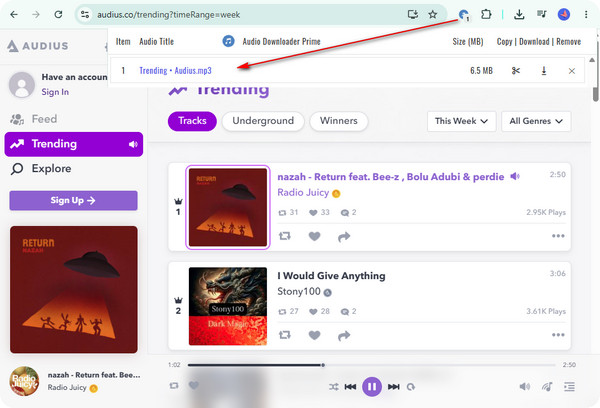
If you prefer downloading music while browsing Audius, Audio Downloader Prime is a simple Chrome extension that detects audio playing in your browser. Unlike online Audius downloaders, it doesn't require you to copy and paste song links into a separate website.
After installing the extension, open Audius and start playing the song you want to save. Once Audio Downloader Prime detects the audio stream, click its extension icon and select Download. In our test, it worked through playback detection rather than directly recognizing individual song or playlist URLs.
✅ Simple and Ad-Free Interface
We found the extension clean and easy to use, with no distracting advertisements during the download process.
✅ Automatic Audio Detection
Once an Audius song starts playing, the extension can detect its audio stream and provide a download option without requiring you to paste a URL.
✅ Convenient Browser Integration
Everything happens inside Chrome, making it handy for saving individual tracks while listening to Audius.
❌ No Direct URL or Playlist Detection
Audio Downloader Prime cannot simply process an Audius song or playlist link. You must play the audio first before the extension can detect it.
❌ Missing ID3 Tags and Unclear File Names
Our downloaded file lacked useful ID3 metadata and had a name made up of random letters and numbers. You'll need to rename and organize the files manually.
❌ Audio Quality Limitations
We noticed a similar result when testing Audio Downloader Prime. The downloaded MP3 was also encoded at 320 kbps, with a noticeable drop in high-frequency content near 16 kHz. As with YTSave, the results suggest limited high-frequency detail despite the high bitrate, so the audio quality is less impressive than the 320 kbps label might suggest.
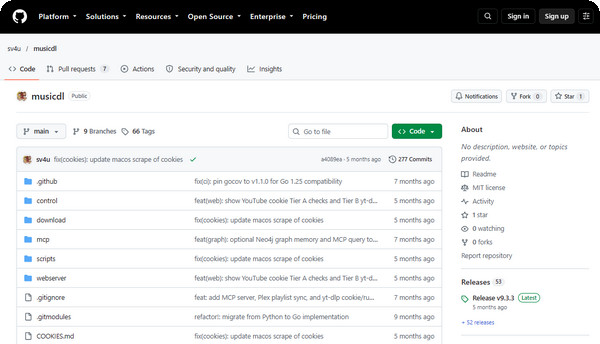
If you prefer an open-source Audius downloader with more control over the downloading process, MusicDL is worth exploring. Unlike browser-based downloaders, MusicDL is a command-line tool that supports Audius alongside Spotify, YouTube, SoundCloud, and Bandcamp. It also offers configurable output formats and metadata embedding, making it particularly appealing to users who want more control over their music files.
To use MusicDL, download the project from GitHub and follow its installation instructions. You can configure Audius as a music source, choose an output format, and use its plan-and-download workflow to process supported tracks. The project also provides a web interface, although initial setup is more involved than simply pasting a link into an online downloader.
✅ Free and Open Source
MusicDL is available on GitHub under the MIT license, allowing users to inspect the code and customize the tool to their needs.
✅ Multiple Audio Formats
According to its documentation, MusicDL supports MP3, FLAC, M4A, and Opus output, giving users more format options than basic online downloaders.
✅ Metadata Embedding
MusicDL is designed to embed track metadata into downloaded files, which may help keep music libraries organized. The completeness of Audius metadata still needs to be verified in actual downloads.
✅ Supports Multiple Music Sources
Besides Audius, MusicDL supports several other music platforms and provides configurable download settings for users managing music from different sources.
❌ Requires Technical Setup
MusicDL is less beginner-friendly than online tools. Installation, configuration, and command-line operations may require some technical knowledge.
Need a Spotify downloader too? Compare 13 Spotify to MP3 tools, including free options, supported formats, and download limitations.Learn More →
To convert Audius music to high-quality 320kbps MP3 files, you can use dedicated software like NoteBurner Music One. Simply set the output format to MP3 and output quality to 320 kbps in settings, play the Audius tracks, and save them directly as local MP3 files with original quality preserved.
While most free online Audius downloaders fail to process whole playlists, desktop downloaders like NoteBurner Music One and command-line tools like MusicDL allow you to capture continuous playback, batch download multiple tracks, and automatically split them into separate songs.
Direct downloads on Audius are determined by individual artists. If an artist disables direct downloading for a track or restricts it to supporters only, you won't see the download button. In such cases, using a third-party Audius downloader or Chrome extension is necessary to save the track locally.
Downloading songs directly provided by artists on Audius is completely safe and legal. When using third-party downloaders for offline listening, ensure the files are used for personal non-commercial use only and obtain tools from official, trustworthy sources.
You can use the official Audius mobile app to enable offline listening for saved tracks and playlists. Alternatively, you can use an Audius MP3 downloader on your computer to save songs as local files, then transfer the MP3 files to your iOS or Android device using iTunes, USB, or cloud storage for playback on any music app.
Finding the right Audius downloader depends on how you want to save your music. YTSave and TTOK are convenient for occasional online downloads, while Audio Downloader Prime works well for capturing individual songs in Chrome. MusicDL offers more flexibility for users comfortable with open-source tools, though each option has its own limitations in file formats, metadata, or playlist support.
If you want to download Audius music as MP3 and manage multiple tracks more easily, NoteBurner Music One is worth considering. With multiple output formats, MP3 quality up to 320 kbps, batch recording, and automatic track splitting, it provides a practical solution for building your offline music library on Windows and Mac.
Note: The free trial version of NoteBurner Music One is limited to recording the first 1 minute of each song. You can buy the full version to unlock the limitation.




