
SpotiSaver is an online Spotify downloader that promises a simple way to save Spotify tracks, albums, and playlists as MP3 files. But does it actually deliver the quality and reliability it promises? Is SpotiSaver safe to use? How does it perform when handling large playlists? To answer these questions, we tested SpotiSaver with various types of Spotify content, focusing on download success rates, speed, audio quality, and metadata. In this article, we share our test results and key pros and cons, and discuss whether SpotiSaver is worth using in 2026.
320 kbps is advertised, but source quality may vary.
Parsing worked well, but free downloads may be temporarily unavailable.
Free: 1 playlist at a time;
Premium: Higher processing limits
Only artist, album, cover art, and release date are preserved.
Free downloads add a “SPOTISAVER” suffix to file names.
Downloaded files passed scans, but the website URL raised security warnings.
SpotiSaver is a web-based Spotify music downloader tool that lets you save tracks, albums, and playlists from Spotify as MP3 files. It works in a web browser, so there is no software to install or Spotify account required. You can download individual tracks, process albums or playlists as ZIP archives, and export tracklists as TXT files. SpotiSaver offers both Free and Premium plans, with the Free plan providing basic download access and Premium adding higher limits and additional features.
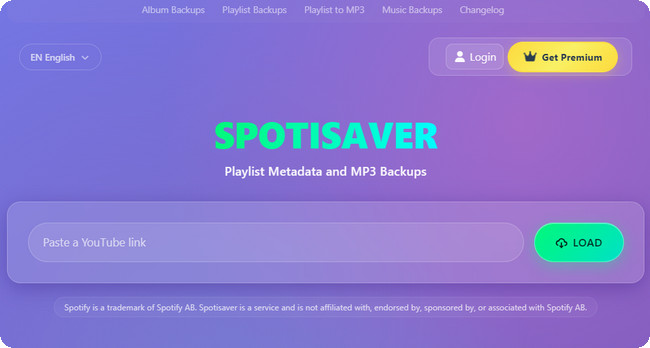
SpotiSaver is often used as a free online Spotify music downloader tool, but it also offers Premium access for users who need higher playlist limits, priority processing, and additional features.
| Feature | Free Plan | Premium Plan |
|---|---|---|
| Price | Free | €2 / 30 days €5 / 3 months |
| Payment | — | One-time payment, no subscription |
| Playlist Limit | Up to 100 tracks per playlist | Up to 1,000 tracks per playlist |
| Playlist Processing | 1 playlist at a time | Higher processing limits |
| Archive Preparation | Standard speed | Faster archive preparation |
| File Names | Includes “SPOTISAVER” tag | No tag; custom filename templates |
| YouTube Music | ❌ | ✅ Supported |
| Email Delivery | ❌ | ✅ Available |
| Support | Basic support | Priority support |
Although SpotiSaver is presented as a Spotify music downloader, it does not directly download audio from Spotify. Instead, it uses the Spotify link to identify the music and then searches external sources, such as YouTube, for a matching audio file.
This is because Spotify links mainly provide information about the music, such as the track title, artist, and album, rather than a directly downloadable audio file. SpotiSaver uses this metadata to find a matching recording from another source and then provides it as an MP3 download.
In short, the process is Spotify link → metadata → external audio matching → MP3 download. This also means the final audio quality and download success can depend on the external source it finds.
Export Spotify playlists easily with NoteBurner Spotify Music Converter. Step-by-step guide to download and save your Spotify music offline. Learn More →
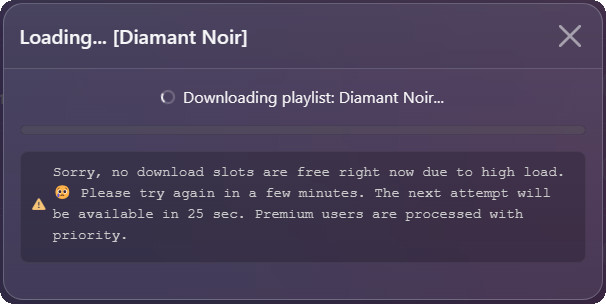
We tested SpotiSaver with 10 individual tracks, 8 playlists, and 8 albums. All 26 test items were successfully recognized and parsed without errors. However, during the download process, we occasionally received a message saying, “Sorry, no download slots are free right now due to high load.” The message also states that Premium users are processed with priority, so free users may need to wait a few minutes and try again when download slots are unavailable.
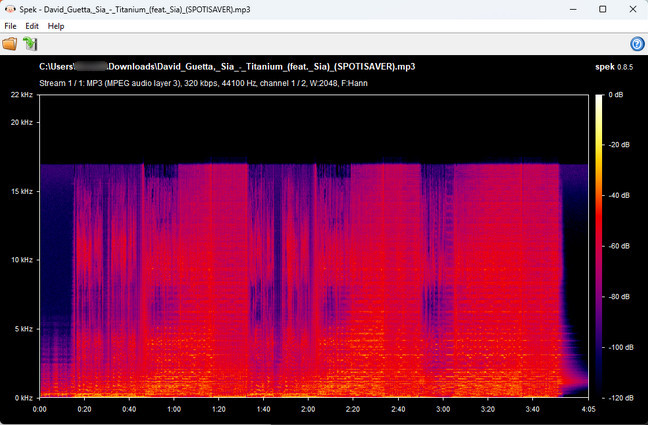
SpotiSaver offers MP3 downloads labeled at up to 320 kbps, so we checked the actual audio with Spek. The downloaded file is identified as a 320 kbps, 44.1 kHz MP3, but its spectrum shows a noticeable high-frequency cutoff at around 16–17 kHz, with very little content above that range. This suggests that the file may have been sourced from or re-encoded from a lower-quality audio stream rather than being a genuine high-quality 320 kbps source. In other words, the 320 kbps label alone does not guarantee 320 kbps source quality.
SpotiSaver offers a reasonable download speed for individual tracks. A single song typically took around 15–25 seconds to process and download, with an average of about 20 seconds per track in our testing.
SpotiSaver supports both playlists and albums. We randomly tested 8 Spotify playlists and 8 albums, and all were successfully recognized and downloaded without parsing errors. A 15-track playlist with around 50–60 minutes of total playback time took roughly 5 minutes to process and download. Multiple tracks are packaged into a ZIP file for easier saving.
SpotiSaver preserves basic metadata in the downloaded MP3 files. In our tests, the files retained the artist, album, cover art, and release date, making the downloaded tracks easy to identify and organize.
Free downloads automatically add a “SPOTISAVER” tag to the file name, such as Artist - Song Title (SPOTISAVER).mp3. The free version also uses a fixed naming pattern, so you cannot customize the file names before downloading. This is not a major issue for a few songs, but it can be inconvenient when managing a larger music collection because the files need to be renamed manually.
We scanned the downloaded MP3 files and ZIP archives with VirusTotal, and neither type triggered any security detections.
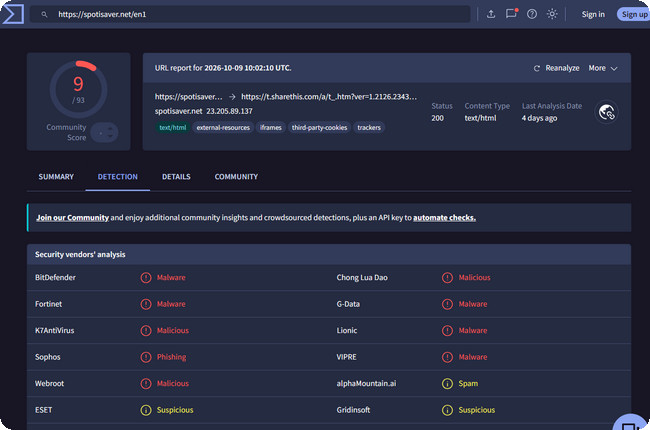
We also checked the SpotiSaver website URL with VirusTotal. The scan showed detections from 9 of 93 security vendors, with some vendors flagging the URL as malware, malicious, phishing, or suspicious. This does not necessarily mean the website is malicious, as security scanners can produce false positives, but the results suggest that you should use caution when accessing the site.
We also checked user feedback on Trustpilot. While some users report a smooth experience, others have mentioned issues with track matching and playlist downloads. For example:
“The playlist download is really difficult. It can download 2-3 songs at a time...”
“It couldn't find the song I was looking for.”
Based on our hands-on testing and these user reports, here are the main pros and cons of SpotiSaver:
Overall, SpotiSaver works well for straightforward music downloads, but its free download limits, occasional track-matching issues, and inconsistent results with larger playlists may be frustrating for heavier users.
SpotiSaver is convenient for occasional downloads, but its free download limits, uncertain source quality, and limited file management options can become frustrating if you download music regularly. If you want more control over audio quality, batch downloads, and saved files, NoteBurner Spotify Music Converter is a more capable desktop alternative.
NoteBurner lets you download Spotify songs, playlists, podcasts, and radio content to MP3, AAC, FLAC, WAV, AIFF, or ALAC. It supports batch downloads at up to 40X speed, preserves ID3 tags and lyrics, and gives you more control over output quality, file names, and folder organization.
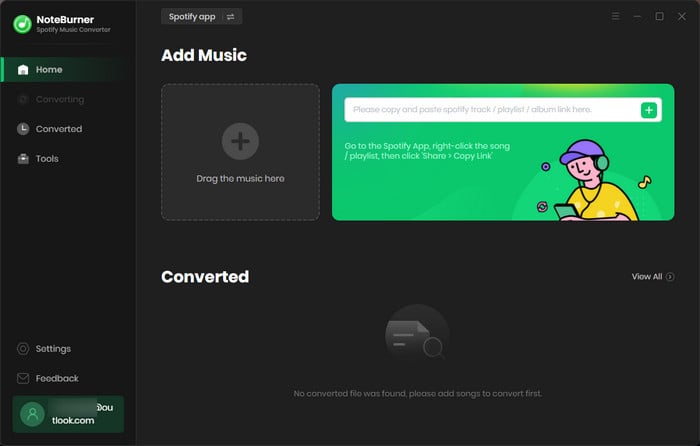
Import Spotify Music/Playlist
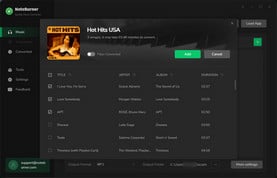
Open the converter. Click the "Add" button to load the Spotify playlist you intend to download.
Choose MP3 as Spotify Output Format
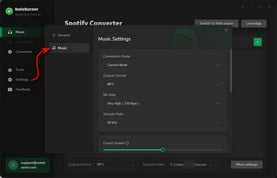
Go to "Settings" to choose MP3 audio quality. Other output settings are also adjustable by your needs.
Batch Convert Spotify Audio to MP3
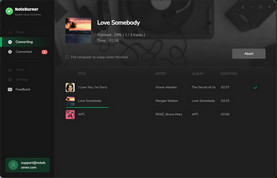
Click the "Convert" button to export Spotify music quickly and go to "History" to find the downloaded MP3 files.
Disclaimer: For personal/educational use only. 🚫 Do not distribute downloaded music/video for commercial use.
If you're deciding between SpotiSaver and NoteBurner, the comparison below highlights the key differences in pricing, audio quality, download options, and overall flexibility.
| Feature | SpotiSaver | NoteBurner Spotify Music Converter |
|---|---|---|
| Price | Free; Premium from €2 / 30 days | Paid software; free trial available |
| Platform | Web browser | Windows, Mac |
| Spotify Account Required | No | No Spotify Premium required |
| Audio Source | External audio sources | Spotify |
| Output Formats | MP3 | MP3, AAC, FLAC, WAV, AIFF, ALAC |
| Audio Quality | Up to 320 kbps; source quality may vary | Up to 320 kbps and Spotify Lossless |
| Playlist & Album Downloads | One playlist/album at a time; saved as a ZIP file |
Multiple playlists/albums can be downloaded at once |
| Playlist Limit | Up to 100 tracks (Free) Up to 1,000 tracks (Premium) |
Unlimited |
| Download Speed | Standard | Up to 40X |
| Metadata | Artist, album, cover art, release date | Full ID3 tags and lyrics |
| File Name Customization | Premium only | ✅ Supported |
| Podcasts & Audiobooks | ❌ | ✅ |
| Spotify Radio | ❌ | ✅ |
| Additional Tools | TXT tracklist export | ID3 editor, audio converter, CD burner, iTunes/Music export |
In short, SpotiSaver is a convenient choice for occasional MP3 downloads, while NoteBurner Spotify Music Converter is better suited to users who need higher-quality audio, batch downloads, more formats, and greater control over their music library.
The post collects the top 9 free Spotify to MP3 downloaders that are still working in 2026, making it easy to get Spotify MP3 songs in 320 kbps. Learn More →
Yes. SpotiSaver offers a Free plan for basic Spotify downloads, while its Premium plans add higher playlist limits, priority processing, and other features. Premium access starts at €2 for 30 days.
If SpotiSaver is not working, the issue may be related to temporary download-slot limits, problems matching a Spotify track, or service-side issues. If you see a high-load message, wait a few minutes and try again. For frequently downloaded playlists, a desktop Spotify downloader can provide a more stable option.
No. SpotiSaver does not bypass Spotify's encryption servers. Instead, it uses a metadata matching mechanism to read your song or playlist link and search for matching audio files from independent, open sources (such as YouTube libraries). Because of this, audio quality can occasionally vary depending on the match found.
Besides SpotiSaver, there are other Spotify playlist downloader websites, such as SpotiDown and Spotidownloader. These online tools are convenient for quick downloads, but they may come with security risks, limited features, and inconsistent results.
If you want a more stable and feature-rich way to download Spotify playlists, we recommend NoteBurner Spotify Music Converter. It supports batch downloads, multiple output formats, high-quality audio, and customizable file names without relying on third-party online download sites.
We tested 10+ free online Spotify playlist downloaders that still work in 2026. Compare 320kbps quality, batch download, speed & safety — see which wins. Learn More →
SpotiSaver is a convenient option if you only need to download a few Spotify tracks or playlists online for free. Our testing found that it can successfully process songs, albums, and playlists, but the experience is not always consistent. Free download limits, uncertain 320 kbps source quality, fixed file names, and occasional track-matching or playlist issues can become frustrating when you download music regularly.
So, is SpotiSaver worth using? For occasional downloads, it can be worth trying. But if you want a more reliable way to build and manage a larger music collection, NoteBurner Spotify Music Converter is a better fit. It offers batch downloads, more output formats, higher-quality audio options, customizable file names, and support for more types of Spotify content.
Note: The free trial version of NoteBurner Spotify Music Converter allows you to convert the first 1 minute of each song. You can buy the full version to unlock this limitation and enable all its features.



