
Spotify++ is an unofficial, modified version of the Spotify app designed to unlock features normally reserved for Premium subscribers—such as ad-free listening and unlimited song skipping. But how exactly does Spotify++ work? Is it safe to use? What risks are involved in using such modified apps? And are there any safe alternatives? This article will answer all these questions.
Spotify++ is an unofficial version of the Spotify app, made by third-party developers. It lets users enjoy many of Spotify Premium's features for free on both iOS and Android devices.
Spotify++ works by modifying the official Spotify app rather than providing a separate music service. The modified app changes or bypasses some restrictions built into the standard Spotify experience, which is why it can offer features that are normally limited to Premium users.
However, Spotify++ depends on an unofficial modified build. This means its availability and functionality can change when Spotify updates its app, authentication systems, or other services. A version that works today may stop working after a future Spotify update.
| Feature | Spotify++ | Official Spotify |
|---|---|---|
| Developer | Third-party developers | Spotify |
| Offline Downloads | ❌ Generally unavailable without Premium. | Available with Premium |
| Ad-Free Listening | ✅ Removes all Spotify ads | Available with Premium |
| Unlimited Skips | ✅ Claims to unlock | Available with Premium |
| High-Quality Audio | ✅ Higher audio quality | Available with Premium |
| Official Updates/Support | ❌ | ✅ |
| Safety | ❌Not guaranteed | ✅ |
Note: Using Spotify++ can put your device at risk for malware or security issues. And it might not get updates or support, leading to bugs or problems with new systems.
It's strongly recommended to use the clean and safe Spotify++ alternative - NoteBurner Spotify Converter for Android - which helps to safely download Spotify songs without Premium, and also blocks the ads. This tool will be discussed in Part 4.
📲 Learn More >> How to use NoteBurner Spotify Downloader APK to download Spotify songs onto Android phone.
Spotify++ is not officially approved by Spotify, and its safety cannot be guaranteed. Although some users have used modified versions without problems, others have reported login issues, account restrictions, and suspicious account activity. There are also concerns about whether using Spotify++ complies with Spotify's terms of service.
The biggest concern is security. Since Spotify++ is distributed through third-party sources, there is no guarantee that every version is free from malicious code.
Real user experiences are mixed. In a Reddit discussion about Spotify++ account safety, several users reported using their main Spotify accounts without problems. However, one user claimed their account was closed after three months of using Spotify++ on iOS.
In another Reddit post, a user reported being unexpectedly logged out after installing a modified Spotify app and receiving a suspicious activity warning from Spotify.
These reports do not mean every Spotify++ version is unsafe. However, positive user experiences are not proof that an app is secure, especially when different versions may come from different developers.
Spotify++ is not automatically illegal just because it is a modified app. However, distributing unauthorized copies of copyrighted software or bypassing paid features may violate local laws, depending on how the app is obtained and used.
Even if using Spotify++ is not illegal in your country, it may still violate Spotify's terms of service and put your account at risk. The official Spotify app is the safer choice.
This tutorial guides you to download music from Spotify for free without Premium so that the Spotify Free users can also listen to Spotify songs offline. Learn More →
Spotify++ is mainly known for offering modified versions of features found in the official Spotify app. The exact features can vary between builds, devices, and versions, so not every Spotify++ release will provide the same experience.
Spotify++ may pose security and privacy risks, as modified apps can contain unauthorized code, expose login credentials, or collect personal data without users' knowledge.
Changes to Spotify's official app or backend systems can break modified features, causing login issues, playback errors, or even making the app unusable.
Spotify++ receives no official updates or technical support. When compatibility issues arise, users must rely on third-party developers for fixes.
Different versions of Spotify++ may offer different features and levels of stability, making it difficult to know what to expect from a particular build.
Compare 13 free Spotify to MP3 converters for online, PC, Mac, and phone. See real tests of audio quality, speed, playlist support, and download limits. Learn More →
If you're looking for an alternative to Spotify++, consider using NoteBurner Spotify Converter for Android. Unlike Spotify++, which may pose security risks, NoteBurner is a safe and reliable tool that allows you to download Spotify songs, albums, playlists, and podcasts. It works well with both free and premium Spotify accounts, giving you flexibility without the need for a risky app.

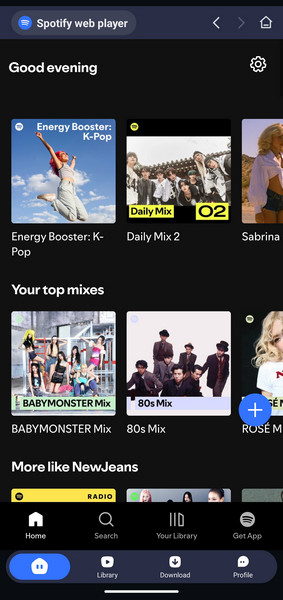
Step 1 Download and install NoteBurner Spotify Downloader on your phone. Open the program, you’ll see a simple interface with a built-in Spotify web player.
Step 2 Directly open a Spotify playlist, album, or artist on the web player, and tap the add icon.
Step 3 Now, you will be directed to the Settings window automatically. Choose Output Path, Output Format, and Output Quality.
Step 4 Click the "Confirm" button, and NoteBurner will start downloading Spotify songs to your phone. After conversion, click the "Library" tab to see the converted songs.
Disclaimer: For personal/educational use only. 🚫 Do not distribute downloaded music/video for commercial use.
| NoteBurner Spotify Downloader | Spotify++ | |
| Price | Free or $44.95/year | Free |
| Platforms | Android, Windows, macOS | Android, iOS |
| Basic Functionality | Download and convert Spotify songs, albums, playlists, podcasts, radio, and audiobooks as local files. | Unlocks Spotify Premium features like no ads, unlimited skips, and high-quality streaming. |
| Supported Accounts | Spotify Free & Premium | Spotify Free & Premium |
| High-Quality Streaming |  Supports high-quality downloads. |
Supports high-quality online streaming. |
| Download Formats | MP3, AAC, WAV, FLAC, AIFF, ALAC |
 Doesn't support downloading or converting |
| Ads-Free | |
|
| Local Storage | Stores converted tracks as local audio files. |
No local storage or backup capability. |
| Official Support | Stable performance and support. |
No official support or updates. |
| Safety | Safe & clean. |
Potential security risks. |
 Winner: NoteBurner Spotify Downloader
NoteBurner Spotify Downloader is a better choice than Spotify++. While Spotify++ is free, it can have risks and might not always work well. NoteBurner is safer, updates regularly, and gives you high-quality downloads. You can even use NoteBurner to save and listen to the Spotify downloads on any music player or music device forever. It costs a bit, but it's a more reliable and secure way to download music compared to Spotify++.
A: Spotify++ is not officially verified or supported by Spotify. Since modified APKs and IPA files come from third-party sources, they may pose security and privacy risks, including malicious code or potential exposure of login credentials. Even if a version appears to work properly, its safety cannot be guaranteed.
How to Reduce the Risks:
✔ Avoid downloading Spotify++ from unknown websites or suspicious links.
✔ Never share your Spotify password with third-party installers or websites.
✔ Consider the official Spotify app or established alternatives instead of relying on modified apps.
A: Not necessarily. Compatibility depends on the Spotify++ build, operating system, and changes to Spotify's app or servers. Updates may cause login failures, playback errors, or broken Premium-style features, and some features, such as native offline downloads, may not work at all.
There is no universally reliable Spotify++ version for every device. Users must depend on third-party developers for compatibility fixes, which may not always be available.
A: The legal status of Spotify++ depends on local laws and how the modified app is obtained or used. However, bypassing advertisements or subscription restrictions can violate Spotify's User Guidelines, potentially leading to account suspension or termination.
For a more detailed explanation of the security concerns and legal issues, see Part 2: Is Spotify++ Safe and Legal?.
A: Most Spotify++ versions cannot unlock Spotify's native offline music downloads. This feature is controlled by Spotify's servers and generally requires a Premium subscription. While some modified apps may support podcast downloads, local music files, or alternative download methods, these should not be confused with Spotify's official offline listening feature.
Spotify++ may sound appealing with features like ad-free listening and unlimited skips, but is it really worth the risks? As this Spotify++ review shows, modified versions can come with security concerns, account restrictions, and unreliable performance.
If you simply want a reliable streaming experience, the official Spotify app is the safest option. However, if your main goal is to download Spotify music for offline listening, NoteBurner Spotify Music Converter offers a different approach. It lets you convert Spotify songs and playlists into MP3, FLAC, and other common audio formats for playback on compatible devices, with software updates and dedicated technical support.
Ultimately, Spotify++ may offer some convenient features for free, but its potential risks and limitations make it difficult to recommend. Choosing a trustworthy solution that fits your listening needs is a better long-term approach.
Note: The free trial version of NoteBurner Spotify Music Converter allows you to convert the first 1 minute of each song. You can buy the full version to unlock this limitation and enable all its features.



