
 By
By
If you’ve invested on any time searching for a free online YouTube downloader, YT1s has probably come up. But is YT1s actually working and safe as expected? In this YT1s review, I'll put the tool to the test and share real findings on its performance. On top of that, you'll also discover several of YT1s best alternatives for downloading YouTube to MP3/MP4.
As an online YouTube converter, YT1s converts YouTube videos to MP4 and music tracks to MP3 files, totally free of charge. The workflow is familiar—you paste the YouTube music or video link, and it processes the link and inputs the options ready for download. It basically does the job for casual users who just want to grab the desired YouTube MP3 audio without registration or installation. But there are a few drawbacks: download quality, ad experience, site stability, and potential safety and legal issues.
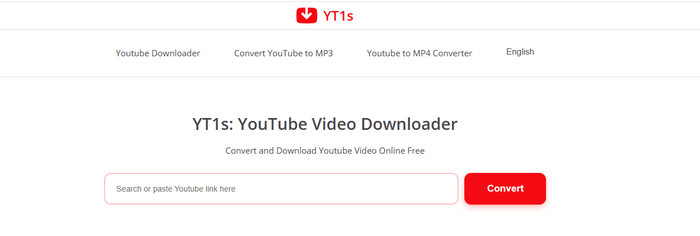
You may notice that there are various sites using YT1s branding in the search list, like yt1s.com, yt1s.blog, yt1s.org, etc. All of them do the same thing, but actually, not all of them work and are still available. I checked 5 common YT1s domains. Here's their current status:
| Website URL | Status | Notes | Use It? |
|---|---|---|---|
| https://yt1s.com.co/en228/ | Working | Downloads work, but come with redirects. | Caution |
| https://yt1s.world/ | Working | Contains banner ads and redirects. | Caution |
| http://yt1s.africa.com/ | Suspicious | Misleading download buttons and excessive redirects. | Avoid |
| https://yt1s.blog/ | Suspicious | Deceptive buttons and prompts to install additional software. | Avoid |
| https://ww2.yt1.org/en/ | Suspicious | Each step trigger redirects | Avoid |
Last tested: October 2026
1. Go to Settings > Privacy and security → Site settings.
2. Click on Pop-ups and redirects, and navigate to "Not allowed to send pop-ups or use redirects"
3. Add the website address of YT1s.
Step 1 Open the YouTube video page, click on the share button and copy the full URL.
Step 2 Paste it into the search field of YT1s, and click on the Convert button. Here, wait for the processing.
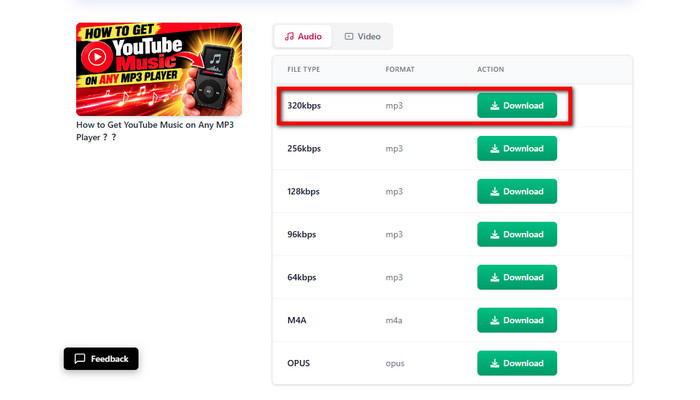
Step 3 Once ready, choose the MP3 or MP4 format and your desired quality. Click on the "Download" button.
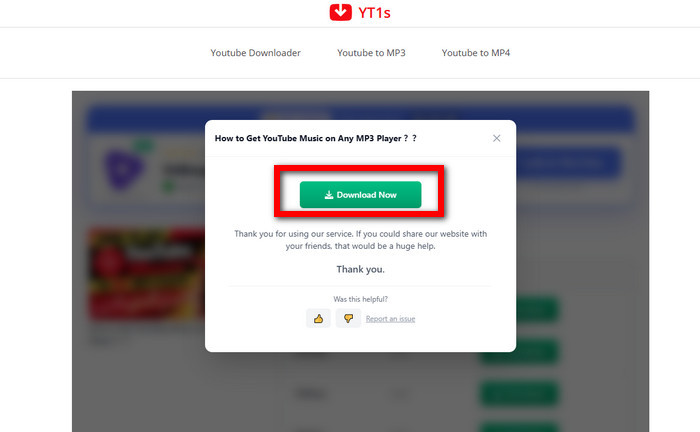
Step 4 A Windows notification pops up; now you need to click the Download button again.
Step 5 Locate the downloaded YouTube MP3 files in the recent download history. Or find them in the local Downloads folder.
🎯 Tips: YT1s not working any more? Try the best alternative - NoteBurner Music One, download YouTube songs and music videos to MP3 with the best quality kept.
| What We Tested | Our Findings | Rating |
|---|---|---|
| Success rate | MP4 Videos: 4/5 (80%) MP3 Tracks: 4/5 (80%) |
★★★☆☆ |
| Download speed | Links processed in 5-10 seconds | ★★★★★ |
| Ease of use | Simple operation, without installation | ★★★★★ |
| Ads or Not | ≥2 redirects per download | ★☆☆☆☆ |
| Metadata Preservation | Video title + channel tag | ★★★☆☆ |
| Output quality (Spek-verified) | 128 – 192 kbps MP3 actual 1080p, 5.87 Mbps in MP4 |
★★☆☆☆ |
| Security (ScamAdviser) | Trust score: 1/100 | ★☆☆☆☆ |
| Stability | Frequent change of domain names | ★☆☆☆☆ |
| Overall Rating: ★★★☆☆ (3/5) | ||
It does not require you to pay extra fees to download YouTube videos to MP3 or MP4 files.
In my testing, it processes and downloads the music video very fast; all successful attempts are done in 5 to 10 seconds. This is one of the few highlights where online tools hold up. Even if you've not logged in to your YouTube account, it converts content normally with a single URL.
The operation is intuitive and simple for even beginners. Paste the URL, pick a format, and click download. That's it. Nothing to install, no account to create. So the ease-of-use score is the highest in this review.
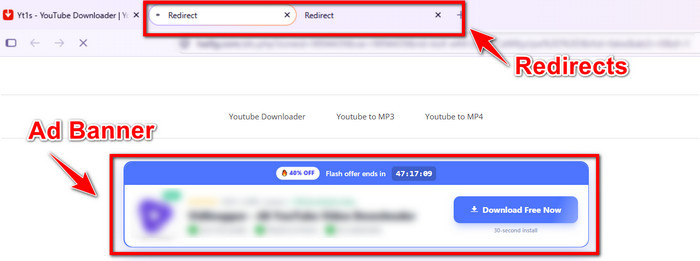
The worst result in this review. The download button causes redirects. Every single download triggered at least two redirects—often opening new tabs, occasionally landing on pages pushing software installs or gambling. This happened more if you do not use an ad blocker.
Not all YouTube links are 100% extractable and downloadable. One failed attempt for audio and video downloads, respectively.
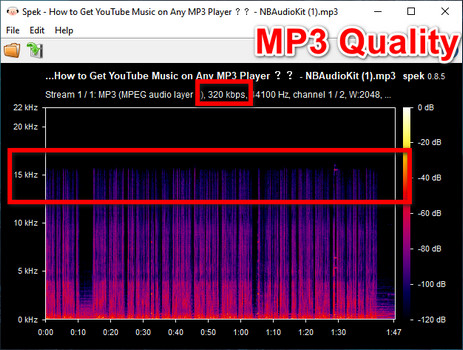
After verifying the labeled YouTube MP3 320 kbps through Spek, it showed a clear cutoff at 15 kHz, which is actually 128-192 kbps at that quality.
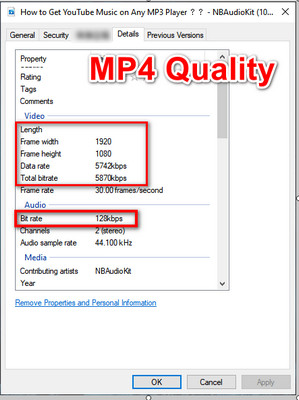
The video specifications are reasonable for a standard HD music video, but the internal audio bitrate is 128 kbps.
💡 Tester's Note: The max YouTube audio stream is 256 kbps; relabeling the file doesn't change what's inside it. If you're looking for true 320 kbps, any online YouTube converters like YT1s can work around it.
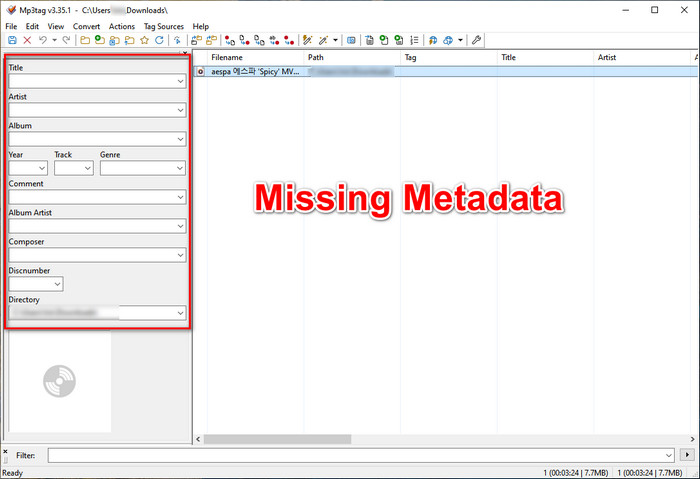
It keeps the basic info, better than expected. The downloaded files embedded the video title and channel name. The missing track information is cover art, album, artist, release year, and genre. Fine for video downloads. But for music downloads specifically, that means your player cannot organize these music tracks properly.
Despite free service and ease of use, KlickAud comes with some undeniable woes when you use it. Here's what we discovered after several hours of hands-on testing.
According to ScamAdviser, the trust score for yt1s.com.co is 0/100. The website is considered potentially unsafe.
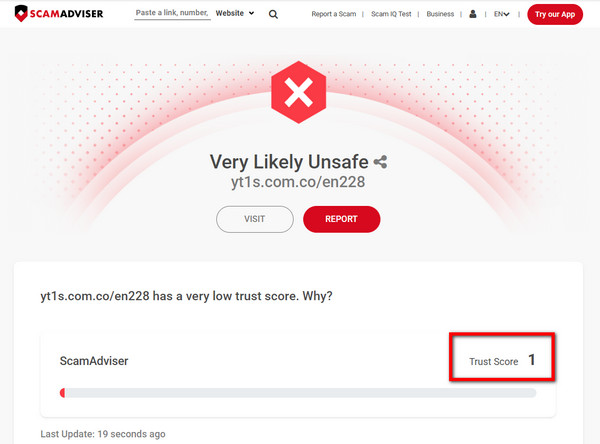
You have the risk of interacting with unsafe content. Instead of saving the designated file to your device directly, the download button lead to sponsored advertisements or an unrelated website. This makes the download process frustrating and potentially risky,
The YT1s domains change frequently. For example, the website that worked before may suddenly go offline or redirect to a different domain, making it difficult to access again.
YT1s stays in a legal grey area. Redistributing downloaded files or using them in commercial projects without the necessary rights can create additional legal risks. So keep using it responsibly.
The website has a low trust score, a terrible ads experience, and the domain is not stable. Its legal suitability is worth your attention. What's next? Just explore the safe alternatives that do a better job.
| Test Results (https://www.noteburner.com/noteburner-music-one.html) | |||||
| Audio Output | Playlists | Albums | Music Videos (MP4) | No Ads/Redirects | Batch |
| 320kbps MP3 (if available) |  |
|
|
|
|
NoteBurner Music One packs a dedicated YouTube Music downloader for both YouTube Free and Premium users. Unlike web-based YouTube downloaders like YT1s, NoteBurner Music One downloads YouTube Music songs, playlists, albums, and music videos in batches without annoying pop-up ads or redirects. It converts YouTube Music tracks to MP3 at up to 10x speed and supports other formats, including FLAC, WAV, ALAC, etc. Plus, with the fully tagged YouTube music files, you can easily organize them into different folders.

Step 1 Select the YouTube Music Platform
Open up NoteBurner Music One, find the "YouTube Music" logo, and click it.
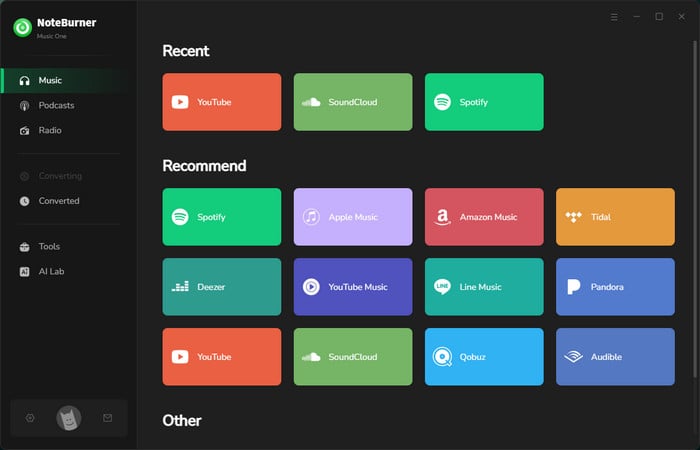
Tips: Choose the "YouTube" logo if you prefer to download YouTube videos and shorts to MP3.
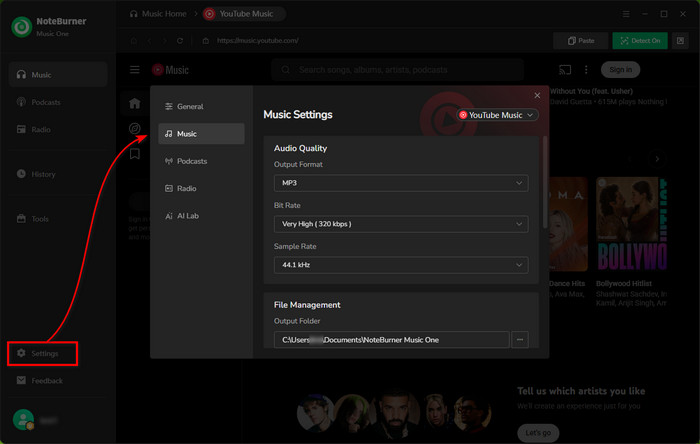
Step 2 Choose MP3 Output Format
Click on Settings at the bottom-left corner; you can select MP3 and 320kbps for YouTube audio output.
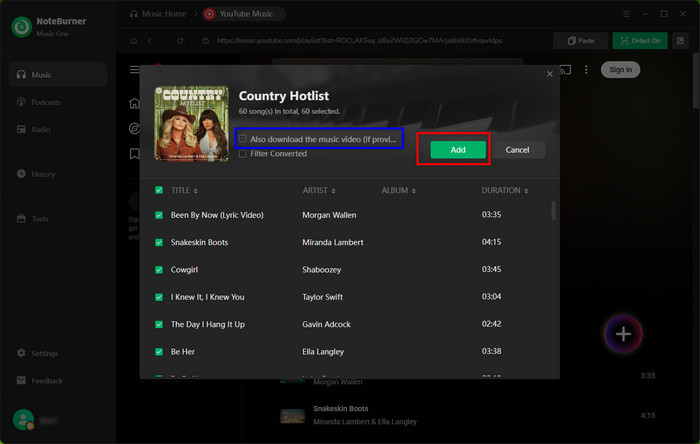
Step 3 Add YouTube Song/Playlist to NoteBurner
On the YouTube Music web player, find the playlist you want to save as MP3s, and hit "Add" to add it to NoteBurner.
Step 4 Batch Convert YouTube Music to MP3
Choose your YouTube tracks from the task list, then hit "Convert" to start downloading all your YouTube audio to MP3.
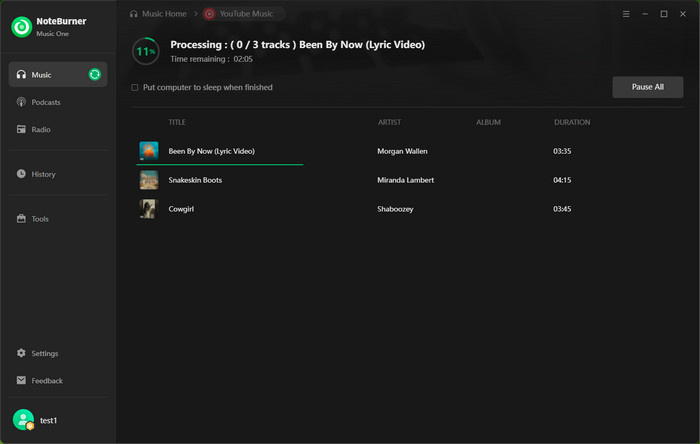
Tips: Tick on the "Also download music video (if provided)" feature; NoteBurner will download YouTube MP3 songs as well as MP4 videos altogether.
Step 5 Find YouTube MP3 Files
Just hit the "History" button, and all your offline YouTube Music songs will be there, saved in MP3 format.
The download speed is slower than YT1s. But it excels at the batch download feature, which handles the entire playlist. That alone saved quite a bit of time for larger download jobs. Also, the software itself was free of intrusive ads, so the whole process felt much smoother and safer.
Best for: YouTube Music lovers who want to download a full playlist or music videos to MP3 at once.
| Test Results (https://www.noteburner-video.com/all-in-one-downloader.html) | |||||
| Video Output | Videos | Playlists | Movies & TV Series | No Ads/Redirects | Batch |
| MP4 4K | |
|
|
|
|
This one-stop video converter specializes in downloading videos from various streaming sites. Built with a free YouTube video downloader, you can save YouTube videos as local MP4 files, with the original video quality. By several simple clicks, you can convert YouTube media to MP3 audio and MP4 video files without even logging in to your YouTube account.

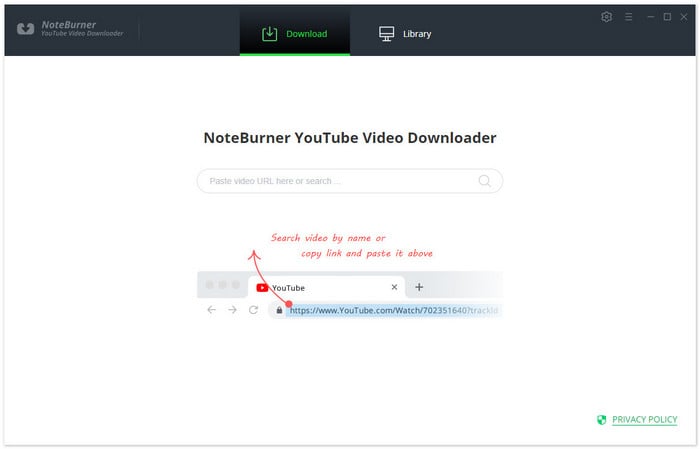
Step 1 Launch it, search video by copying and pasting the video link or entering keywords into the search box, and then press "Enter" button.
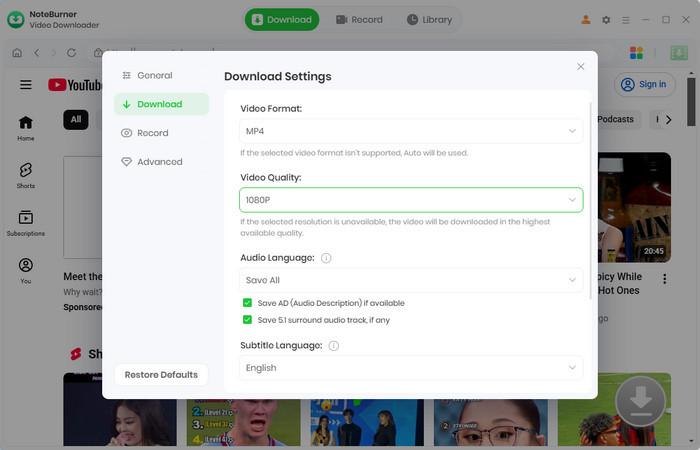
Step 2Click on Settings icon on the upper right corner. Here choose MP4 as the video format, and the desired video quality.
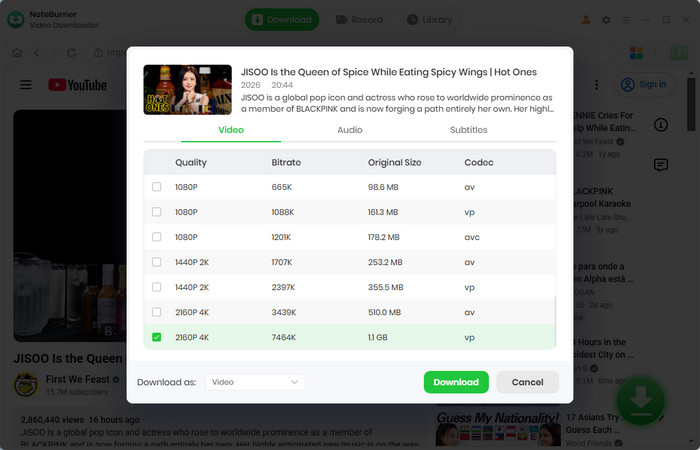
Step 3Click the "Advanced Download" button next to the video. Under Video panel, pick your preferred quality and bitrate. Then click the Download button.
Step 4 The program now automatically downloads your desired YouTube videos to MP3 locally. After downloading, click "Library" on the top menu bar to find your downloaded file.
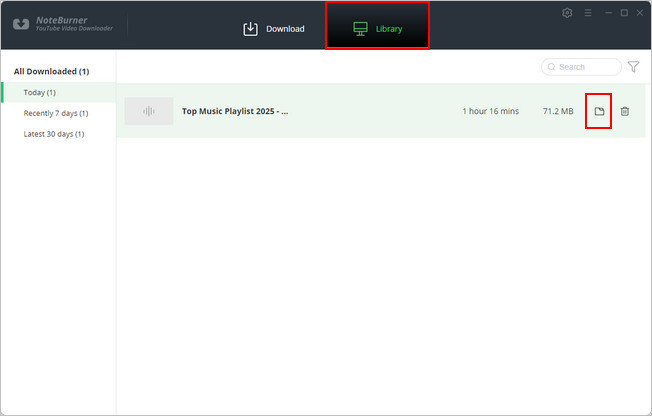
It works as it claims – download multiple YouTube videos to MP4 on the local computer and operate with the same no ads. Also, you can even choose the max resolution up to 8K, with details like video titles, thumbnails, and channel names preserved. While it can extract MP3 audio from videos, the actual audio bitrate ranged from 128 to 256 kbps.
Best for: Users who want to download high-resolution videos from YouTube and other supported websites.
If you prefer a free, browser-based YT1s alternative, here are five YouTube playlist downloaders worth switching to. They require no software installation, but be advised that these online tools are not 100% safe; you should use them with caution.
| Features | YTMP3 | EzMP3 | Loader.to | CNVMP3 | Y2Mate |
| MP3 Output (Tested) | 128 kbps | 128 kbps | 256 kbps | 128 – 256 kbps | 128 kbps |
| Batch Downloads | ❌ | ❌ | ✅ | ❌ | ❌ |
| No Ads | ❌ | ✅ | ❌ | ✅ | ❌ |
| Free to Use | ✅ | ✅ | ✅ | ✅ | ✅ |
Looking for 100% free & safe YouTube to MP3 sites? Discover 10 virus-free sites with high-quality audio — download quickly without ads!
| Tool | YT1s | NoteBurner Music One | All-in-One Video Downloader |
|---|---|---|---|
| Ad load / redirects | Heavy ads & redirects | Zero ads or malwares observed | Zero ads / malware |
| Download Content | Music, videos | Playlist, album, music video, podcast | Playlist, videos |
| Cost | Free | Paid (free trial available) | Free for YouTube; paid for other services |
| Sound Quality | 128kbps (relabeled as 320kbps) | Up to 320 kbps (when available) | 128-256kbps |
| Video Quality | Up to 1080p | Up to 4K (Music Video) | Up to 8K |
| Supported Format | MP3, MP4 | MP3, MP4, AAC, WAV, FLAC, AIFF, ALAC | MP3, MP4, MKV, M4A, WEBM |
| Download Speed | Fast for single files | 10X faster conversion | 5x |
| Metadata | Incomplete | Fully preserved | Fully preserved |
| Compatibility | Browser-based | Windows & Mac | Windows & Mac |
| Batch Downloads | ❌ | ✔️ | ✔️ |
YT1s is still a common option for free YouTube downloads, but lossy audio quality, redirects, and unreliable domains make it less appealing for regular use. If you're looking for a more reliable alternative, the two NoteBurner tools serve different needs:
NoteBurner All-In-One Video Downloader: Better for downloading high-resolution YouTube videos to MP4, including 4K and up to 8K when available, with batch support.
NoteBurner Music One: Combine playlists and music videos, with a focus on batch converting music to MP3 and multiple audio formats – no intrusive ads, no Premium needed.
YT1s may stop working owing to domain name adjustments, server issues, or changes to YouTube’s download limits. Some YT1s sites may also go down or reroute to unrelated sites. If YT1s is down or is unable to process a link, you can try another stable tool, such as NoteBurner Music One.
Not genuinely. The marked 320kbps audio by YT1S may have a much lower bitrate. It only delivers roughly 128 kbps audio.
No. YT1s only processes a single music or video track. It does not have the ability to rip the playlist URL and save multiple media locally.
Just a reminder: whichever tool you choose, use it responsibly and only for personal purposes.
Note: The free trial version of NoteBurner Music One is limited to convert the first 1 minute of each song. You can buy the full version to unlock the limitation.




