
 By
By
Line Music enjoys huge popularity in Japan, Taiwan, Thailand, and among global fans of J-Pop, anime soundtracks, K-Pop, Japanese R&B, and Asian chart hits. While the app delivers excellent streaming quality, many Android users quickly run into the same frustration: there’s no official way to download Line Music songs on Android as MP3 files or save them permanently.
This guide will explain why downloading Line Music on Android is so restrictive and walk you through how to save your favorite tracks directly to your phone using a Line Music Android downloader.
If you use Line Music on Android, you've probably experienced many limitations and frustrations while using it every day.
| Limitation | What It Means |
| Subscription Restrictions | All downloaded songs will disappear when the subscription ends.Free-plan users can only play 30-second previews. |
| DRM & Format Lockdown | Songs can’t be saved as MP3 or transferred to other devices.Offline cache only works inside the Line Music app. |
| Device Compatibility Issues | Newer Line Music versions require Android 7.1.2+. |
Individually, these limitations may seem minor, but together they significantly reduce your freedom as a listener. Even if you're paying for a subscription, you still can't truly "own" your music. You can't back up your playlists, manage your library across devices, or use your songs in everyday scenarios — whether that's studying, driving, content creation, or personal projects.
If these issues sound familiar, don't worry — in the next section, we'll introduce a powerful yet easy-to-use Line Music Android downloader to help you regain full control over your Line Music collection.
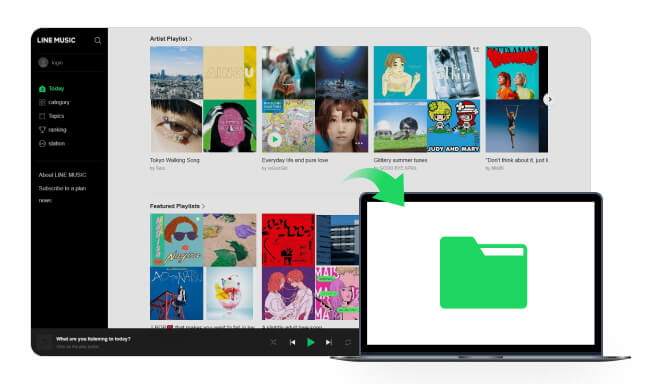
Read this guide to learn how to download all your favorite songs from Line Music to your computer unlimitedly, and you can enjoy them anywhere forever!
NoteBurner Line Music Downloader for Android is designed to solve all these issues in a simple and user-friendly way. It runs directly on your Android device — no computer, cables, or complicated setup required. With just a few taps, you can convert your Line Music tracks into real, offline audio files in MP3, AAC, FLAC, or WAV formats.
Whether you want to loop your favorite songs in another music player, import them into editing apps for mixes, or back them up to your personal drive, NoteBurner makes the entire process fast, flexible, and hassle-free.

Step 1 Install and launch NoteBurner Line Music Downloader for Android. Then, log in to your Line Music account.
Note: After purchasing the full version, you can also use the same account on Windows or macOS to download and organize your Line Music library.
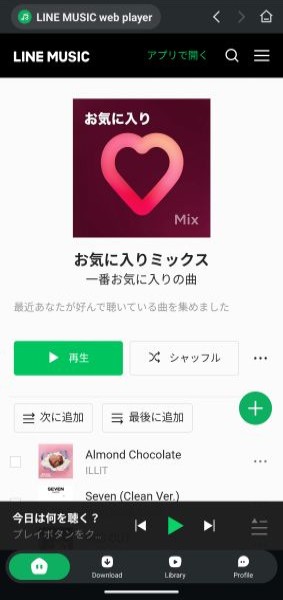
Step 2 Click the green "Add" button on the right, then select the song you want to download.
Step 3 Choose output format and quality. You can set the bitrate or keep high-quality formats for audiophile-level sound.
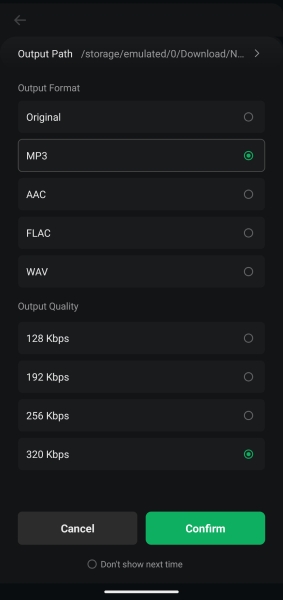
Step 4 Tap the "Confirm" button, and NoteBurner will start downloading Line Music songs to your Android phone.
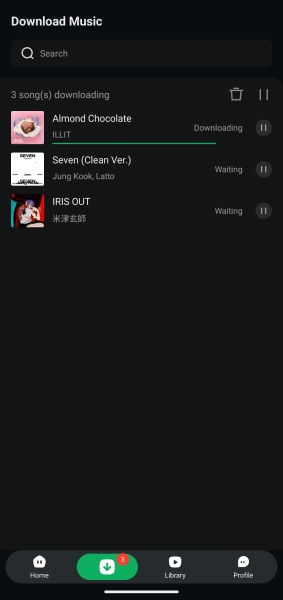
Step 5 After conversion, tap the "Library" tab. Your Line Music songs are now saved as local files.
Since your files are now real audio files (rather than temporary encrypted caches), you can utilize them in dozens of practical ways — ways that Line Music itself does NOT support.
Line Music only provides user with Web player oneline mode when streaming it on a computer. This article is going to show you the best way on how to download the Line Music songs to your Mac for offline stream.
No. The official app only supports encrypted offline playback inside Line Music.
Yes. It works locally on your device and does not collect personal data.
Yes. Without logging into Line Music Premium, only 30-second preview clips are available.
No. You can choose MP3 high bitrate (320kbps) or lossless formats like FLAC/WAV — matching Line Music’s original streaming quality.
By now, you should have a clear understanding of how to download Line Music songs on Android from start to finish. If you want the entire process to be simpler, faster, and more reliable, NoteBurner Line Music Downloader for Android is undoubtedly the best solution to try. It’s more than just a downloader — it’s a way to truly "own" your music.
With NoteBurner, you can back up your playlists anytime, import your favorite tracks into other apps, or permanently save full albums directly to your device. That means no more worrying about losing access when your subscription expires, and no more limitations caused by device restrictions. Instead, you get the freedom to manage, play, and enjoy your Line Music library however you want.



