
 By
By
SoundCloud and CapCut don't talk to each other. You can't simply upload SoundCloud downloads or paste audio links into CapCut for use on your projects. But there's a clean two-step workaround that actually works—and once you've done it, it takes only a few minutes. Just dive in!
Not directly.
Regarding SoundCloud, it disallows users from downloading tracks without the artist's permission (unless the artist has enabled downloads on their profile). Plus, the downloaded tracks are only available for streaming on the platform; there is no way to use them directly in CapCut, iMovie, or other video editor apps.
CapCut's audio import system only accepts MP3, WAV, M4A, and FLAC formats. The downloaded songs from SoundCloud are not yet compatible with that.
Check out the 4 best feasible SoundCloud-to-MP3 workarounds shown in this article.
NoteBurner Music One offers the easiest way to prepare SoundCloud MP3 Audioio files for CapCut projects. The purpose-built SoundCloud Music Converter downloads tracks, playlists or albums from SoundCloud to MP3, WAV and more formats. With all output settings configured, it preserves track title, artist, cover art and more metadata — so your CapCut audio panel stays organized. After conversions, you’re free to move SoundCloud audio to CapCut for use on your projects.

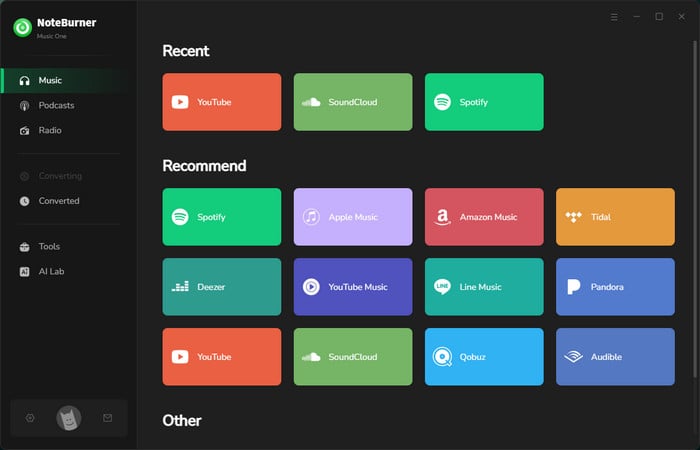
Step 1 Select SoundCloud
Download and install NoteBurner Music One on your PC or Mac. Once the program is launched, simply choose the "SoundCloud" platform at the Music tab.
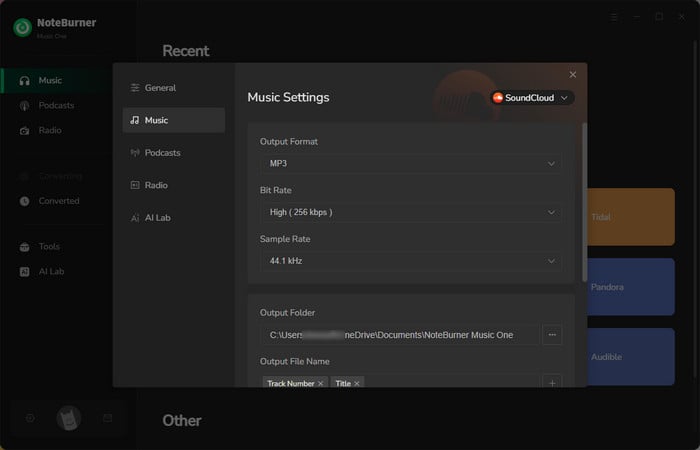
Step 2 Customize Output Settings
Click the gear icon. at the lower left corner. In the "Settings" window, choose MP3 as the output format and 320 kbps as the output bitrate. Create a new output folder for later backup use.
✅ Tips for choosing an audio format for Capcut:
Step 3 Add SoundCloud Music
Open the SoundCloud web player, and click the "Add" button to load the tracks to NoteBurner. In the queue list, check songs for conversion.
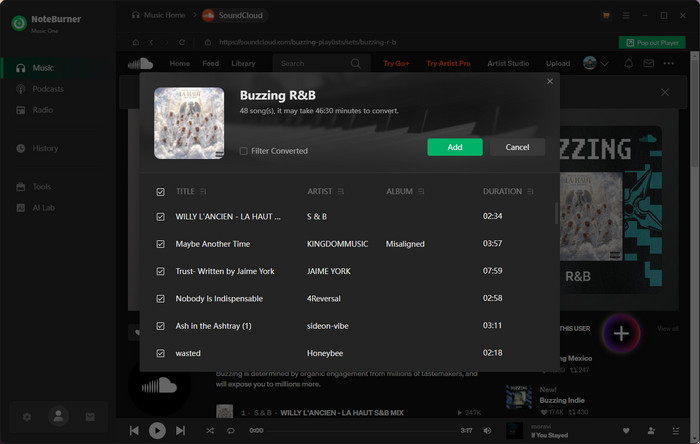
Step 4 Start Converting SoundCloud Music to MP3
Tap on "Convert" to start downloading. You can also monitor the process in the app.
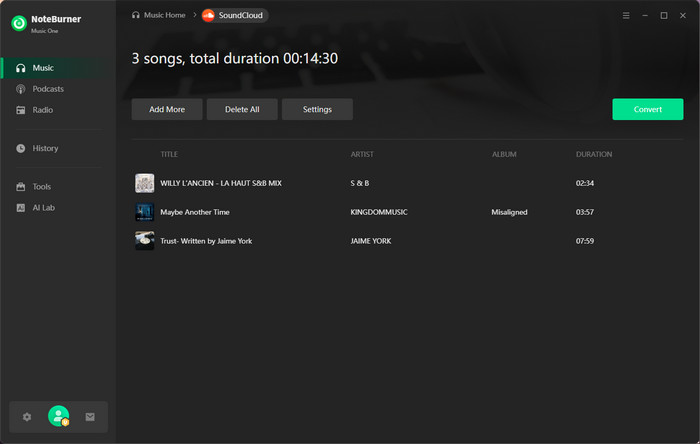
Step 5 Find Downloaded Files
After conversion, open the History tab. Click a folder icon next to a track to locate the saved SoundCloud MP3 files.
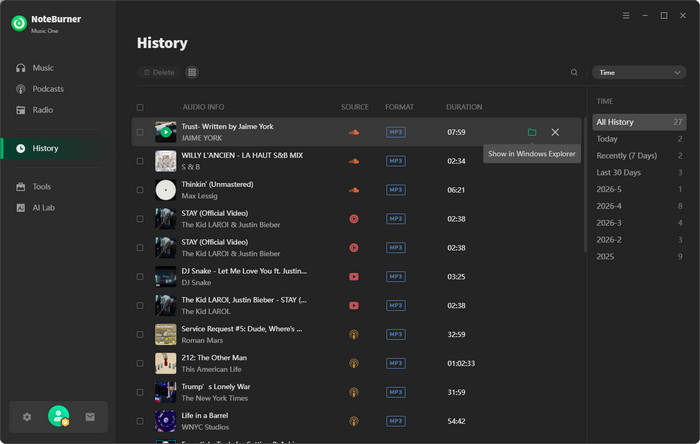
Bravo! These audio files are now ready to import into CapCut.
Well, now importing converted SoundCloud tracks into CapCut is straightforward. Notably, the exact steps differ depending on whether you're on mobile, desktop, or the web editor. We outline each on clearly.
Before starting, transfer SoundCloud MP3 files to your phone via USB or iTunes, etc.
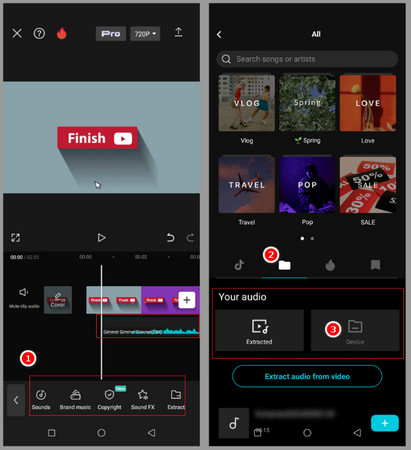
Step 1 On the Capcut app, start a new project or open an existing one. Add your video clip to the timeline first..
Step 2 Tap "Add Audio" below the video track or "Audio" on the toolbar. Then choose "Sounds".
Step 3 Choose to add audio from Device. On iPhone, this opens the Files app. On Android, it opens your device storage. Locate and check the converted SoundCloud MP3files.
Step 4 Once loaded, you can tap the blue "+" icon to add the track to your timeline.
Step 1 On the Capcut desktop app, create a new project or open your previous one.
Step 2 Click Import at the top of the CapCut interface. Select your MP3 file from your local folder. Or you can directly drag and drop the MP3 file into the media zone of CapCut.
Step 3 Position it to start where you want in the video. You can trim, split, and adjust volume from the timeline just like any other audio track.
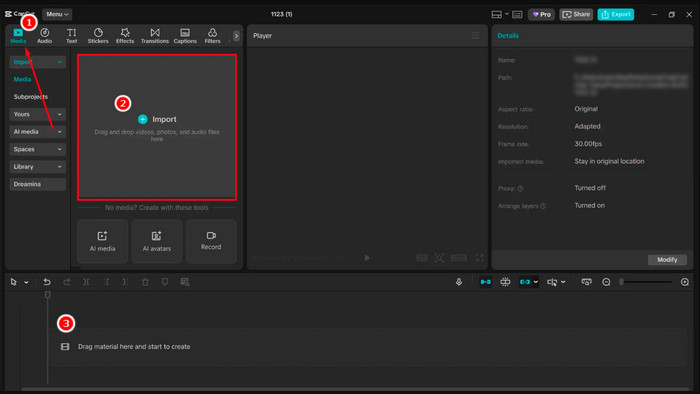
"Drag-and-drop on desktop is genuinely instant when you just want to import several songs. CapCut imports the file mid-drag, and it shows up in the media panel by the time you release. NoteBurner output files with the full track title, so they'll show up in the CapCut panel with the correct name. You can easily locate them in the timeline and work on a multi-track edit."
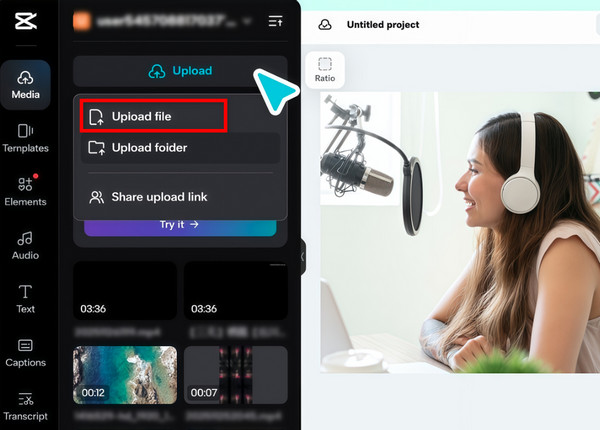
Step 1 Open the web version of CapCut in your browser, such as Chrome, Firefox, Edge and so on.
Step 2 Click "+ New project", upload your video, then bring it into the timeline before adding audio.
Step 3 On the Media tab in the left panel, click on "Upload file" , then select your local SoundCloud MP3 files and wait for uploading.
Beyond SoundCloud to MP3 conversion, you can proceed with a few extra steps to make a smoother editing experience.
If you're exporting the Capcut creation at a higher quality (4K for example), choose 320kbps MP3 on NoteBurner to download audio in the best quality possible.
Drop all your SoundCloud MP3 files for a CapCut project into one dedicated folder on your desktop before importing. It is easy for you to do multi-track tasks.
If you know which SoundCloud tracks you'll use, convert and transfer them to your phone before you open CapCut. USB drive, Google Drive, Dropbox, or iTunes (iPhone) are all fast routes.
SoundCloud hosts both Creative Commons and fully copyrighted music. If you plan to mix with your projects for posting on TikTok, Instagram Reels, or YouTube, you should check the track's license on its SoundCloud page. Otherwise the platform content ID systems will flag unlicensed commercial tracks..
It depends on the track and what you do with the exported video. Some converted audio is for a private project or for personal reference. If you export the video and upload it to the streaming platform, it may flag any track that isn't royalty-free or licensed for content creation. Before publishing, check the SoundCloud track's license.
NoteBurner is open to all types of SoundCloud accounts. It works normally even if you're using the SoundCloud free account.
NoteBurner works with publicly streamable SoundCloud content. It covers the vast majority of the platform's catalog. For SoundCloud Go+ exclusive content (tracks only for paid subscribers), the converter can only access it if you're logged in to a Go+ account.
Yes. The local converted SoundCloud songs are integrated into your own CapCut project. It always works permanently if you do not migrate it to another location or delete it.
This guide reveals the most reliable method to download SoundCloud songs to your PC
Adding SoundCloud music to CapCut doesn’t have to be complicated. Once you convert the track into a compatible audio file, it can be imported and edited just like any other local music.
For occasional projects, a basic conversion may be all you need. But if you regularly use SoundCloud music in CapCut, NoteBurner Music One makes the workflow easier with batch conversion, high-quality output, and preserved metadata. Once the tracks are saved locally, you’re ready to bring them into CapCut and start editing.
Note: The free trial version of NoteBurner SoundCloud Music Converter is limited to convert the first 1 minute of each song. You can buy the full version to unlock the limitation.




