
 By
By
What SoundCloud songs defined your year? SoundCloud Playback helps you relive most-listened-to tracks throughout the year, and best of all, it wraps them in a personalized Playback 2025. If you have no idea where to start, this post will walk you through the process of finding your SoundCloud Wrapped 2025 and even downloading your Playback playlist to MP3s for offline listening.

Yes. Just like Spotify Wrapped, Apple Music Replay, and YouTube Music Recap, SoundCloud also has its own Wrapped-style feature called SoundCloud Playback. The annual SoundCloud Playback Playlist, which typically rolls out at the end of each year, lets SoundCloud users find their listening highlights from the past year. So, what does SoundCloud Wrapped include?
| Top Tracks and Artists | Your SoundCloud songs from most-listened-to to least-listened-to. |
| Favorite Genres | The genres and even moods you gravitated toward the most. |
| Total Listening Time | The hours spent enjoying SoundCloud’s vast library. |
| Your Playback Playlist 2025 | A curated Playback playlist that contains your top 50 tracks from the year. |
➡️Official Entrance: SoundCloud 2025 Playback
SoundCloud Playback 2025 is readily accessible on the application and web browser. Just see how to.
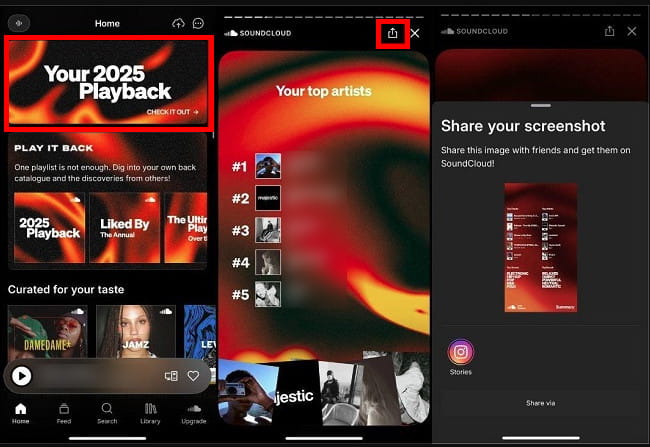
Step 1 Open the SoundCloud app on your mobile.
Step 2 At the Home interface, tap on the banner of "Your 2025 Playback".
Step 3 Now browse your Wrapped story of top song, top artists, and other stats
Step 4 Click the Share and social media icon if you want to share this SoundCloud Wrapped slideshow.
Step 1 Open the SoundCloud web player and sign in to your account. (or directly go to https://soundcloud.com/2025-playback)
Step 2 Click the top banner of "Meet your 2025 Playback", and you'll be brought to the page that shows your 2025 Playback stats.
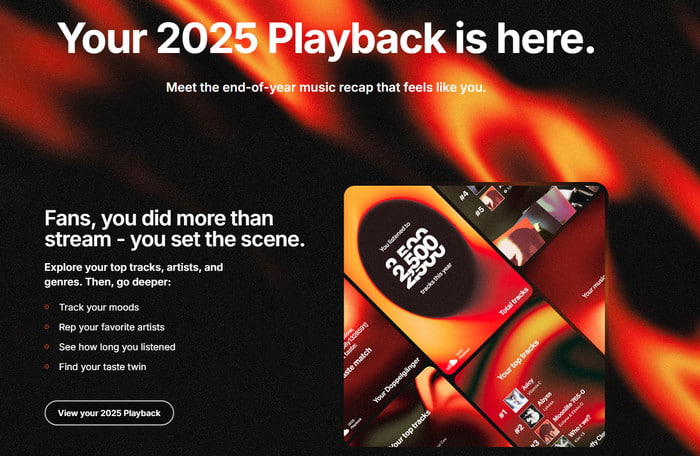
Step 3 Later, you can find your top SoundCloud songs on the 2025 Playback playlist. Just save it for later listening or share the Playback playlist to social media.
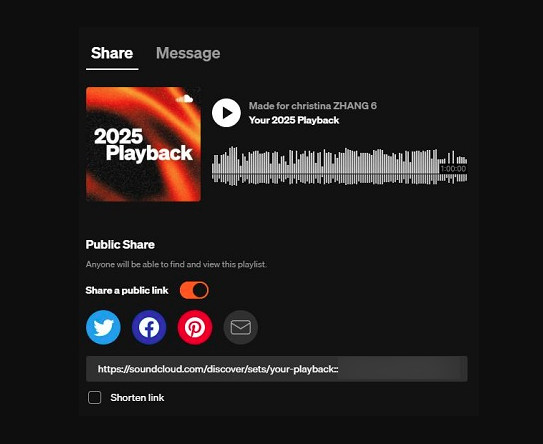
🚀 Pro tips: To download the "Your Playback" playlist for offline listening, you’ll need to upgrade to Go or Go+ subscriptions. Alternatively, it is feasible to save the SoundCloud Playback Playlist 2025 with NoteBurner SoundCloud Playlist Downloader, no subscriptions required.
NoteBurner Music One works as both a SoundCloud Playlist to MP3 Downloader and SoundCloud Music Converter, effortlessly downloading SoundCloud music to PC and Mac in batches. Also, it can export your SoundCloud Playback Playlist 2025 in MP3, WAV, FLAC, and other formats-all while keeping lossless quality and ID3 tags.
More surprisingly, NoteBurner Music One works beyond SoundCloud. You can download songs from a wide range of music platforms, including Spotify, Apple Music, YouTube Music, and the like.
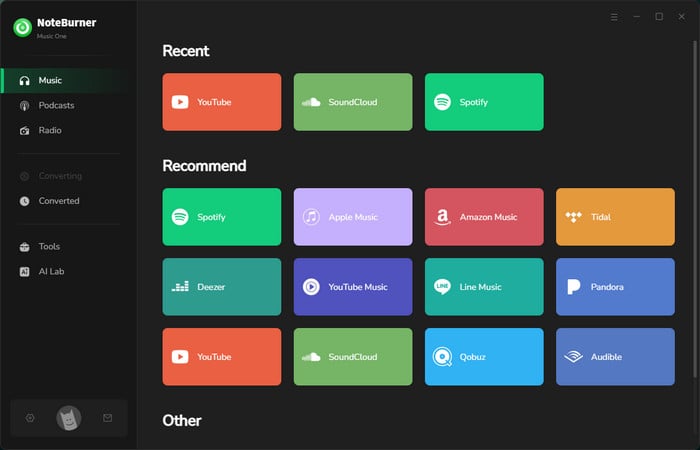
Step 1 Choose SoundCloud
Open NoteBurner Music One, and you will see the main interface as below. Simply choose the "SoundCloud" module. Sign in your SoundCloud account when the web player pops up.
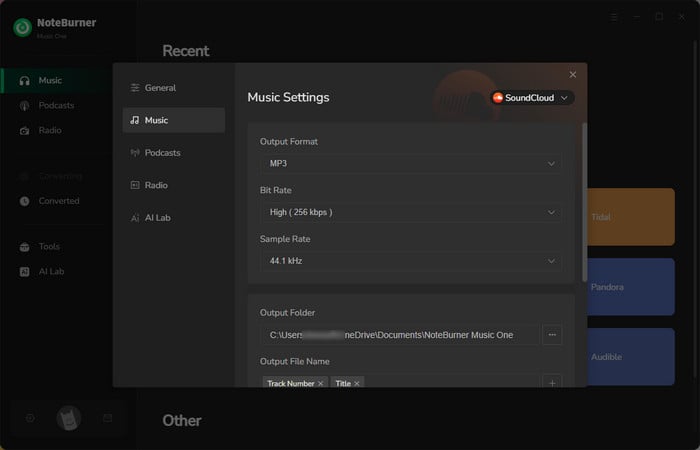
Step 2 Adjust Output Settings for SoundCloud Playback
Open the "Settings" menu on NoteBurner. Here you can choose the "Output Format", "Output Quality", "Output Folder", etc. Here you should choose "MP3" as the output format.
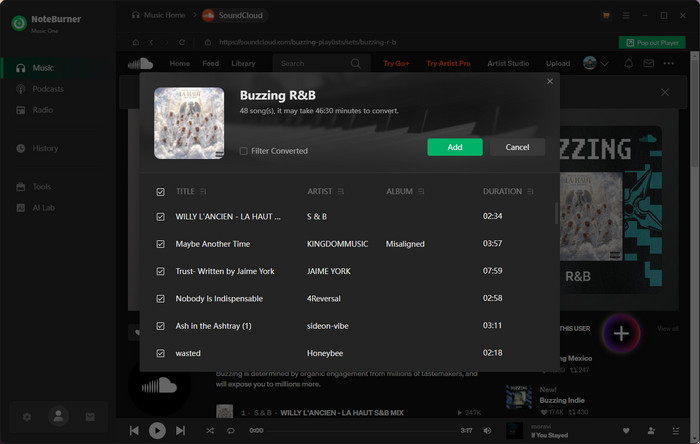
Step 3 Add SoundCloud Playback Playlist
Open the SoundCloud web player, and navigate to "Your Playback 2025" playlist. Now find and click the "Add" button at the lower right corner of SoundCloud, and add the top songs and artists you want to convert.
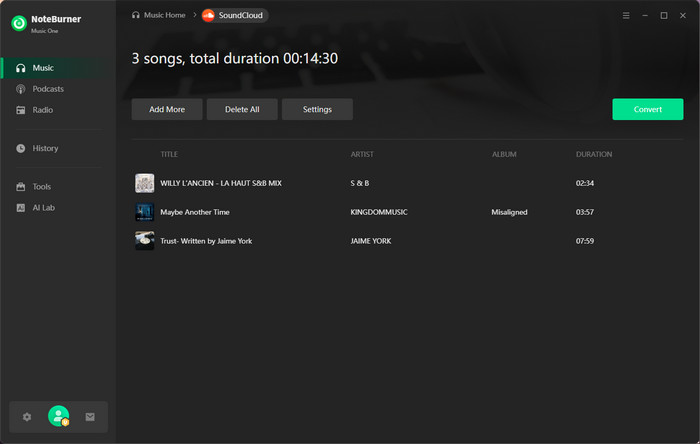
Step 4 Convert SoundCloud Playlist to MP3
Tap on "Convert" to start downloading all song of the SoundCloud Playback 2025 playlist. Once completed, click the Complete button to finalized the current conversion.
Step 5 Find Your SoundCloud Playback Downloads
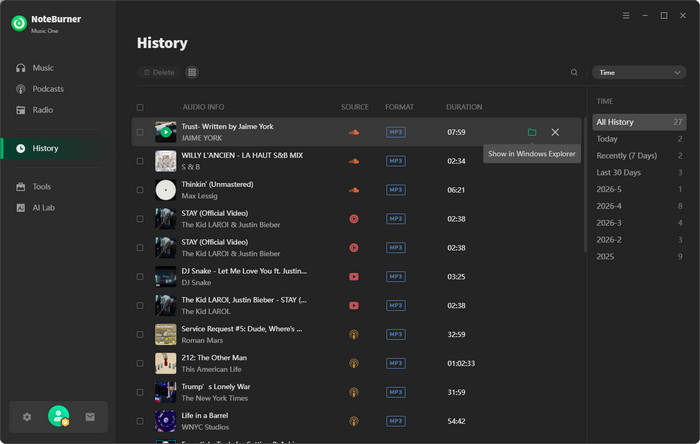
You can browse the converted SoundCloud Wrapped songs by directly going to "History > Folder".
A: It could have anything to do with the version of the app and the state of your account. To keep "Your Playback 2025" running properly, please update the SoundCloud app to the most recent version. Plus, make sure your account has enough listening data, with at least 30 distinct tracks and 10 different artists.
A: You can see previous "Playback" playlists in the following entrance.
A: Yes. SoundCloud keeps the "Your Playback 2025" playlist in the library as long as you don’t delete it. But if you want to back up and transfer the playlist to other devices for offline listening, NoteBurner Music One is a helpful alternative.
A: Yes. Just upgrade to the Go/Go+ tier to enable direct downloads. Or you can go for NoteBurner SoundCloud Music Converter to download SoundCloud playlists to MP3 320kbps.
A: No. The tracks you've uploaded to SoundCloud will not be included in the new "Playback" playlist.
The SoundCloud Playback playlist is a nostalgia-packed mix of your most-streamed artists and songs from 2025, and it’s super easy for anyone to view and share. If you're looking to save your 2025 Playback playlist without a SoundCloud subscription, NoteBurner SoundCloud Playlist Downloader is a no-brainer. It lets you convert your year-in-review tracks to MP3 and drop them onto any device for offline playback. Now go enjoy your SoundCloud Wrapped experience!
Note: The free trial version of NoteBurner SoundCloud Music Converter is limited to convert the first 1 minute of each song. You can buy the full version to unlock the limitation.




