
Looking for the best Amazon Music downloader in 2026? We tested Amazon Music downloaders across different categories, including desktop software, free online tools, GitHub projects, and Telegram bots, to see which options actually work well. After comparing their download quality, supported formats, ease of use, features, and overall reliability, we selected 8 Amazon Music downloaders worth trying, giving you options for different needs and devices.
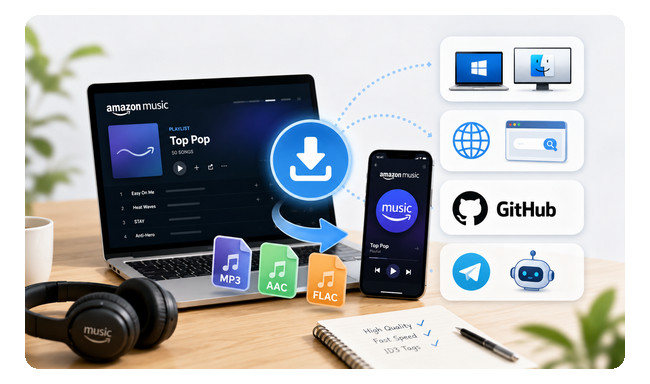
For the best overall experience: Choose a NoteBurner Amazon Music Converter or NoteBurner Music One for higher audio quality, faster batch downloads, more output formats, and better metadata support.
For free online downloads: Choose an online Amazon Music downloader for quick access without installing software, with options for MP3, M4A, or FLAC depending on the tool.
For flexible music library management: Choose a GitHub-based Amazon Music downloader with support for multiple streaming platforms, high-quality formats, and automatic metadata organization.
For mobile downloads: Choose a Telegram Amazon Music downloader bot to download tracks, albums, or playlists directly on your phone.
To make our test results easier to understand at a glance, we’ve summarized the recommended tools in the table below. While each downloader has its strengths, none is perfect, so choose the one that best fits your needs and priorities.
| Downloader | Type | Output | Max Quality | Speed | Batch Downloader | ID3 Tags |
|---|---|---|---|---|---|---|
| NoteBurner Amazon Music Downloader | Desktop | 8 Formats | Ultra HD | 10X | ✅ | ✅ |
| NoteBurner Music One | Desktop | 8 Formats | Ultra HD | 10X | ✅ | ✅ |
| DoubleDouble | Online | FLAC | Lossless | ~3X | ✅ | ✅Basic |
| Amazon Music to MP3 Downloader | Online | MP3, M4A | 320kbps | ~4X | ❌ | ✅Basic |
| Lucida | Online | MP3, FLAC | Lossless | ~2X | ✅ | Varies |
| Antra | GitHub | FLAC, ALAC, AAC, MP3 | Hi-Res | ~4X | ✅ | ✅ |
| SpotiFLAC-Next | GitHub | FLAC | Lossless | ~3X | ❌ | ✅ |
| GlomaticoBlueMusicBot | Telegram | FLAC | Lossless | ~2X | ✅ | ✅ |
For desktop downloaders, we tested several popular Amazon Music converters, comparing their audio quality, downloader speed, ease of use, and other key aspects. After testing, we selected two tools that stood out for their different needs: one focused solely on Amazon Music, and the other for users downloading music from multiple streaming platforms, including Amazon Music.
Our Rating: ⭐⭐⭐⭐⭐
Official Website: https://www.noteburner.com/amazon-music-recorder-windows.html
Best for: Windows and Mac users who need a full-featured Amazon Music downloader with Ultra HD & Dolby Atmos support, up to 10X faster batch downloads, and 8 output formats.
During testing, NoteBurner Amazon Music Converter stood out for its well-balanced features and ease of use. It supports conversion of songs, albums, playlists, and podcasts, and offers eight output formats, including EAC3, AC4, MP3, AAC, WAV, AIFF, FLAC, and ALAC. Its biggest advantages are its support for Ultra HD and Dolby Atmos, batch download speeds up to 10x, and a wealth of customization options. As a desktop application, it provides full control over output settings without complicating the download process. Furthermore, in our tests, metadata and lyrics were fully preserved.

Step 1 Download, install and launch NoteBurner Amazon Music Converter. Choose the "Amazon Music App" or Amazon Music web player download source.
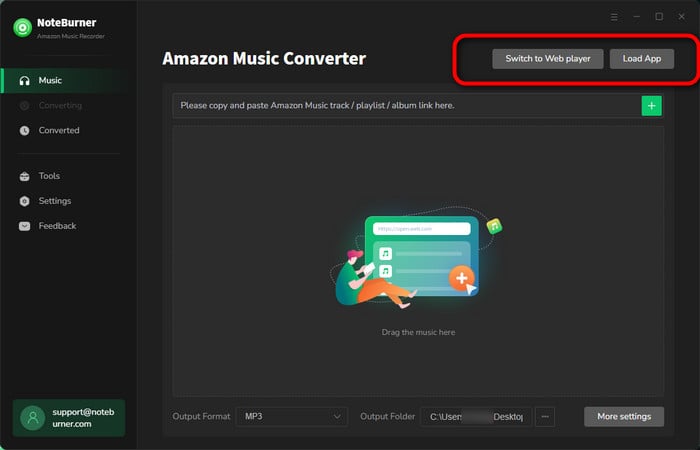
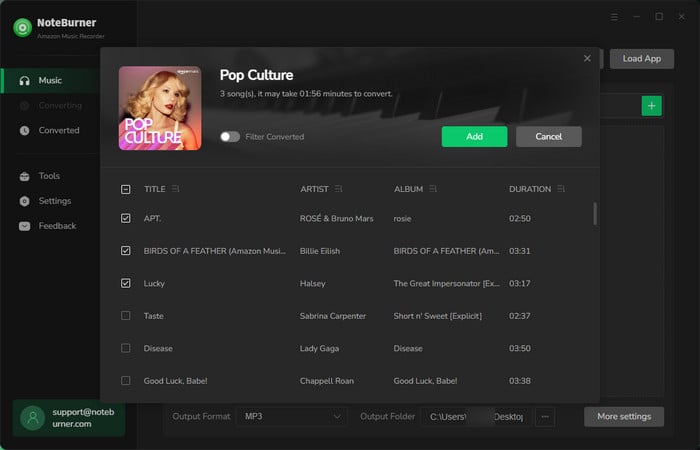
Step 2 Simply drag and drop a song or playlist from the Amazon Music app to NoteBurner, then click Add.
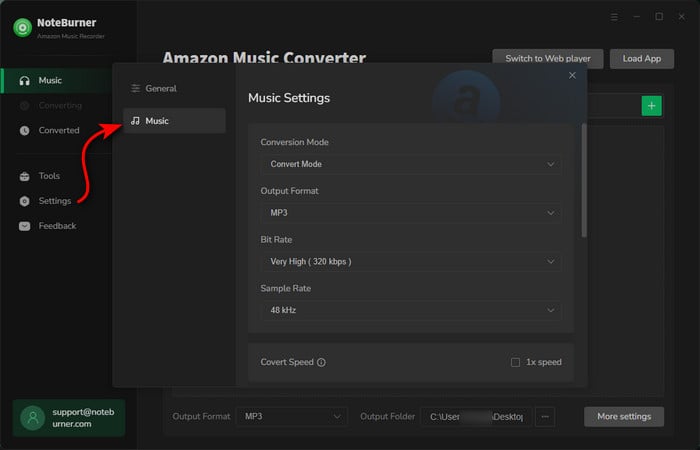
Step 3 Click the "Settings" button on the bottom left. Here you can choose output format (MP3/AAC/FLAC/WAV/AIFF/ALAC), output quality (320kbps, 256kbps, 192kbps, 128kbps), as well as output path.
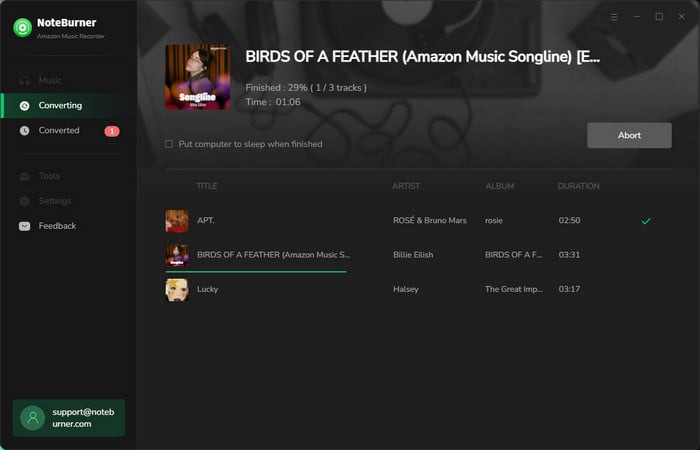
Step 4 Click the "Convert" button to start downloading Amazon Music to MP3, or another audio format on your PC.
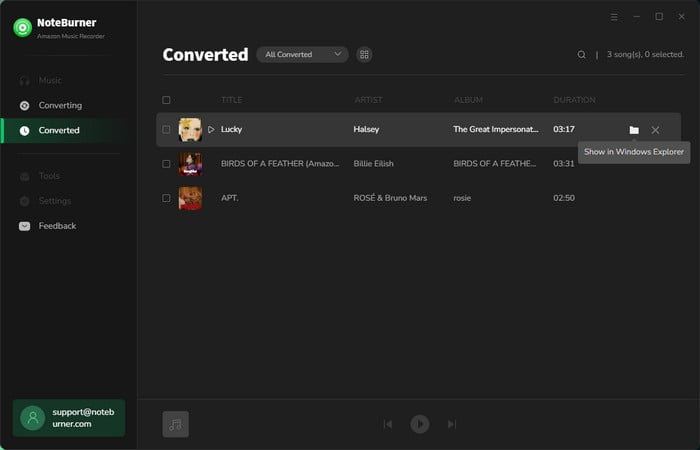
Step 5 After conversion, click the "History" button to view your downloaded Alarm tracks. Click the "Folder" icon next to a song to locate the files on your computer.
Disclaimer: For personal/educational use only. 🚫 Do not distribute downloaded music/video for commercial use.
Our Rating: ⭐⭐⭐⭐⭐
Official Website: https://www.noteburner.com/noteburner-music-one.html
Best for: Users who want to download music from Amazon Music and other streaming services with one all-in-one desktop app.
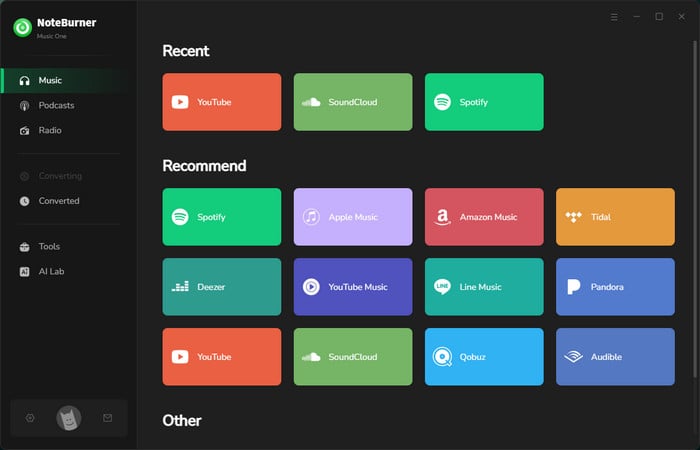
Due to the excellent performance of NoteBurner Amazon Music Converter in our tests, we also tested NoteBurner Music One to meet the needs of users who want to download music from platforms other than Amazon Music. We tested its ability to download music from Amazon Music, Spotify, SoundCloud, Qobuz, and JioSaavn, and downloads on all tested platforms were successful.
In addition to its excellent performance in download speed, original sound quality, and preservation of ID3 tags, Music One also includes tools for audio conversion, ID3 editing, CD burning, audiobook conversion, and AI vocal/instrument separation. We also tested its built-in podcast and radio library, which offers free access to thousands of podcasts and radio stations.
We tested a wide range of free Amazon Music online downloaders, comparing their parsing success rate, audio quality, output options, download speed, and overall ease of use. Based on our testing, we selected three online downloaders that each offer distinct advantages.
Our Rating: ⭐⭐⭐⭐
Official Website: https://us.doubledouble.top/
Best for: Users who want a free, ad-free downloader for Amazon Music and other streaming platforms, with support for tracks, albums, and playlists.
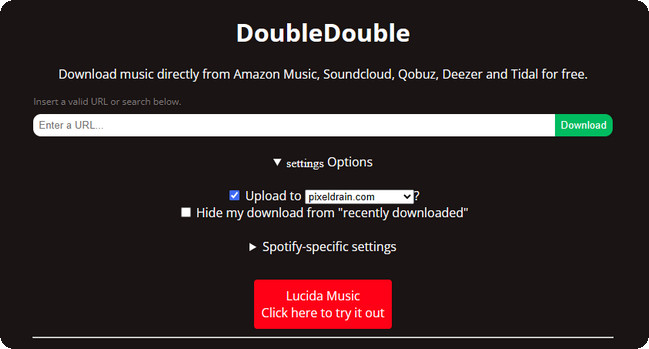
DoubleDouble is another Amazon Music online downloader we recommend. It has a clean, ad-free interface and supports downloading single tracks, albums, and playlists. It preserves basic ID3 tags and maintains the original track order when downloading albums or playlists. However, it only supports FLAC output, so it can consume a lot of memory when downloading large music libraries. Another limitation is that DoubleDouble doesn't offer the ability to download multiple individual tracks from an album or playlist with a single click. Instead, the service processes the selected music library as a whole, which may be inconvenient if you only need specific songs.
Step 1 Open Amazon Music in your web browser and find the song, album, or playlist you want to download. Copy its URL from the Share option.
Step 2 Open the DoubleDouble website and paste the Amazon Music URL into the search bar. Then click Download.
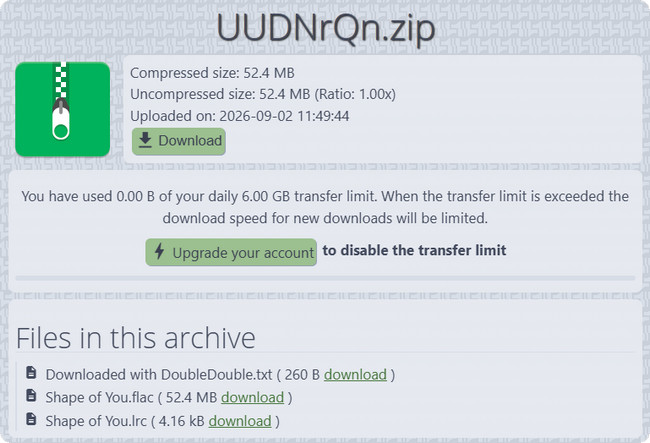
Step 3 Wait for DoubleDouble to process the Amazon Music link. Once the analysis is complete, click the Here link to open the download page.
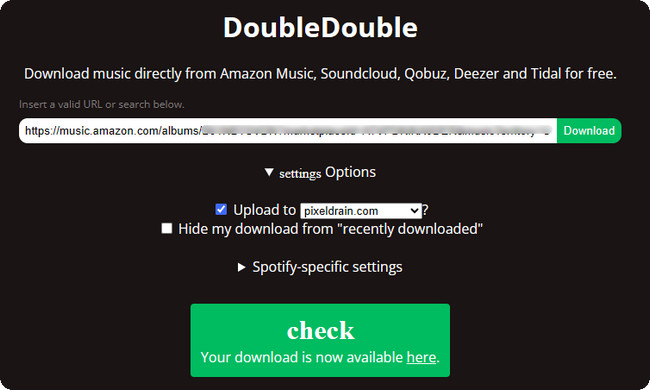
Step 4 On the download page, click Download to save the processed Amazon Music tracks to your device.
Our Rating: ⭐⭐⭐⭐
Official Website: https://amazon-music-downloader.com/
Best for: Users who want a simple online way to download Amazon Music songs, albums, and playlists without dealing with complicated settings.
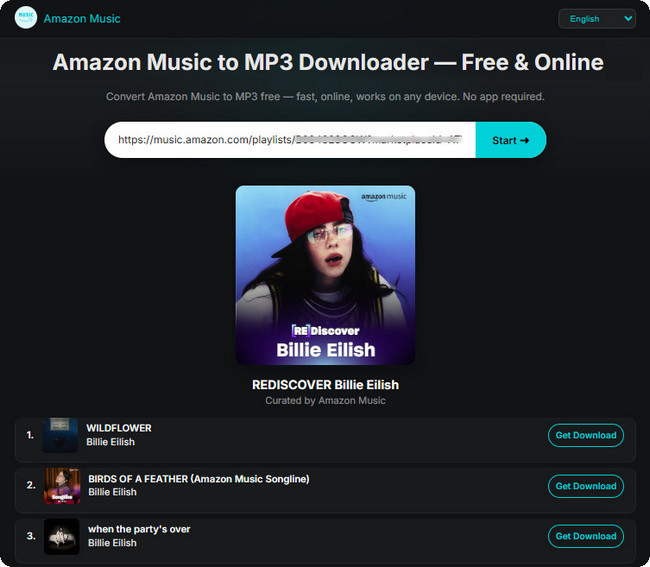
During testing, Amazon Music to MP3 Downloader stood out for its simple and straightforward download process. We only needed to copy a song, album, or playlist link from Amazon Music, paste it into the downloader, and start the conversion.
The tool supports MP3 and M4A output and can preserve basic metadata such as artist, album artwork, and release date. It also supports Amazon Music playlists. However, playlist downloads are not completely automated, as we had to select the output format for each track individually rather than downloading the entire playlist with one click. We also found that the tool occasionally failed to fetch the target audio source or album information, and some tracks showed "Not available" after analysis.
In terms of audio quality, it can only preserve up to 320kbps MP3. This means it cannot retain the original lossless quality of Amazon Music HD or Ultra HD tracks.
Step 1 Open Amazon Music in your web browser and find the song, album, or playlist you want to download.
Step 2 Click the Share button next to the song or album, then select Copy Link to copy the Amazon Music URL.
Step 3 Open Amazon Music to MP3 Downloader and paste the URL into the search box. Then click Start.
Step 4 Once the song or album has been analyzed, click Get Download. You can then choose between MP3 and M4A. In some cases, the tool may display "Not available", which means the target content cannot be downloaded.
Step 5 Select the desired output format and click the corresponding download button to save the converted Amazon Music file.
Our Rating: ⭐⭐⭐
Official Website: https://lucida.to/
Best for: Users who want more control over Amazon Music downloads, including flexible format and bitrate options and support for high-quality audio.
During testing, Lucida stood out for offering more control over output quality than many other online Amazon Music downloaders. Like DoubleDouble, it supports Amazon Music tracks, albums, and playlists, but it also allows us to choose the output format and bitrate before downloading. Depending on the available source, it can provide options such as FLAC or 320kbps MP3.
We also found that Lucida provides more flexibility when working with playlists. After a playlist is parsed, we can choose to download individual tracks or the entire playlist. However, it does not allow us to select multiple tracks at once, so downloading several specific songs still requires additional manual steps. Another issue we encountered was inconsistent parsing. The same Amazon Music track or playlist could sometimes be parsed successfully and fail to load at other times.
Step 1 Open Amazon Music in your web browser and find the song, album, or playlist you want to download. Click Share and select Copy Link to copy its URL.
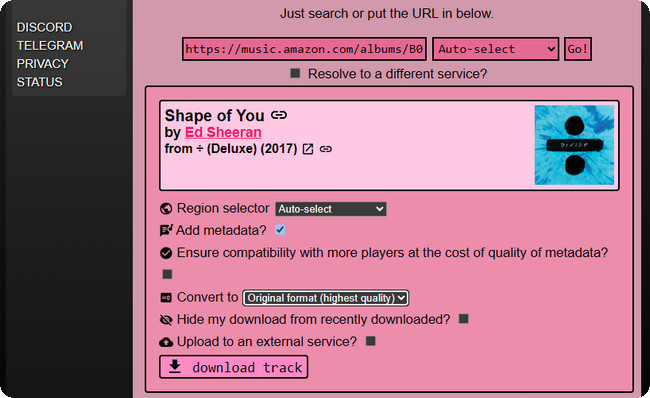
Step 2 Open the Lucida website and paste the Amazon Music URL into the search bar. Then click Go to start processing the link.
Step 3 Wait for Lucida to analyze the Amazon Music link. If multiple output options are available, choose the desired format and bitrate. For the highest available quality, you can select the original or lossless format when offered.
Step 4 After selecting the desired track and output settings, click Download Track. Lucida will process the file on its server and prepare it for download.
Step 5 Once processing is complete, save the downloaded Amazon Music file to your computer.
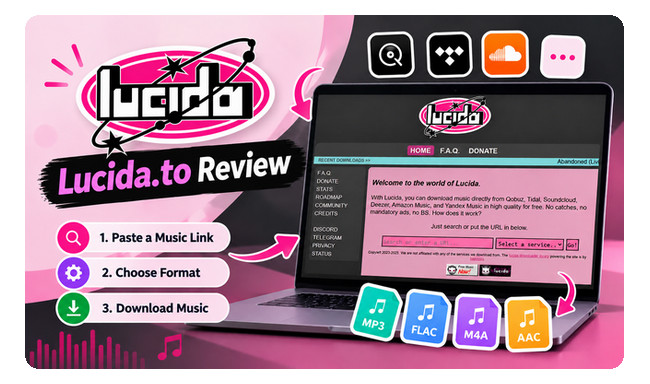
Read our Lucida.to review in 2026 to see how it works, whether it is safe, its pros and cons, common problems, and the best alternatives. Learn More →
GitHub offers a number of music-related downloader projects, but only a limited selection currently provides practical support for Amazon Music. After reviewing and testing the available options, we selected two GitHub-based tools that are worth considering.
Our Rating: ⭐⭐⭐
GitHub: https://github.com/anandprtp/Antra
Best for: Users who want to build a well-organized local music library with automatic metadata, artwork, lyrics, and high-quality audio formats.
Antra is a desktop music downloader and music library manager that supports Amazon Music, Spotify, Apple Music, Tidal, Qobuz, Deezer, and YouTube Music. It can download songs, albums, and playlists and save them in FLAC, ALAC, AAC, or MP3 formats. Using Antra is also very simple. After pasting the Amazon Music link into Antra, the software will automatically handle the download and file organization. It offers standalone versions for Windows, macOS, and Linux, so there's no need to install Python separately. However, its stability can be inconsistent, and we sometimes encountered incorrect track matching or download failures.
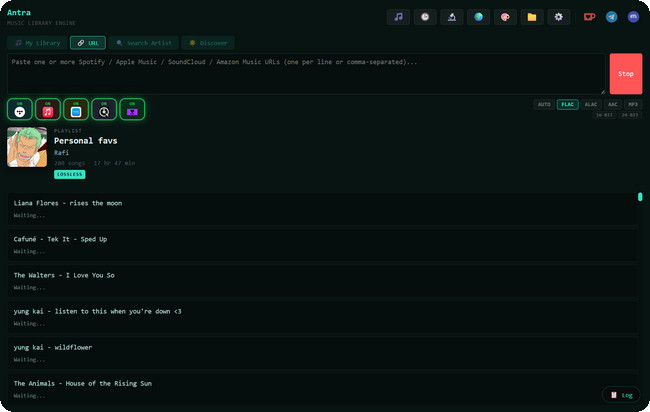
Step 1 Download the appropriate Antra build from its GitHub Releases page and launch the application. On the first run, choose the folder where you want to store your music library.
Step 2 Select your preferred output format, such as FLAC, ALAC, AAC, or MP3.
Step 3 Open Amazon Music in your browser, find the song, album, or playlist you want to download, and copy its link.
Step 4 Paste the Amazon Music link into Antra and click Add to Library. Antra will analyze the link and display the available tracks.
Step 5 Wait for the download to finish. The tracks will be automatically tagged and organized into the selected music library folder with the available metadata and artwork.
Our Rating: ⭐⭐⭐⭐
GitHub: https://github.com/spotbye/SpotiFLAC-Next
Best for: Users who want to download Amazon Music in FLAC and also work with music from other streaming platforms.
SpotiFLAC-Next is a desktop music downloader that supports Amazon Music, Spotify, Tidal, Qobuz, and Deezer. For Amazon Music, it can download tracks as FLAC. The software also provides settings for the file name, ID3 tags, and output path. However, SpotiFLAC-Next only supports FLAC output, with no option to choose other formats or adjust the audio quality. We also found that its download reliability can vary, so some links may occasionally fail to process or download successfully.
One thing to note is that SpotiFLAC-Next is not distributed as a regular free product. According to the project, it is offered as a thank-you gift to people who support the SpotiFLAC project, rather than being sold as a standalone paid application.
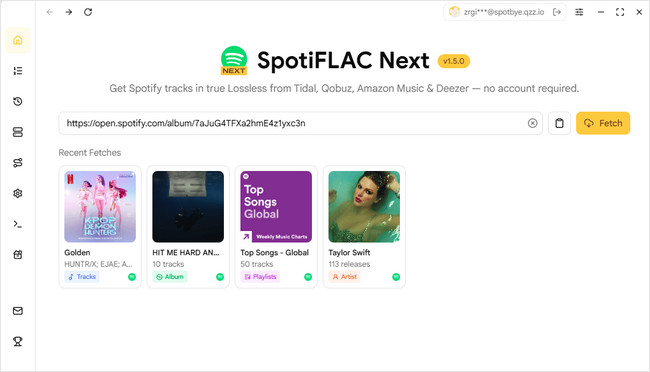
Step 1 Open Amazon Music in your browser and find the song, album, or playlist you want to download. Copy its link.
Step 2 Launch SpotiFLAC-Next and paste the Amazon Music link into the search box.
Step 3 Open the settings if you want to customize the file name, ID3 tags, or output path before saving your music.
Step 4 Wait for the link to be processed. Once the track information appears, click Download to start downloading the FLAC file.

If you want to keep Amazon Music even after unsubscribing, just refer to the solution in this article.
Telegram Amazon Music Download Bots are especially suitable for users who prefer mobile devices and don't want to install dedicated download software. However, the number of Telegram bots that can reliably download Amazon Music is currently quite limited. Here, we only recommend one Telegram bot.
Our Rating: ⭐⭐⭐⭐
Telegram: @GlomaticoBlueMusicBot
Best for: Mobile users who want a simple way to download Amazon Music tracks, albums, and playlists in FLAC through Telegram.
GlomaticoBlueMusicBot is a Telegram-based Amazon Music downloader that lets you download individual tracks, albums, and full playlists directly through the Telegram app. Instead of installing dedicated desktop software, you can simply send an Amazon Music link to the bot and receive the downloadable music file through Telegram.
In our tests, the bot can download Amazon Music in FLAC format while retaining important ID3 metadata, including the song title, artist, album, and other track information. This makes it a convenient option for users who primarily use their smartphones. However, it offers fewer customization options than desktop downloaders, with no MP3 output or advanced audio settings. Its reliability also depends on the availability and stability of the Telegram bot.
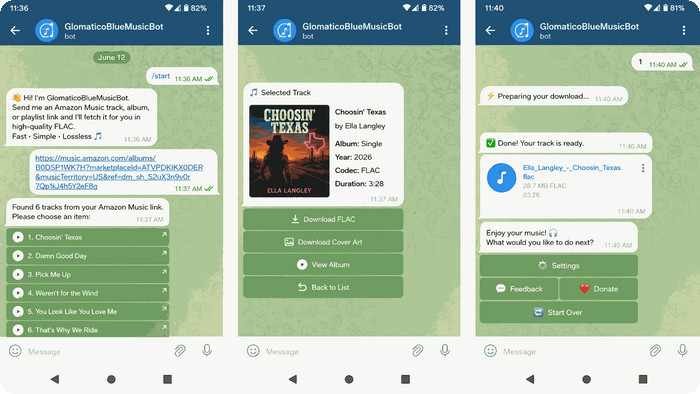
Step 1 Open Telegram and search for @GlomaticoBlueMusicBot. Select the bot and click Start.
Step 2 Open Amazon Music and find the song, album, or playlist you want to download. Tap Share and copy the Amazon Music link.
Step 3 Return to Telegram, paste the copied link into the chat with the bot, and tap Send.
Step 4 Wait for the bot to process the link. When the download option appears, tap Save as Music to receive the music file.
It depends on how the downloaded content is used and the laws in your region. We recommend using Amazon Music downloaders only for personal, non-commercial purposes and respecting Amazon's terms of service and copyright laws.
Safety varies by tool. Download software only from its official website or trusted sources such as GitHub, and be cautious with unknown online services or Telegram bots. No third-party downloader can guarantee zero account or security risks.
Yes, some free Amazon Music downloaders support MP3 output. However, available formats and download quality vary between tools, so check the supported options before downloading.
It depends on the downloader and the source quality. NoteBurner can preserve high-quality audio when downloading Amazon Music, making it a suitable choice for users who prioritize Lossless, HD, or Ultra HD audio quality.
Choose based on your needs. Desktop downloaders are best for advanced features and reliability, while online tools are convenient for quick downloads. GitHub projects and Telegram bots can be useful for users who prefer lightweight or mobile-friendly options. For the best overall experience, NoteBurner is our recommended choice.

Let’s see if NoteBurner Amazon Music Converter really lives up to its name.
There is no single best Amazon Music downloader for everyone. After testing Amazon Music downloaders across different categories, we selected the most worthwhile options for different needs—from users who want a feature-rich desktop downloader to those looking for a free online tool, a lightweight GitHub project, or a convenient Telegram bot. Whether you prioritize download quality, supported formats, ease of use, or flexibility, this guide can help you find the Amazon Music downloader that fits you best.
If you're looking for the best overall Amazon Music downloader, NoteBurner Amazon Music Converter is your top choice. With its strong combination of download quality, features, format support, and ease of use, it offers a well-rounded solution for users who want a more reliable way to download Amazon Music.
The free trial version of NoteBurner Amazon Music Converter enables you to convert the first 1 minute of each song. You can unlock the time limitation by purchasing the full version.



