
Amazon Music goes beyond Ultra HD playback for audiophiles with its immersive Dolby Atmos audio. This Atmos version makes music feel more engaging and surround-like. Wondering how to download Amazon Music Dolby Atmos in EAC3 or AC4? In this guide, we'll outline what Amazon Music Dolby Atmos is, how to turn on it, as well as how to downloading Dolby Atmos tracks in EAC3. Dive in!
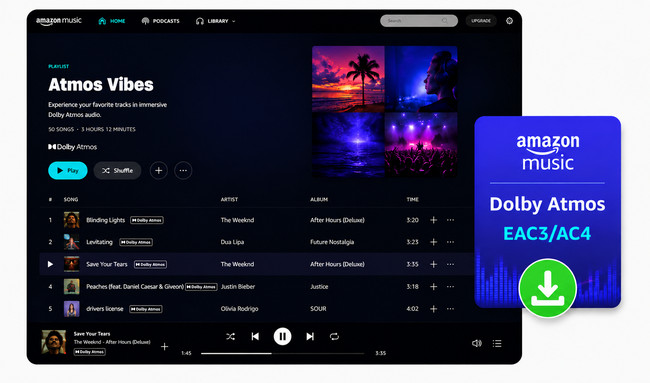
As one of the spatial audio options in Amazon Music, Dolby Atmos adds a 3D positioning to music. The individual sounds feel as though they are placed within a virtual space around the listener. Of course, not all songs are available in Dolby Atmos. Only tracks labeled in Dolby own this effect, and playback needs to take into account a compatible device and audio system.
Entrance: https://www.dolby.com/experience/amazon-music/
Actually, Amazon Music uses both E-AC-3 (Dolby Digital Plus) and Dolby AC-4 for Dolby Atmos. But what it does is related to the streaming context. If you're staying on an Android phone, or some Fire Tablet devices, the device usually uses AC4. If you're listening through an AV receiver or soundbar connected via HDMI eARC, you want EAC3.
| EAC3 | AC4 | |
|---|---|---|
| FULL NAME | Enhanced AC-3 / Dolby Digital Plus (DD+) | Dolby AC-4 |
| Extension | .eac3 or .m4a | .ac4 or .m4a |
| Typical Bitrate | 448-768kbps | 112–256kbps |
| Best for | Windows PC, AV receivers/soundbars, Echo Studio, Fire TV devices, smart TVs | Mobile phone (Android & iOS), some Fire Tablets |
1. Already subscribed or upgraded to the Amazon Music Unlimited plan.
2. Find music tagged with the Dolby Atmos logo.
3. Connect to Dolby-supported devices, here are:
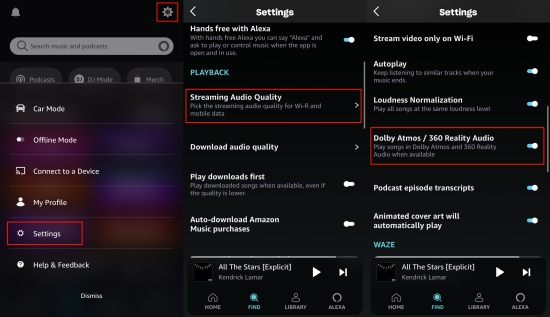
Step 1 Open the Amazon Music app, click a gear icon to open the Settings menu.
Step 2 Select Streaming Audio Quality, find the Dolby Atmos option, then toggle it on.
Step 3 Navigate to the songs with a Dolby icon. Now you can listen to songs with the best quality.
Step 1 On the home screen of Fire TV, find the "Settings".
Step 2 Click on 'Display & Sounds', go to 'Audio > Surround Sound'.
Step 3 Choose 'Best Available'. And you can enjoy your Dolby Atmos songs.
Streaming Amazon Music Dolby Atmos is easy, but downloading it in Dolby Atmos EAC3/AC4 is hard due to the encryption lock. Hopefully, NoteBurner Amazon Music Converter gets this job done.
It effortlessly saves Amazon Music Dolby Atmos tracks, albums, and playlists as standalone EAC3, AC4 files (.m4a) , with full ID3 tags preserved. The tool captures audio through the Amazon Music web player and downloads Dolby tracks at 10x the speed for offline playback anywhere, anytime. You can keep Amazon Music Dolby Atmos playable forever, even if the Unlimited subscription lapses.

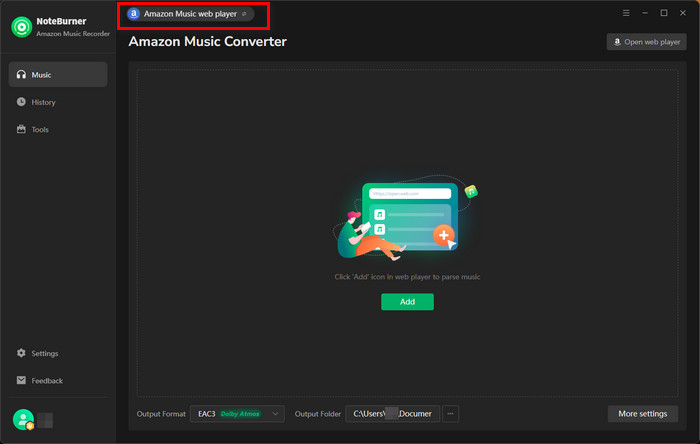
Step 1 Download and Launch NoteBurner Amazon Music Converter
Open NoteBurner Amazon Music Converter on your computer and just choose "Amazon Music web player."
Step 2 Choose EAC3 for Amazon Music Dolby Atmos
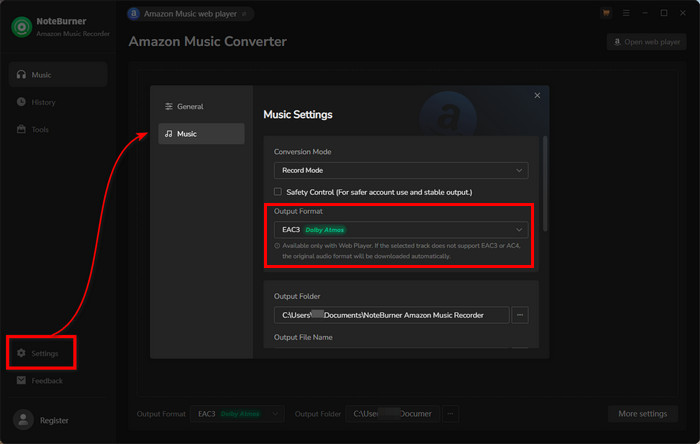
Click on the Settings button, pick Record Mode as the conversion mode, and EAC3 (.m4a) or AC4 as the output format. You can also select the output path for your Amazon Music Dolby Atmos downloads.
✅ Tips: Which Amazon Music format should you choose on NoteBurner?
Step 3 Add Amazon Music for Conversion
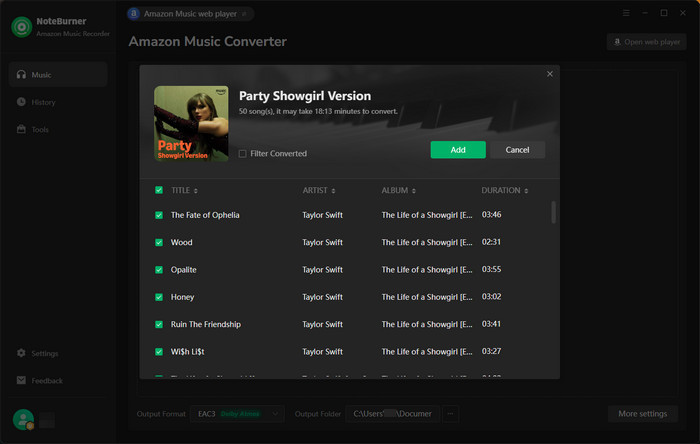
Open a playlist, artist, or album on the Amazon Music web player, and tap the "Add" icon at the bottom right to add it to NoteBurner. Then select the songs that you intend to convert.
Step 4 Convert Amazon Dolby Atmos to EAC3
After completing the above steps, all you need to do is click on the "Convert" button. Within a few seconds, NoteBurner fastly downloads Amazon Music tracks as Dolby Atmos EAC3 files as you designate.
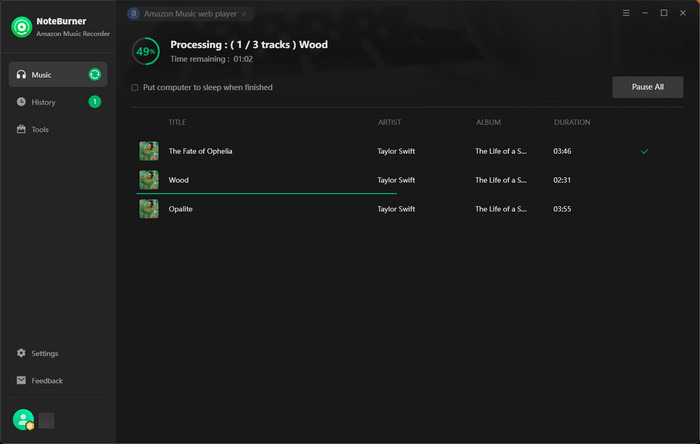
Once done, just go to History to see all converted Amazon Music EAC3 files
Disclaimer: For personal/educational use only. 🚫 Do not distribute downloaded music/video for commercial use.
Purchase MP3s from Amazon Music or use NoteBurner Amazon Music Converter to convert Amazon songs to MP3 so that you can transfer Amazon playlist to MP3 player easily.
| Quality | Codec | Bit Depth & Sample Rate |
Typical Bitrate |
Bandwidth | Spatial | Offline Download |
Subscription Bundled |
Best For |
|---|---|---|---|---|---|---|---|---|
| SD | Opus | 16-bit / 48 kHz | ~320 kbps | Low | ✘ | ✅️ (Protected) |
Free / Prime / Unlimited |
Casual listening |
| HD | FLAC | 16-bit / 44.1 kHz | ~850 kbps | Medium | ✘ | ✅️ | Unlimited | CD-quality lossless |
| Ultra HD | FLAC | 24-bit / up to 192 kHz | 1.6–5 Mbps | Very High | ✘ | ✅️ | Unlimited | Hi-Res listening |
| Dolby Atmos |
E-AC-3 / DD+ JOC |
16-bit / 48 kHz | 448–768 kbps | Medium–High | ✅️ | ✅️ (No standalone Atmos file) |
Unlimited | Immersive 3D music |
| 360 Reality Audio |
MPEG-H / MHA1 |
16-bit / 48 kHz | 320–1536 kbps |
High | ✅️ | ✅️ (No standalone Atmos file) |
Unlimited | 360° spatial music |
Want to download Amazon Music in Ultra HD FLAC and even Dolby Atmos EAC3? NoteBurner Amazon Music Converter covers nearly all Amazon Music audio quality, letting you enjoy high-quality Amazon Music songs on any compatible device without the Amazon app.
A: No-Amazon Music streams Dolby Atmos tracks online and caches them on the platform for offline playback only; none can be physically downloaded as local EAC3/AC4 files. To convert music to EAC3 Dolby Atmos, you can use NoteBurner Amazon Music Converter.
A: No. Dolby Atmos is required for an Amazon Music Unlimited subscription.
A: Yes. The locally stored EAC3/AC4 files are playable on any player, even if the device doesn't support the full Atmos 3D effect. But to make full use of the spatial audio, you had better put converted EAC3/AC4 files on a Dolby Atmos-capable player.
Amazon Music Dolby Atmos delivers Dolby Atmos spatial audio to maximize your playback experience. On this page, you've learned how to enable Amazon Music Dolby Atmos for listening and how to download Dolby Atmos EAC3 from Amazon Music using NoteBurner Amazon Music Converter. With it, your Dolby Atmos library is always ready for playing. Enjoy!
The free trial version of NoteBurner Amazon Music Converter enables you to convert the first 1 minute of each song. You can unlock the time limitation by purchasing the full version.



