
 > Resources > Topics and Tips >
Many viewers want to download Hulu shows for offline viewing, especially when traveling or dealing with unstable internet connections. Currently, there are two main ways to watch Hulu content offline: the official in-app download feature and a permanent download method using a desktop tool.
Hulu’s built-in download feature is convenient but only available on select plans and supported mobile devices. It also comes with limitations such as expiration dates, playback restrictions, and device limits.
For users who want offline access without these restrictions, a permanent download solution offers a more flexible alternative that works across all plans. Below, we’ll explain how each method works and compare their differences to help you choose the best option.
👉 You can skip directly to Part 3 to see a full comparison of these two methods.
The official offline download feature on Hulu is designed for mobile viewing and is available to users subscribed to the No Ads or No Ads + Live TV plan on supported devices.
If your subscription supports downloads, follow the steps below to download Hulu shows using the official method.
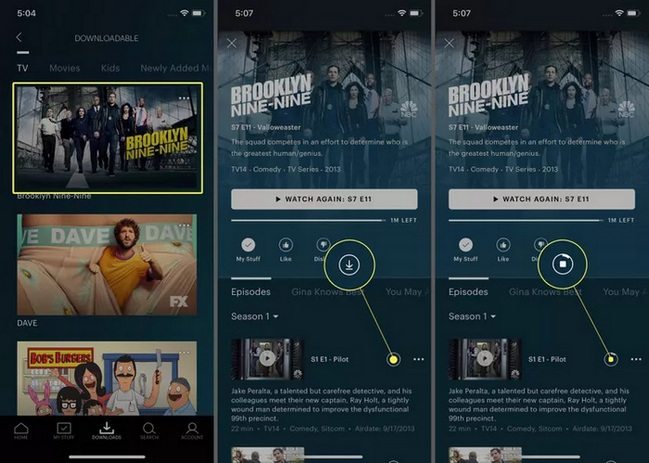
Step 1 Open the Hulu app and tap the Downloads icon in the bottom navigation bar.
Step 2 Select See What’s Downloadable to browse available content.
Step 3 Choose a movie or TV show to view its details page.
Step 4 Tap the Download button to start downloading (next to individual episodes or at the top of the movie page).
You can also choose between Standard and High quality for downloads:

Explore 10+ top MP4 movie downloaders to save movies for free. Compare safe, high-speed tools for downloading movies in MP4 on desktop, mobile, and online.
If you want to keep Hulu videos without expiration, device limits, or plan restrictions, a permanent download method provides a more flexible solution.
One option is NoteBurner All-In-One Video Downloader, which supports downloading Hulu content regardless of subscription plan. It allows users to save videos in MP4 or MKV format in up to 1080P quality while preserving multilingual subtitles. Once downloaded, the videos can be played on Windows Media Player or VLC, transferred between devices, or stored in USB drives for long-term offline access.

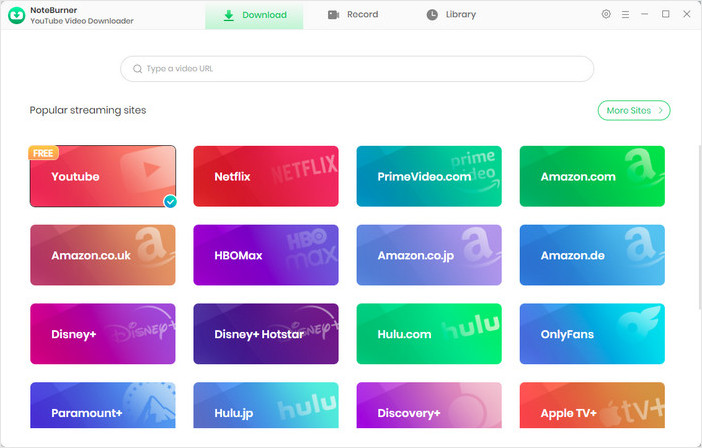
Step 1 Select Website
On the main interface, click the  icon on the upper right. Then find and click on Hulu. The built-in browser will open and take you directly to Hulu's official website.
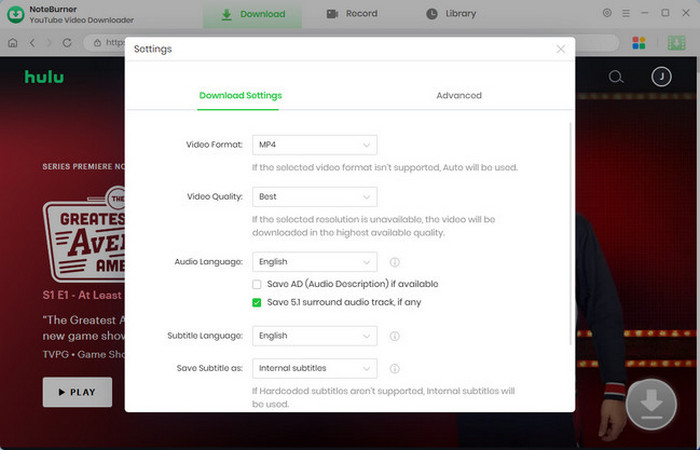
Step 2 Adjust the Output Settings
Click the gear icon at the top-right corner. Choose your preferred output format (MP4 / MKV), video quality (up to 1080P), subtitles, and output folder before downloading.
Step 3 Find the Hulu Video You Want to Download
Browse Hulu inside the embedded browser and open the episode you want to save. Then, click the download icon to parse the video link.

Step 4 Select Video Quality and Download Options
Click the  icon and select all the episodes you want to download. Then, click "Advanced Download" in the bottom-left corner to customize the video quality, audio quality, and subtitle options.
If you prefer to download only the audio, select "Download as Audio". NoteBurner also offers the option to download subtitles as separate files; just choose "Download as Subtitles".
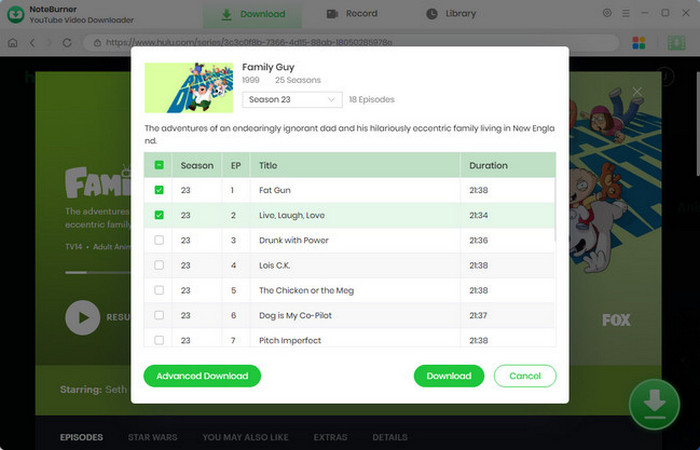
Step 5 Download Hulu Movies and Shows
Click the "Download" button to begin saving the video to your PC or Mac. If you want to download more titles, simply repeat the steps to add them to the task queue — NoteBurner will download them in order at a fast speed. After the download is complete, go to the "Library" tab to view your history. Open the output folder to find your MP4 files and enjoy Hulu movies and shows offline anytime.
Disclaimer: For personal/educational use only. 🚫 Do not distribute downloaded music/video for commercial use.
Want to download TikTok videos without watermarks? Check out the 5 top TikTok downloaders that let you save videos in MP4 or MKV format — no ads, no watermark.
To help you choose the best way to watch content from Hulu offline, we’ve compared the official download feature with the permanent download solution.
The two main differences between official downloads and permanent downloads are expiration limits and device restrictions. The comparison below highlights how these methods differ in flexibility, limitations, and overall usability.
A: The official download feature on Hulu is only available with ad-free plans and supported mobile devices. If you’re using other plans, you’ll need an alternative solution to download videos for offline viewing.
A: Some third-party websites claim to let you download Hulu videos for free. However, these sites are often unreliable, may expose you to security risks, and typically provide unstable or low-quality downloads. A more dependable and cost-effective option is to use a professional downloader like NoteBurner, which offers a safer and more stable way to download videos for offline viewing.
A: Official downloads can only be viewed inside the Hulu app on supported mobile devices. To watch videos on a computer or transfer them between devices, you’ll need NoteBurner All-In-One Video Downloader, which saves videos in standard formats like MP4 or MKV.
A: No. Once the download is complete, you can watch the content offline. However, the Hulu app may occasionally require an internet connection to verify your subscription status.
A: The download feature is only available on supported mobile devices and eligible ad-free subscription plans. If you’re using a browser, a computer, or an unsupported plan, the download option will not appear.
Can't access movie sites due to the school's internet blocking? Luckily, there's a solution — this article handpicks 10+ free Unblocked Movie Sites for schools!
No matter which method you choose, downloading Hulu videos for offline viewing is simple and straightforward. This article compares the official download feature of Hulu with the capabilities of the popular downloader NoteBurner. If you have an ad-free subscription and a supported mobile device, the official app is a convenient option for short-term offline viewing. If you prefer permanent files, no expiration limits, and the freedom to watch on any device, NoteBurner All-In-One Video Downloader is the better choice.
Note: Only the first 5 minutes of each video can be downloaded with the trial version. Please purchase a license to enjoy the full video. It is suggested that you download the trial version and have a test it before purchasing.
Want to improve the clarity of your video? AVCLabs Video Enhancer AI comes in handy. It's a powerful AI video enhancer that can upscale the resolution of videos by applying the power of AI technology. This AI-based video enhancer uses the deep-learning-based super-resolution technology to upscale videos from 480p to 1080p, 720p to UHD, and from 1080p to 4K.



