
If you want to download Apple Music songs as MP3 for free or you just found APLMate recently, the following content will help you a lot. APLMate is a free online Apple Music downloader that makes downloading music simple and hassle‑free. But is it really safe, reliable, and worth using?
To answer these questions, I did some real-world testing of APLMate using songs, albums and playlists from Apple Music, selected at random. I test and rate the downloading speed, audio quality, metadata retention, stability, and user experience.
In this review, I'm going to give my thoughts on the testing that I did, what I liked and didn't like about it, and whether I think you should use APLMate to download Apple Music, or if you should wait for a more fully-featured desktop Apple Music downloader.(NoteBurner Apple Music Converter).
APLMate is a free online Apple Music downloader that allows you to download Apple Music songs for free without installing any desktop software. You just need to paste an Apple Music track link to download it within a couple of clicks. It is because of that APLMate is considered to be one of the fastest Apple Music to MP3 downloader. With its simple interface, it is often the top choice for complete beginners or users who only occasionally want to save a few songs.
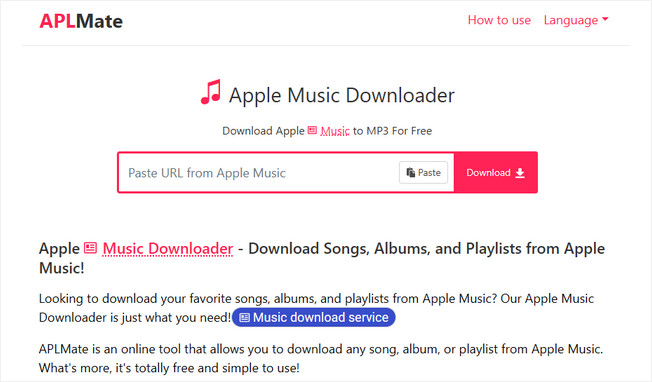
It can download a single Apple Music track at a time, and it works on Windows, Mac, Android, and iPhone with the latest browsers. Since it all is done online, user can take advantage of it from just about any device that can be connected to the internet.
So what’s the bottom line, is APLMate a solid Apple Music downloader or does it have limitations that you should be aware of before you get too excited? To find out, I tried the downloader with a few songs, albums, and playlists on Apple Music to see how it really performs.
Rather than relying on the claims on APLMate's website, I wanted to find out how it performs in real-world use. To keep the results as objective as possible, I tested APLMate with different Apple Music links, including individual songs, albums, and playlist links, paying close attention to its download speed, ease of use, audio quality, metadata preservation, and overall stability.
Step 1 Paste an Apple Music Link
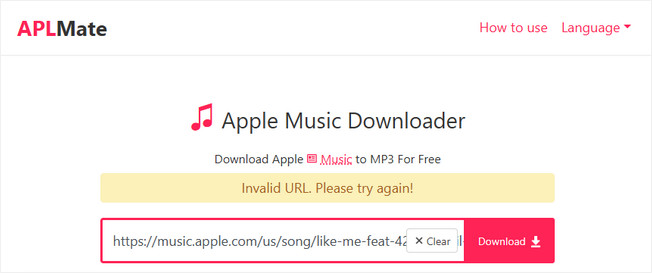
First, I copied a link to a single song from Apple Music and pasted it into APLMate. However, when I clicked the "Download" button, the page showed the error message: "Invalid URL. Please try again!" I then tried pasting links from other songs, but the same error kept appearing. To make sure it wasn't my mistake, I double-checked that I had followed APLMate's instructions exactly when copying and pasting. Still, nothing worked. After a short while, I decided to refresh the page and give it another try—and this time, APLMate successfully parsed the link.
Step 2 Download the MP3 File
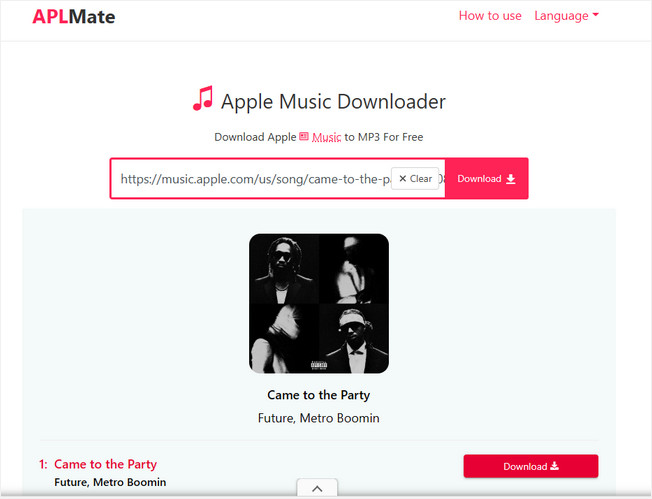
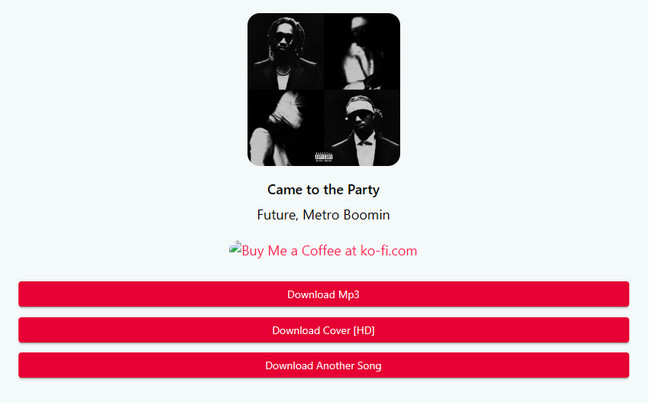
After the link was successfully parsed, I had to click the "Download" button again. This time, APLMate presented me with two options: download as MP3 or download the cover art. I chose "Download MP3," and right after that, a pop-up ad appeared—but the download started shortly afterward. I have to say, this site really has a lot of ads.
Step 3 Check the Output File
In my tests, the MP3 file was usually generated within 3 to 4 seconds, which is fairly fast for an online Apple Music downloader. After the download finished, I checked the file properties. In my test, the MP3 file was saved at a bitrate of 320 kbps. The song title, cover art, and album information were all preserved intact—though no other tags were included. One thing that bothered me, however, was that while the title in the properties was correct, the filename itself contained the word "APLMate," so I had to manually rename it to remove that.
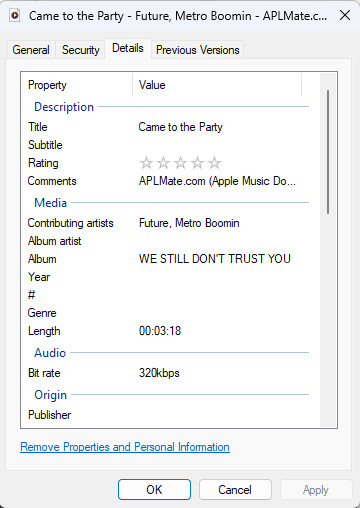
The overall sound quality is perfectly fine for everyday listening. That said, unlike desktop versions of Apple Music downloaders, APLMate doesn't let you customize output formats, bitrates, or other audio settings. On top of that, ID3 tags aren't fully preserved, and the constant ads really take away from the overall download experience.
To test APLMate's performance with larger-scale download tasks, I also tried downloading albums and playlists. Although the site can generate download links for individual tracks, I found that it does not currently support batch downloading. To save an entire album or playlist, I had to manually click the button for each song and download them one by one.

Having used APLMate to download Apple Music single songs, albums and playlists, I can say that it indeed works as advertised — an easy and cost-free way to download Apple Music without signing up or installing any software. For the casual user who only wants to save one or two songs, it’s a pretty simple and surprisingly effective experience. That said, I did hit a few roadblocks in my use of the tool, that limit its application for downloading extensive music libraries.
| Category | Rating |
|---|---|
| Ease of Use | ⭐⭐⭐⭐⭐ (5/5) |
| Download Speed | ⭐⭐⭐⭐☆ (4.5/5) |
| Audio Quality | ⭐⭐⭐⭐☆ (4/5) |
| Metadata | ⭐⭐⭐☆☆ (3.5/5) |
| Playlist Support | ⭐☆☆☆☆ (1/5) |
| User Experience (Ads) | ⭐⭐⭐☆☆ (3/5) |
| Overall | ⭐⭐⭐⭐☆ (4.0/5) |
Based on my testing, APLMate is best suited for users who only need to download a few Apple Music songs occasionally. Since it works entirely in a browser and doesn't require installation, it's a convenient choice for beginners.
However, unless you only download a few albums or playlists at a time, prefer a cleaner, ad-free experience, or require full metadata and batch downloading capabilities, you will eventually find APLMate’s features too limited.
Overall, APLMate is a solid free online Apple Music downloader for casual users. However, its occasional parsing errors, frequent ads, incomplete metadata, and lack of batch downloading make it less suitable for managing a large offline music library.
If you're looking for a more reliable and efficient way to download Apple Music to MP3, I recommend NoteBurner Apple Music Converter. Unlike browser-based online downloaders, NoteBurner is a professional desktop application that can batch download Apple Music songs, albums, playlists, podcasts, and audiobooks to MP3, AAC, FLAC, WAV, AIFF, or ALAC. It also preserves 100% original audio quality and keeps complete ID3 tags, including the title, artist, album, artwork, and more, making it much easier to manage a large offline music library.
Another advantage is stability. During my testing, NoteBurner consistently recognized every Apple Music link without parsing errors. Combined with its 10X faster conversion speed, automatic file naming, and batch downloading support, it provides a much smoother experience for users who regularly save Apple Music content.

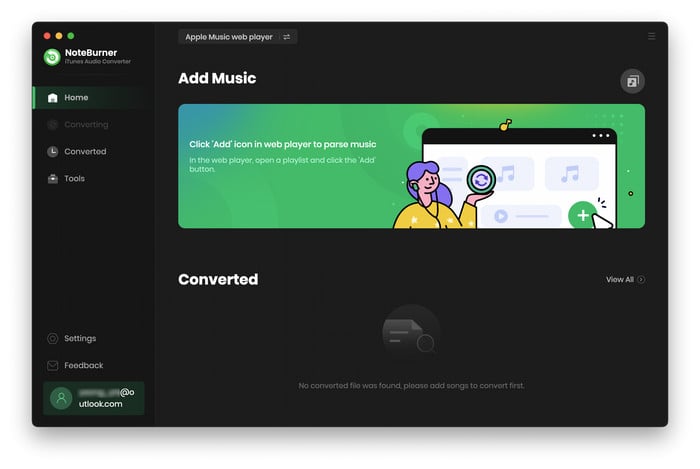
Step 1Download and launch NoteBurner Apple Music Converter.
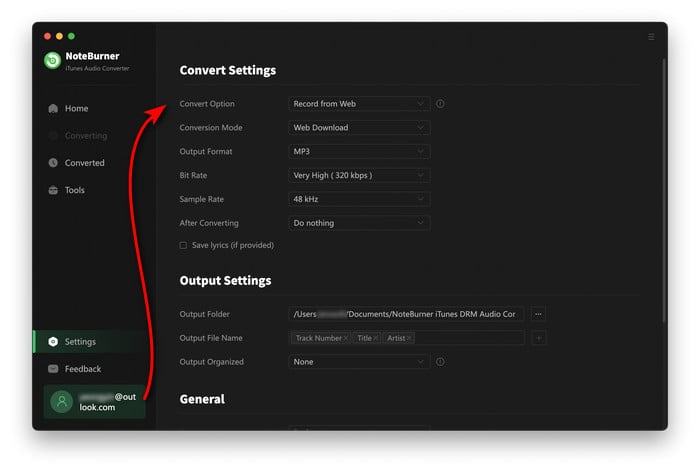
Step 2 Click on the "Settings" button to choose output format (MP3), bit rate, sample rate, etc.
Step 3 Select a playlist you like (you can also choose songs from your library), and click the "Add" icon.
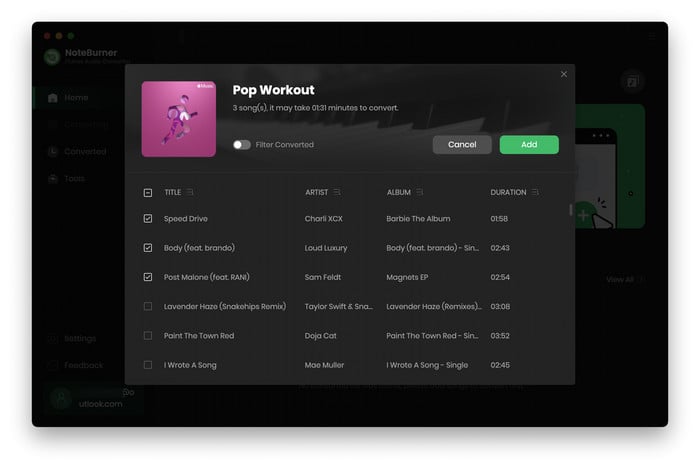
Step 4 Click the "Convert" button to start converting. After conversion is complete, click "History", then click the "Folder" icon to navigate to the output folder.
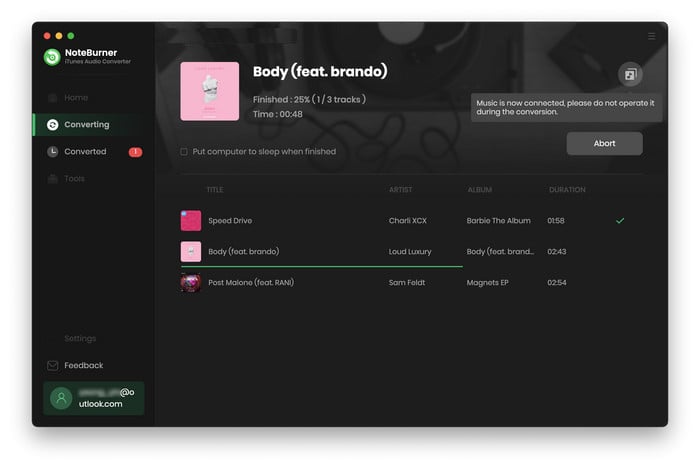
Once the download is complete, you can transfer these music files to any device for offline playback, like Android phones, smart TVs, and portable speakers.
Yes. APLMate is 100% free and no need install app or register account. Just drop an Apple Music link on the site, and the music downloader will save the song as an MP3 file. However, the website is ad supported, which means you will see some pop-up adverts while downloading.
While I didn't encounter any malware or suspicious downloads, the website displays frequent pop-up ads, so I recommend avoiding unnecessary clicks and only using the official download button. As with any free online downloader, it's always wise to stay cautious.
During my testing, I occasionally encountered the "Invalid URL. Please try again!" error even when using valid Apple Music links. Refreshing the page or trying again later usually resolved the issue. This appears to be a temporary parsing or server-related problem rather than an issue with the Apple Music link itself.
No, not really. APLMate is capable to identify a playlist or album, though currently does not support download in batches. To download all tracks in playlist or album, you are required to save songs one by one, which is really time consuming especially when you have a large collection.
If you download only a couple of songs now and then, APLMate offers you a simple and free solution. However, for batch downloading, full ID3 tags, better stability, and a better user experience without any ads a desktop solution such as NoteBurner Apple Music Converter, is highly recommended.
APLMate is free to use and there is no limit to how many songs you can download but be ready to see a lot of pop-ups while downloading. To protect from interruptions, make sure your browser has the pop-up blocker turned on, close any newly open tabs without doing anything on them, and always download your files from the original download button rather than clicking on any ads.
After spending time testing APLMate, I can understand why it has become one of the most popular free online Apple Music downloaders. It's easy to use, requires no software installation, and works great for getting single Apple Music songs. If you just want to save a few songs once in a while, APLMate is definitely worth trying.
But there were also several limitations I noticed during my hands-on testing such as sporadic "Invalid URL" errors, multiple pop-up ads, incomplete metadata and no support for batch downloading. Those problems might not make much difference for a casual user, but they can really start to grate if you download albums or playlists on a regular basis.
Overall, my APLMate review is positive for light, occasional use. However, if you're looking for a faster, more reliable way to download Apple Music to MP3 while preserving complete metadata and downloading entire playlists at once, NoteBurner Apple Music Converter is the solution I'd recommend. It offers a much smoother experience and is a better long-term choice for building and managing an offline Apple Music library.



