
 > Resources > Video Tips >
Set in the eerie town of Hawkins, Stranger Things blends 80s nostalgia with supernatural mystery, quickly becoming a global phenomenon since the day it premiered. With the long-awaited Season 5 finally here, many fans are looking for a reliable way to save all episodes for offline viewing. While Netflix does offer an in-app download feature, it comes with limitations — restricted devices, encrypted files that can’t be transferred, and expiration dates that automatically remove episodes.
For viewers who want flexible, permanent MP4 saves, these constraints make alternative solutions necessary. In this guide, we’ll walk you through the best tool and the simplest steps to download Stranger Things Season 1–5 in MP4, so you can enjoy the entire series anytime, anywhere.
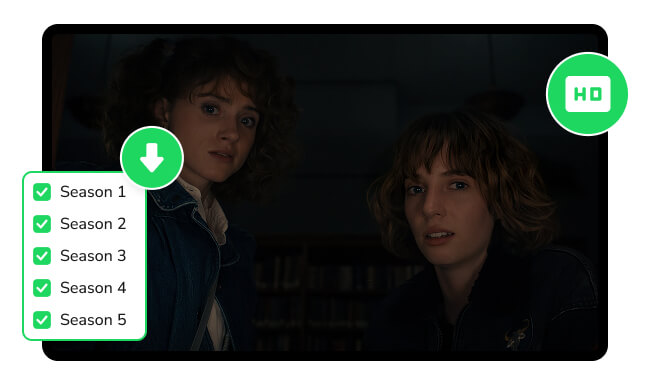
When choosing the best tool to save Stranger Things Season 1–5 in HD, the key factors are always the same: stable downloading, high output quality, flexible formats, and full subtitle/audio support. A good Netflix video downloader should preserve the original 1080P resolution, export episodes to widely-compatible formats, and ensure smooth, interruption-free downloading — especially for long seasons like Stranger Things.
Among the available options, NoteBurner Netflix Video Downloader stands out as a reliable, beginner-friendly solution designed exactly for this purpose. It allows you to download all Stranger Things seasons directly to your computer in HD (up to 1080p), save episodes as unrestricted MP4 or MKV files, and transfer them freely to your phone, tablet, or TV. With batch mode, fast download performance, and continuous free updates, it provides a smooth and consistent way to archive and enjoy the entire series offline—permanently, and without quality loss.
| OS | Formats | Max Quality | Speed | Subtitles & Audio | Extras |
| Windows, Mac | MP4, MKV | Up to 1080P | 5x Faster |
Multi-language Subtitles, Dolby Atmos Audio |
Built-in Video Player, Batch Download |
Looking for 123Movies downloaders to save movies & TV shows offline? Explore free tools and follow our step-by-step guide to download and watch offline.
Now that you’ve picked a reliable tool to save Stranger Things in high-quality, the next step is to learn how to download each episode to MP4 for offline viewing. Below, we’ll walk you through the full step-by-step guide so you can quickly download Stranger Things Season 1–5 as MP4 files and enjoy them on any device without restrictions.
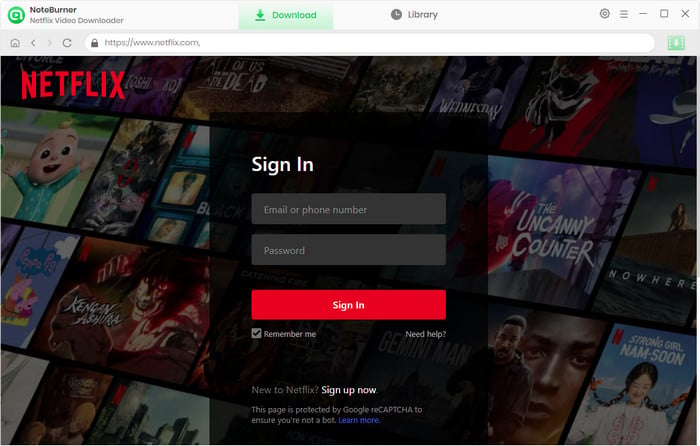
Step 1 Log in to your Netflix account
Launch NoteBurner Netflix Video Downloader on your computer first. And you need to select "Sign In" to activate a pop-up window, which will require you to log in to your Netflix account.
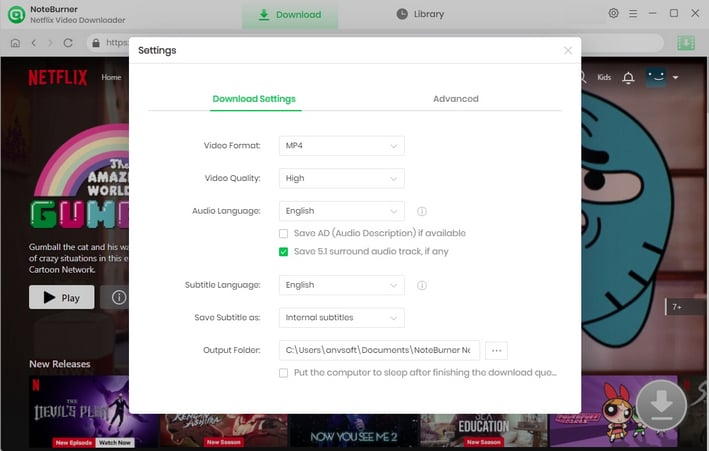
Step 2 Choose Output Settings
Click the "Settings" button in the upper right corner to customize the output quality (High), the video format (MP4), output path, and more.
Step 3 Search the Video
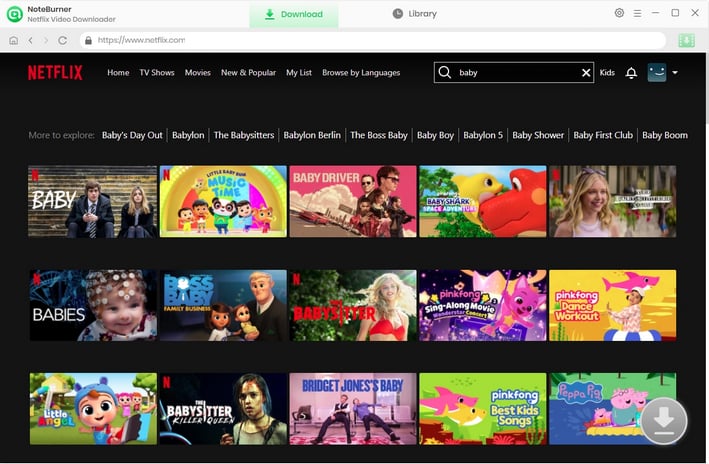
NoteBurner Netflix Video Downloader seamlessly connects to the Netflix website. To begin searching for movies and TV shows, simply click the magnifying glass button located in the upper right corner, the same as you would on the Netflix platform. In the search bar, enter Stranger Things, and within moments, you will be presented with a list of search results.
Step 4 Customize Advanced Settings
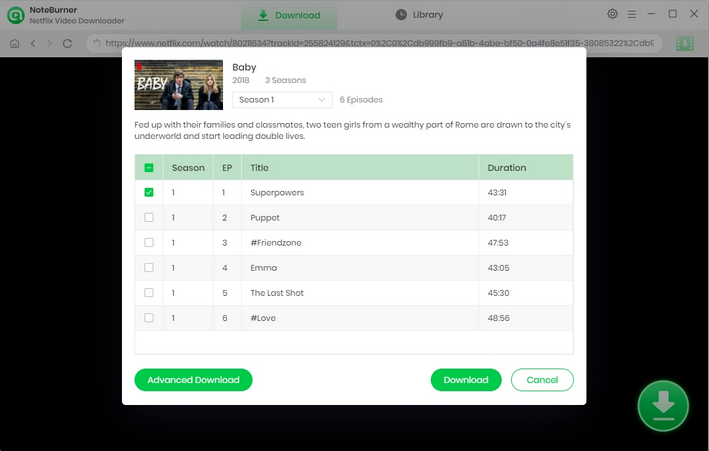
Select the video's thumbnail, and you'll access the video's details page or the playback page. Meanwhile, the gray download button in the lower right corner will change to green. Netflix Video Downloader empowers you to select your preferred audio track and subtitles before downloading.
Simply click the  icon, and a window will pop up allowing you to select titles as well as seasons to download Stranger Things in batch, and to choose audio track and subtitles by clicking "Advanced Download" in the bottom left corner.
Step 5 Download Stranger Things videos
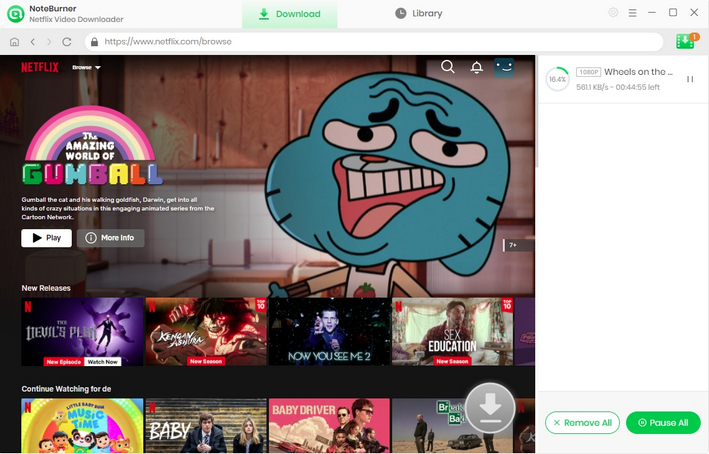
After completing the above steps, simply click the Download icon to start downloading the Stranger Things TV series to the output folder you've chosen in the previous step.
Once the conversion is done, you can find the downloaded videos by clicking the "Library" button or just opening the output folder.
Want to download TikTok videos without watermarks? Check out the 5 top TikTok downloaders that let you save videos in MP4 or MKV format — no ads, no watermark.
A: Downloading Stranger Things episodes from official streaming platforms that provide offline viewing is completely legal. However, downloading from unauthorized websites may violate copyright laws in many regions. To stay safe, always use official sources or licensed downloader tools.
A: The fastest method is to use a professional video downloader like NoteBurner that supports batch downloads and HD output. This way, you can save multiple episodes or even a full season at once, instead of downloading each episode individually, saving time and effort.
A: MP4 is one of the most universally supported video formats. You can watch your downloaded Stranger Things episodes on PC, Mac, Android phones, iPhones, tablets, Smart TVs, and even some game consoles. No special software is needed—any standard media player will work.
A: Absolutely. Many download tools allow you to embed subtitles directly into the video or save them as separate SRT files. This way, you can watch Stranger Things offline with your preferred subtitles, making it perfect for multilingual viewers or for accessibility purposes.
A: Free downloads from unofficial sources are generally illegal and unsafe. In addition, many so-called "free online download sites" often contain intrusive ads, misleading buttons, pop-ups, or even malicious redirects. For your safety, it’s always best to use official platforms or trusted downloader tools rather than risky free sites.
A: With the right downloader, your episodes can retain full HD 1080P quality and original audio tracks. Avoid low-quality tools that compress the video excessively, which can cause pixelation, blurry visuals, or distorted sound. Always check if the tool supports HD output before downloading.
Stranger Things has long been a classic series that many people revisit repeatedly. Saving each season in an offline format makes viewing possible anytime, anywhere. With NoteBurner, you can not only save the Stranger Things series in full HD quality but also convert the content to the universal MP4 format for seamless playback on any device. Whether you're ready to revisit Hawkins' original story or savor the latest season, now is the perfect time to download the entire series and enjoy it at your leisure.
Note: Only the first 5 minutes of each video can be downloaded with the trial version. Please purchase a license to enjoy the full video. It is suggested that you download the trial version and have a test before purchasing it.
Want to improve the clarity of your video? AVCLabs Video Enhancer AI comes in handy. It's a powerful AI video enhancer that can upscale the resolution of videos by applying the power of AI technology. This AI-based video enhancer uses the deep-learning-based super-resolution technology to upscale videos from 480p to 1080p, 720p to UHD, and from 1080p to 4K.



