
 By
By
Qobuz prides itself on audiophile-grade streaming. It offers a huge lossless catalogue, with support for HiRes audio up to 24-bit 192 kHz. But downloading those files onto your device in FLAC? That's where you'll find this guide helpful, which covers 5 practical ways to download Qobuz music to FLAC in 2026. Dive in!
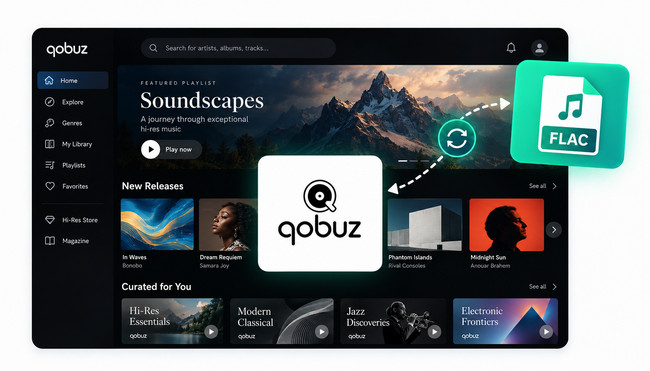
Yes. Actually, Qobuz has two official options for getting music downloads.
For Qobuz Hi-Fi or Studio subscribers, they can directly download Qobuz tracks for offline listening through the Qobuz app. But like other streaming music platforms, the downloaded audio is only cached within the Qobuz app itself. These aren't local FLAC files you can drag into your music library or throw onto a device for listening. They're gone as the subscription ends.
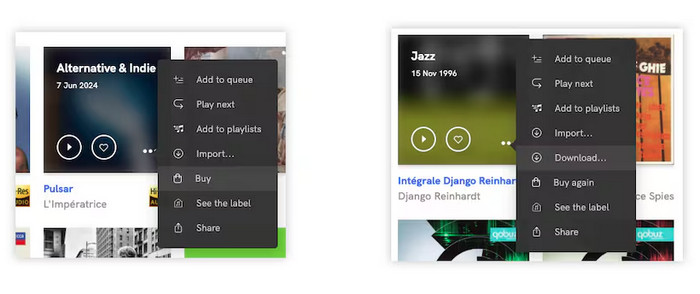
Purchased albums and tracks adopt a pay-per-track model. When you actually buy music through Qobuz's store (either standalone or with the Sublime+ discount plan), you get true FLAC files, with lossless 16-bit/44.1 kH, and often 24-bit Hi-Res if it is available.
| In-App Qobuz Downloads | Qobuz Purchased Downloads | |
|---|---|---|
| Audio format | Encrypted FLAC | FLAC, WAV, AIFF, ALAC, and others |
| Downloads | App only | Any browser works with Qobuz Store |
| Playback | Within the Qobuz app | Compatible music players and devices |
| Survives cancellation | Disappears | Purchased files remain playable |
| Hi-Res 24-bit available | ✓ (streaming) | ✓ (downloads) |
| Cost | Monthly subscription | Per album / track |
Check out the 4 easy ways to download music from Qobuz on your Android, iPhone, Windows, and Mac
This table briefly compares 5 methods for converting Qobuz to FLAC, including their pricing, sound quality, batch support and so on.
| Method | Cost | Platforms | Max Quality | Batch | Full Metadata | Highlights |
|---|---|---|---|---|---|---|
| 🏬 Qobuz Store | Pay per track/album | Web, Windows, Mac, mobile | Up to 24-bit/192 kHz | Albums ✓; playlists ✗ | ✓ | Legal downloads of Qobuz FLAC tracks. |
| 🏆 NoteBurner Music One | Free trial / Paid | Windows, macOS | Hi-Res FLAC | ✓ | ✓ | Fast batch conversion |
| 🌐 Lucida | Free | Web browser | 320kbps | Albums ✓; playlists ✗ | ✗ (Partial) | Convert Qobuz to FLAC online for free. |
| 💻 qobuz-dl | Free; Qobuz subscription required | Windows, macOS, Linux | Up to 24-bit/192 kHz | ✓ | ✓ | Open-source downloader with Hi-Res FLAC |
| 🎧 Audacity | Free | Windows, macOS, Linux | 320kbps for FLAC & MP3 | ✗ | ✗ | Free Qobuz audio recording |
Entrance: https://www.qobuz.com/us-en/shop
Best fit for: Qobuz audiophiles who pay per release to get specific albums in true Hi-Res FLAC with no risks.
Downloading Qobuz music offline within the app is convenient, but not for local use on other devices. So we'll demonstrate the other legal approach to get Qobuz FLAC songs.
It is feasible if you've bought albums or tracks from Qobuz and are downloading them as FLAC. Everything is processed via the Qobuz Store website. Once the tracks are purchased and downloaded as FLAC, you can play offline and transfer them to other compatible devices. It is worth noting that prices vary depending on the record label and audio quality, typically ranging from around $1 for individual tracks to $25 or more for albums.
Step 1 Visit the Qobuz website, and click on the Download Store. Find the desired track or album, and click the "Buy the album" button.
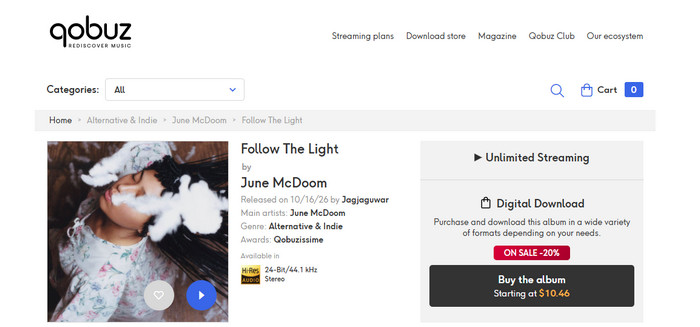
Step 2 Select the audio quality and finalise the payment.
Step 3 Click your profile icon in the top right, then go to My account > My Purchase tab.Here are two options to download tracks.
For single tracks, choose "Download track by track" and select the "FLAC" format.
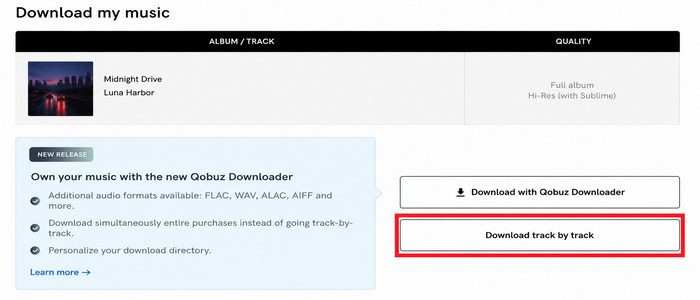
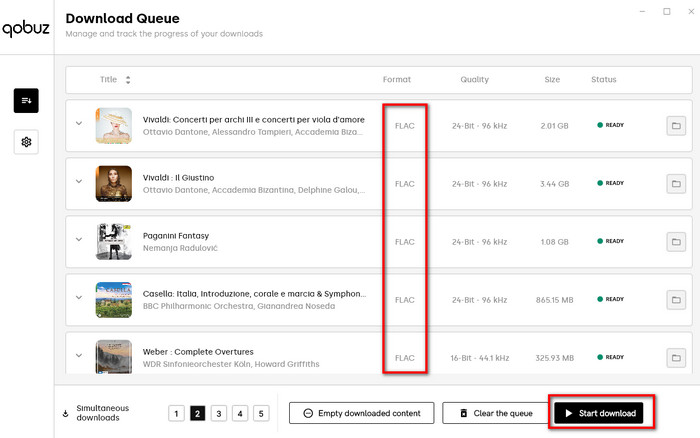
For the whole album songs, pick "Download with Qobuz Downloader" and install it. Later, choose the "FLAC" format and "Start download".
Entrance:https://www.noteburner.com/noteburner-music-one.html
Best fit for: Music lovers who want to quickly download lossless FLAC audio from Qobuz, Tidal, Apple Music, and more, with intact metadata and easy organisation.
Sometimes you want to download Qobuz music to FLAC, not just the albums you've paid for, but also the Hi-Res Qobuz streams and the large playlists you've created. NoteBurner Music One provides a comprehensive solution.
It acts as a desktop Qobuz music downloader. On the embedded Qobuz web player, you're free to pick what you want — a track, a full album, or an entire Qobuz playlist. And download Qobuz to lossless FLAC in batches, with full metadata preserved. Once converted, transferring Qobuz FLAC audio to any portable device has never been easier!

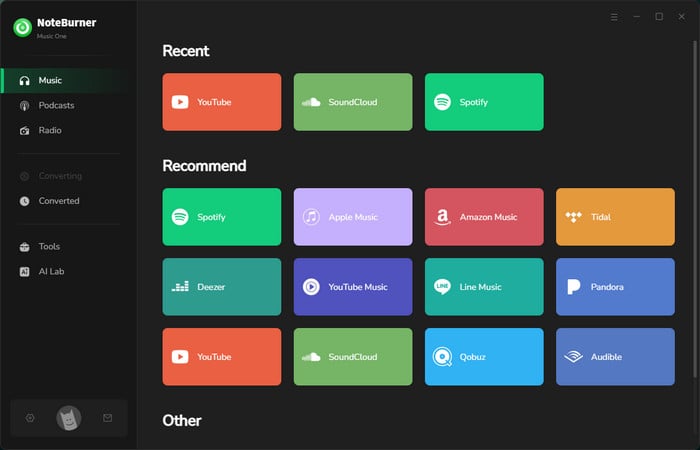
Step 1 Download and launch NoteBurner Music One, and choose Qobuz on the Music tab.
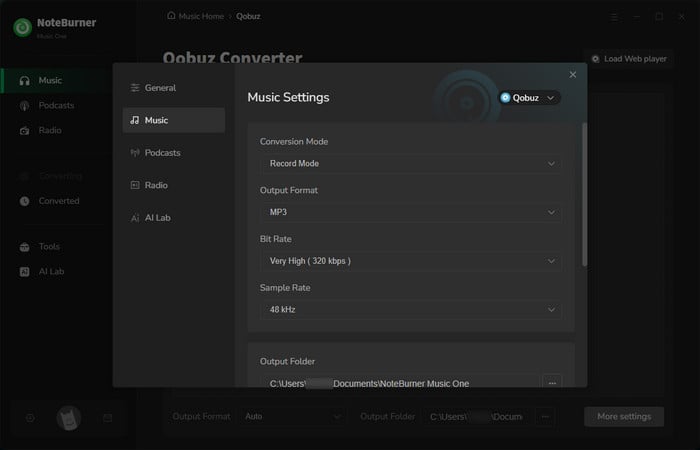
Step 2 Go to the Settings window, where you can select the output format, quality, and more for your Qobuz songs.
Step 3 Add a song or playlist from the Qobuz web player. In the queue list, check the tracks for conversion and confirm "Add".
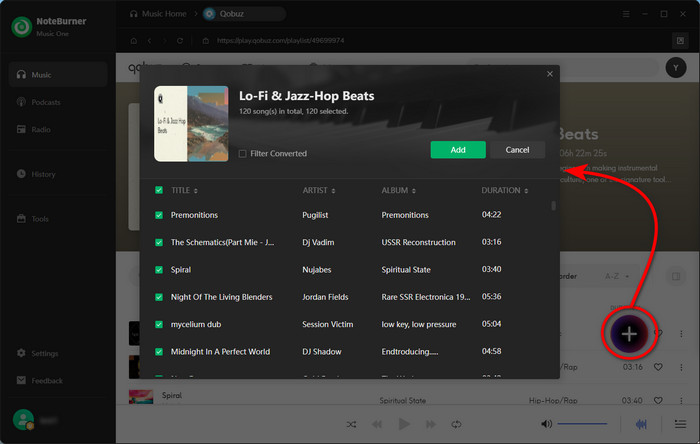
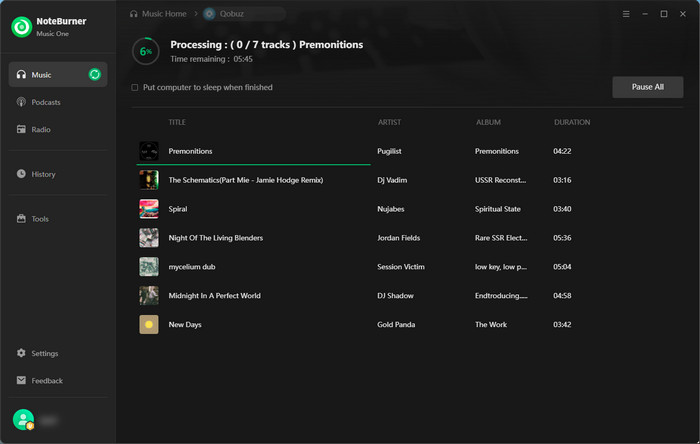
Step 4 Click on the Convert button. NoteBurner will quickly download the Qobuz songs to local FLAC audio files.
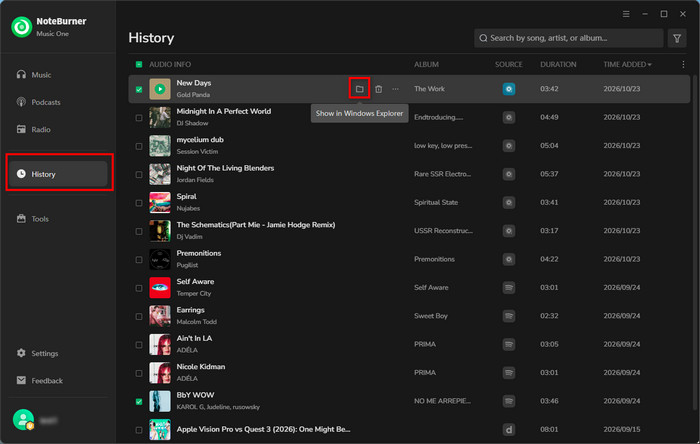
Step 5 Go to the History tab to find all converted Qobuz tracks. To locate where store the local audio file, just click a folder icon at the end of the track.
Entrance: https://doubledouble.top/
Best fit for: Users who prefer outputting Qobuz music as FLAC for free without installing software. Short-term use only.
Instead of getting a specific app installed, DoubleDouble works online and converts Qobuz links into downloadable audio files for free. The appeal is obvious: paste a Qobuz track URL, and it processes it into a FLAC download. There's no account, no install, and notably no ads cluttering the interface. Besides SoundCloud, it also claims to download music from Amazon Music, SoundCloud, Deezer, and Tidal.
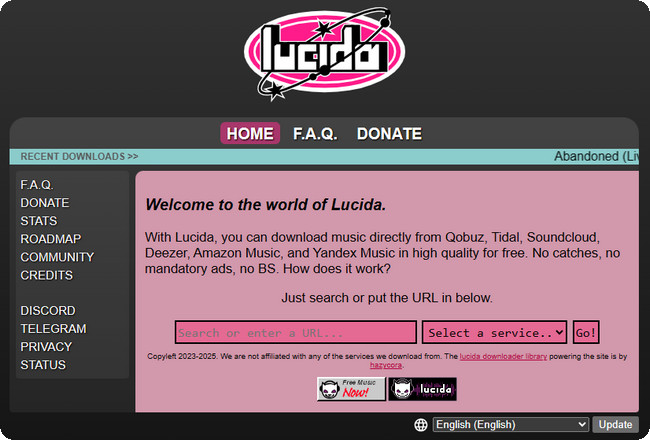
Step 1 Copy and paste a valid Qobuz track URL into the search bar of DoubleDouble.
Step 2 Click the download button. DoubleDouble processes the link server-side
Step 3 Once ready, you can save the file. For the album, you'll get a ZIP, and you need to extract it to find individually named FLAC files.
Entrance: https://github.com/vitiko98/qobuz-dl
Best fit for: Tech-savvy Qobuz subscribers who are comfortable with Python and loselessly download Hi-Res Qobuz to FLAC.
For the technically inclined, qobuz-dl does the conversion job. Being an open-source Python tool, it can access your Qobuz library to download tracks, albums, artists, playlists, and labels in MP3 or FLAC. By using a specific one-liner command, you can convert a Qobuz playlist to FLAC. But notably, it requires your account login and an active Qobuz subscription.
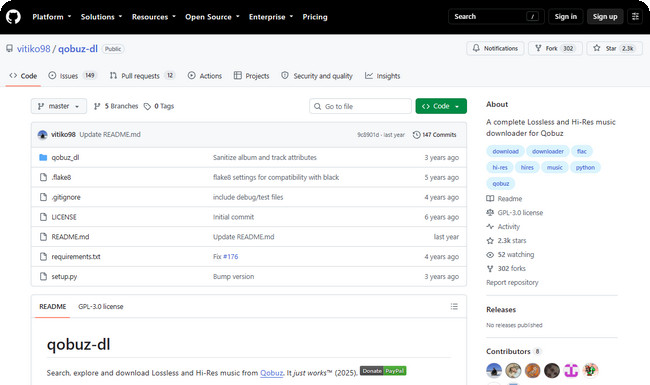
Step 1 Install via pip (Python 3.6+ required)
On Linux / MAC OS:
pip3 install --upgrade qobuz-dlOn Windows:
pip3 install windows-curses
pip3 install --upgrade qobuz-dl
Step 2 Run and sign in to your Qobuz account, the credentials are stored in a config file for future use.
Step 3 Get the playlist or album URL from the Qobuz website, and combine it with the specific dl command, then download audio in the desired quality. For example, the -q 27 flag selects maximum quality (24-bit >96kHz Hi-Res). The full command is like:
qobuz-dl dl https://play.qobuz.com/album/qxjbxh1dc3xyb -q 7Other quality flags available: 5 = 320kbps MP3, 6 = FLAC 16-bit lossless, 7 = FLAC 24-bit under 96kHz, 27 = FLAC 24-bit over 96kHz (maximum).
Entrance: https://www.audacityteam.org/
Best fit for: Users who want a free way to record a few Qobuz tracks as FLAC files and don't mind real-time recording or manual editing.
Audacity is a well-established audio recorder and editor. Although it works differently from other dedicated Qobuz downloaders, it still captures Qobuz music playing on your computer and saves it as FLAC files. It shines out in the free service, extensive format support, and stable output without ads. In practice, it can be regarded as a practical alternative if you only need to save a few tracks or output a specific audio segment.
Step 1 Launch this reocrder program and open Qobuz on your computer.
Step 2 Go to Audio Setup > Host and select Windows WASAPI. Then choose your active playback device with "(loopback)" in its name as the recording input.
Step 3 Start playing your liked song in Qobuz, then click the red Record button in Audacity. Let the track play through and click Stop when it finishes.
Step 4 Open File > Export Audio, choose FLAC as the audio format, and select your preferred bit depth and sample rate. Click Export to save this Qobuz FLAC recording to your computer.
A: Downloading music you've purchased from Qobuz as FLAC is completely legal. For third-party converters and downloaders, the legality depends on how the music is obtained, your local copyright laws, and the platform's terms of service. Do not share or redistribute downloaded music without permission, and always respect copyright restrictions and platform rules.
A: Officially NO. Qobuz users typically download FLAC tracks via the subscription plan or purchase them in the store separately. For free downloads, try some free tools, such as Lucida and Audacity. Or turn to NoteBurner Music One and save Qobuz music as FLAC via a Qobuz free account.
A: Yes. With NoteBurner Music One, you can back up the downloaded Qobuz FLAC files for offline use. They are always playable even if the subscription is over.
Five methods, five different use cases. Official download and purchase is the safe and legal route for Hi-Res albums. but buying individual tracks and albums may get expensive if you have a large collection.
Lucida.to runs free single-track downloads when you're not worried about reliability. Qobuz-DL is professional and free for anyone willing to work in a terminal. Audacity is the unusual option for people who want to record specific audio for further editing. The stable and practical option overall goes, unsurprisingly, to NoteBurner Music One. By using it, you can save playlists or albums from Qobuz to FLAC, with zero ads, no quality loss, and no pay-per-track.




