
 By Annie Cale
You may have a big library for the Amazon Music collection and want to transfer or sync these songs to your portable device, like some generic MP3 players, for enjoying on the move without a network connection. However, most of the songs from Amazon are copy-protected DRM files that can only be played through the Amazon Music app. Luckily, on this page, we've singled out three methods to help you download or record high-quality MP3s from Amazon Music to your PC/Mac. After that, you're free to enjoy high-quality Amazon Music songs on both desktop and other devices.

Yes, but it takes a recorder tool. Amazon Music puts encryption on every track, whether you're using a Free, Prime, or Unlimited account. That said, you can't directly copy the files off your hard drive, convert them in iTunes, or use a basic format converter for music conversion.
What works is to use a third-party Amazon Music recorder. By using this, you're recording Amazon Music locally, not cracking or stripping the file directly. The key difference between tools is output quality and how much manual work is involved.
1. Desktop Amazon Music Recorder: It extracts the Amazon Music audio from the playback source (like NoteBurner). This dedicated converter provides better control over output format, audio quality, batch downloads, metadata management and ect,.
2. Real-time Recorder Software: It records the system audio in real time (like Apowersoft).
3. Online Audio Recorders: Browser-based tools are easier to start with if you don't want extra installation or registration.
| Feature | NoteBurner | Apowersoft | Online Recorder |
|---|---|---|---|
| Availability | Desktop (Win/Mac) | Desktop (Windows) | Desktop Browser |
| Output Quality | True 320kbps / FLAC | Depends on system | Mic/speaker quality |
| Speed | Up to 10× faster (Web source) | Real-time only | Real-time only |
| Batch Recording | ✅️ Full playlist/album | ✘ | ✘ |
| ID3 Metadata | ✅️ Full (Title, Artist, Album, Artwork, Playlist Index, etc) |
~ Partial | ✘ |
| Cost | Paid (free trial) | Paid | Free |
| Highlight | Record Amazon Music in batches, with 320kbps kept | Record audio from Amazon Music and other platforms to PC | Single track recording, no installation |
 Method 1. Record Amazon Music Songs with NoteBurner
Get it from: https://www.noteburner.com/amazon-music-recorder-windows.html
Best for: Users who prefer fast batch conversion, lossless output, and music library management.
It is a professional NoteBurner Amazon Music Recorder and Amazon Music playlist downloader, designed specifically for both Amazon Music Free and Paid users. Instead of recording a single track at a time, this desktop recorder downloads any songs, albums, or playlists from Amazon Music to MP3, WAV, FLAC, and more at up to 10x speed. All recorded Amazon Music songs are preserved in the original quality and even up to ultra HD quality. With it, you can easily play them on various media players and transfer them to your MP3 players, car players, iPhone and more.

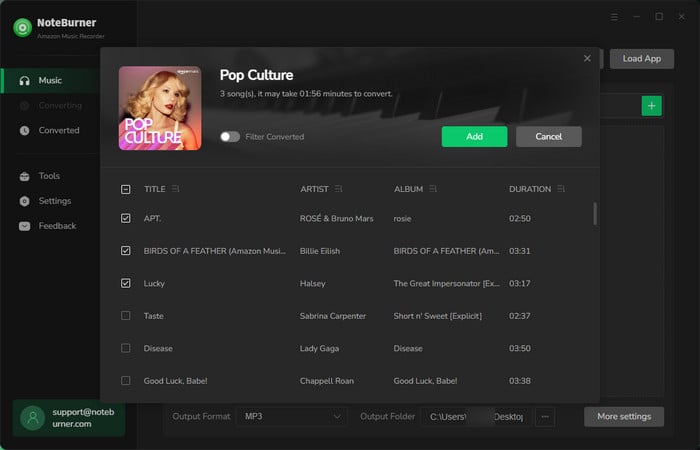
Step 1 Add Amazon Music to NoteBurner
Open the NoteBurner program, and choose the "Switch to Web Player" option. Then click on "Add" to add the music you want to download to NoteBurner.
Step 2 Choose Output Settings
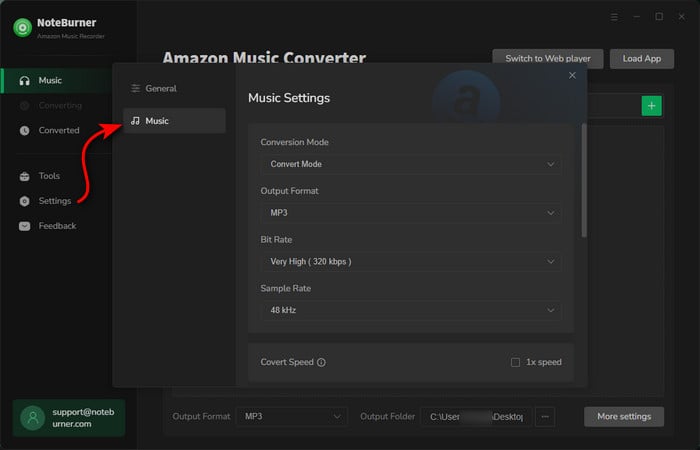
Go to the Settings by clicking the gear icon. You're able to choose the conversion mode, output format, bit rate, sample rate, and so on.
Tips: If you've added the Amazon Music HD tracks, it's suggested to choose the "Recommend" output format to save the best original sound quality. But note that high-quality music files are larger and will take up more space on your device.
Step 3 Record Amazon Music to Local Computer
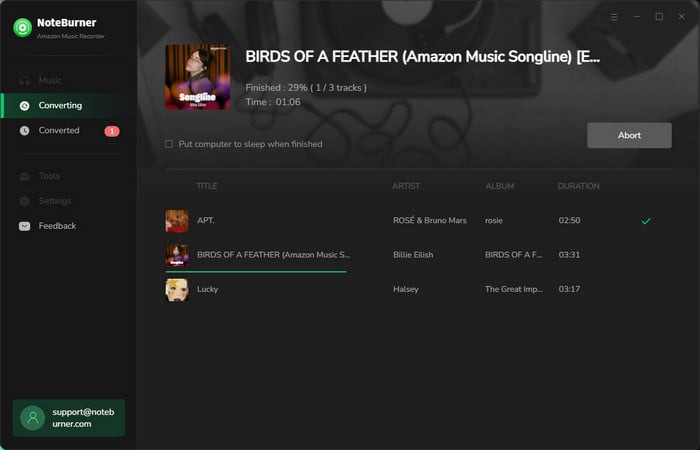
The next step is to directly click "Convert" to start downloading Amazon Music as offline music files. The conversion will be finished soon.
Step 3 Find Recorded Amazon Music Files
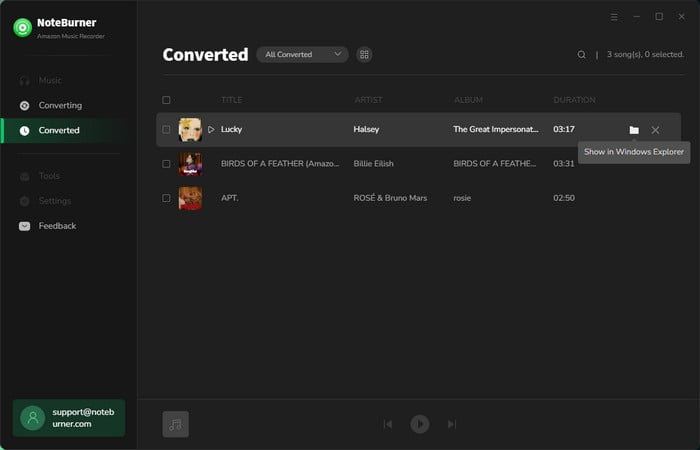
When everything is done, the output folder will be opened by default. Otherwise, you could also go to the "History" section, hover over the music list, and tap "Folder", the output window will pop up either.
We ran a 20-track Amazon Music playlist through NoteBurner and all set as MP3 at 320 kbps in the settings. Total conversion time was about 8 minutes. Every file is embedded with the correct title, artist, album art, and year. The batch workflow is the real exclusive point. And you can choose to sort out the recordings by playlist, album, and others. That's not something any real-time recorder can match.
Method 2. Record Amazon Music Tracks with Apowersoft [Real-time Recording]Get it from: https://www.apowersoft.com/streaming-audio-recorder.html
Best for: Users who want to record live broadcasts, short episodes, or specific segments of audio from Amazon Music.
Apowersoft Streaming Audio Recorder is a fairly comprehensive recording software. It includes handy tools for scheduling recordings, editing ID3 tags, converting audio files to alternative formats and ripping and burning audio from and to CDs. It allows you to record streaming audio from music sites, video platforms, radio stations or capture sound from audio chats effortlessly. This software also includes a Video to MP3 converter with which you can convert YouTube music videos to MP3s by entering their URLs.
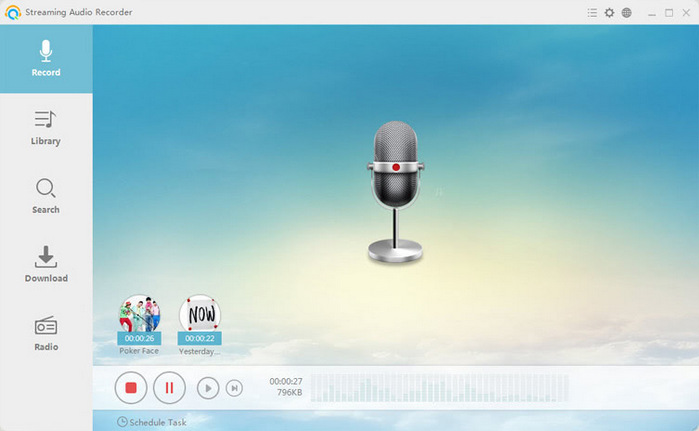
Step 1 Click "Start Recording" and then select the audio source.
Step 2 Control audio recording by clicking "Start", "Pause" and "Stop" buttons.
Step 3 Hit the "Show in Folder" button to locate the recorded file in the output directory.
Apowersoft records anything playing through your system. The ID3 tag detection is not stable with Amazon Music specifically. Sometimes the track title is only embedded with the recording date. Plus, the limitation versus NoteBurner is significant, though. The real-time workflow is at 1:1 speed, so it is better for recording live broadcasts or radio than a playlist.
Method 3. Record Amazon Music with Online RecorderGet it from: https://online-voice-recorder.com/
Best for: Casual users who need a free online tool to record Amazon Music audio, no installation needed.
In addition to music recorder software, you can also use online audio recorder to record Amazon Music, here is a totally free online recording site to record music.
OnlineVoiceRecorder.com is a convenient and simple online site that can be used right in your browser. It allows you to record your voice using a microphone and save it as an mp3 file. And it is completely free without any hidden payments, activation fees, or charges for extra features. And Voice Recorder will automatically detect silent fragments at the beginning and the end of your recording and deletes them for your convenience. After the recording is complete, you can crop it to the section you actually need. With this free recorder, you can easy record your music.
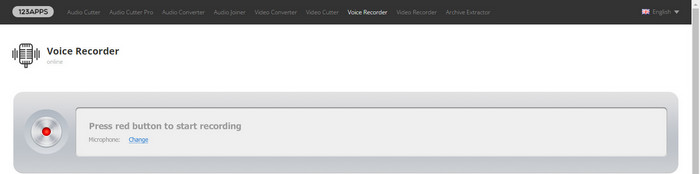
Step 1 Go to this online Amazon Music recorder in your browser. Allow microphone access when prompted.
Step 2 Click the red circle button to start recording, then play your Amazon Music track. 3. When the track ends, click the button again to stop.
Step 3 Then click Save to download as MP3.
For a single track you need right now without any software setup, it gets the job done. But the quality is noticeably below what dedicated software delivers. I'd honestly only reach for this if I specifically couldn't install software on the machine I was using.
Yes. With NoteBurner Amazon Music Converter. It captures audio at the source, with up to MP3 320 kbps or lossless FLAC for Amazon Music Prime/Unlimited. Real-time recorders like Apowersoft are limited by your system audio quality, and online recorders depend on your microphone and speakers. If quality matters, NoteBurner is the right choice for recording Amazon Music on PC or Mac.
These tools are designed for personal backup, not for distribution or commercial use. Always use recorder tools resonsibly, and obey the platform rules.
NoteBurner Amazon Music Converter is consistently the best Amazon Music recorder for PC and Mac in 2026. It delivers true 320 kbps MP3 output, supports full playlist batch recording, preserves complete ID3 metadata automatically, and works at up to 10× speed.



