
For music lovers seeking the ultimate listening experience, TunePat Amazon Music Converter is an ideal choice. It easily converts Amazon Music tracks to multiple formats, allowing users to enjoy high-quality Amazon songs with original ID3 meta tags more flexibly. But you might wonder: Is TunePat still worth paying for in 2026? This article will answer that question for you.

Rating: 4.6/5. TunePat Amazon Music Converter is a solid choice for most Amazon Music users, but not without its quirks (a few small issues we'll cover below).
Who it's for: Music collectors who prefer owning local copies of their music, users who care about preserving audio quality, and anyone who wants to play Amazon Music tracks on devices that don't support the Amazon Music app.
Who should look elsewhere: Casual listeners who simply want a way to convert Amazon Music songs to MP3, FLAC, or other common formats for offline playback on various devices without spending too much money.
The catch: The free trial only lets you convert the first 1 minute of each track.
Verdict: Worth a try. Download the free trial, test it with your own music, and decide if the output quality meets your standards. For most users, it's a capable and cost-effective tool.
To give you an honest assessment, we spent 3 days testing TunePat Amazon Music Converter on a Windows 11 machine with an Amazon Music Unlimited account. Here's what we found across three key areas: conversion speed, audio quality, and overall user experience.
Speed is often the first thing users ask about, so we put TunePat's claimed "10X faster" performance to the test.
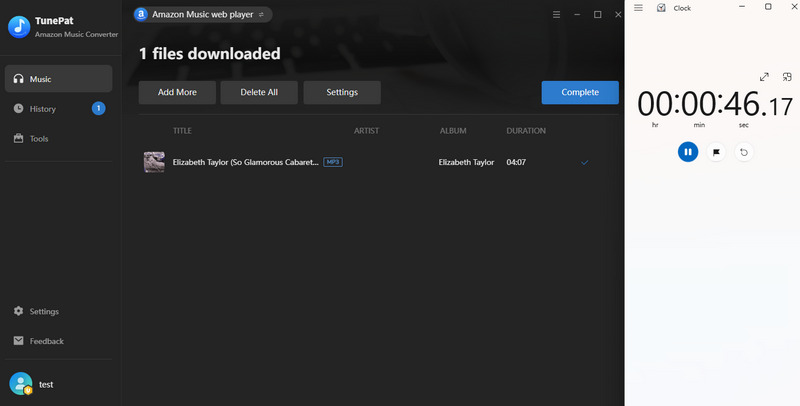
Single-track conversion: We converted a 4-minute song to MP3 via Amazon Web Player, completing the task in about 46 seconds. Although it didn't quite hit the 10X mark in our test, the speed is still notably quick. Given that conversion times vary by computer, we award this category a score of 4/5.
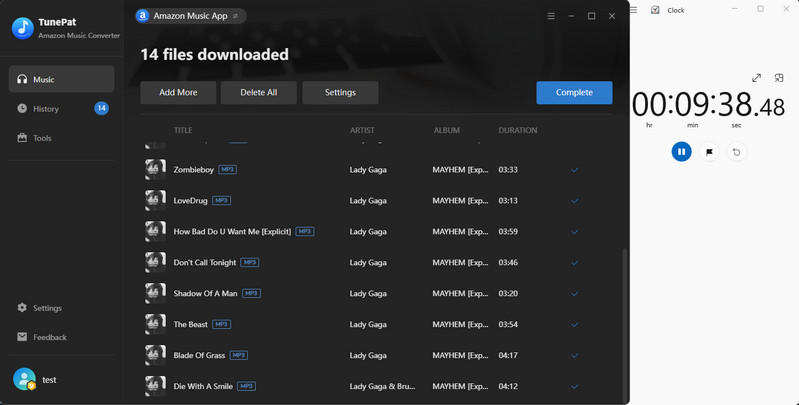
Batch processing: Next, we tested a more real-world application scenario: converting a complete playlist containing 14 songs. The total processing time was approximately 10 minutes, averaging about 41 seconds per song. The software handled the batch queue smoothly without any crashes, stutters, or unexpected interruptions. Given that we did not test larger libraries of hundreds of tracks, we rate this criterion 4.5 out of 5.
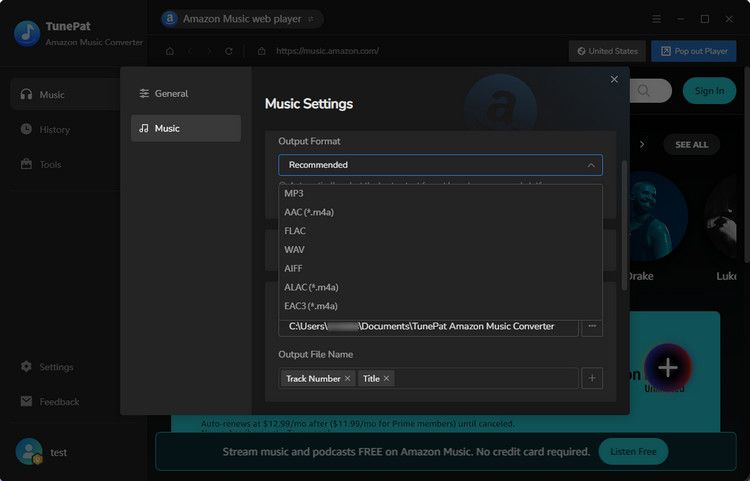
Output formats: TunePat supports a wide range of output formats, including MP3, AAC, WAV, FLAC, AIFF, ALAC, EAC3 and AC4. We successfully converted test tracks to each format with zero errors. For casual listeners, MP3 at 320 kbps is more than adequate, while users focused on archiving or professional applications will find FLAC and WAV solid choices. Given the variety and versatility of format options, we award this section a perfect score of 5 out of 5.
Lossless quality: TunePat can preserve the original audio quality, up to 24-bit/192kHz, but only when converting from the Amazon Music desktop application, and only if the source track itself supports that quality. Naturally, the output will never exceed the source's native resolution. In our actual test with Lady Gaga's "Abracadabra", the source was encoded at 24-bit/44.1kHz, which is still high-resolution. Based on this, we rate this aspect 4.5 out of 5.
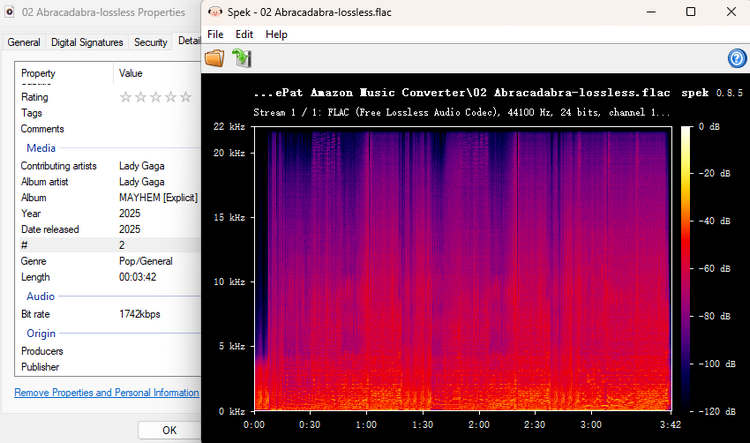
ID3 tags & metadata: TunePat excels at preserving ID3 metadata. After conversion, we inspected the output files and confirmed that track titles, artist names, album artwork, and track numbers were all fully retained. We rate this aspect a perfect 5 out of 5.
Installation: The download and installation process took under 1.5 minutes on our test machine, though actual times will vary depending on system specs and internet speed. The installer was clean and straightforward, with no bundled bloatware or hidden extras. We give this a perfect 5 out of 5.
Interface design: The interface is clean and functional, offering both dark and light themes for user preference. While it may not win any design awards, all key functions are clearly laid out and easily accessible. We give this a 4 out of 5.
Overall workflow: The entire workflow, from adding songs and adjusting settings to initiating conversion, is guided by clear on-screen buttons at each step, making the process straightforward even for first-time users. We rate this aspect a perfect 5 out of 5.

Pricing is often the deciding factor when choosing a music converter, especially for users comparing multiple tools in the same category. TunePat Amazon Music Converter follows a typical software licensing model, offering different subscription options depending on how long you plan to use it.
TunePat generally provides multiple license types, including quarterly, yearly, and lifetime plans. While the exact pricing may vary depending on promotions or regional offers, the structure is designed to give users flexibility based on usage needs. The quarterly plan is suitable for short-term users who want to evaluate the tool beyond the limited free version. The yearly plan is more cost-effective for users who regularly convert music. The lifetime license is positioned as the best long-term value for users who plan to build and maintain a permanent offline Amazon Music library.

Based on our hands-on testing, TunePat Amazon Music Converter delivers solid performance across speed, audio quality, format flexibility, and metadata retention. It is especially strong for users who want to build an organized offline music library from Amazon Music without losing quality or ID3 information.
However, it is not a perfect tool. The lack of a mobile version and the restricted trial experience may be drawbacks for some users. In addition, casual listeners who only need occasional conversions may find it more feature-rich than necessary.
If you are a serious music collector or someone who frequently manages local music files, TunePat is a practical and reliable investment. For light or occasional users, it may be worth testing the free version first before committing to a paid plan.
After several days of hands-on testing, TunePat Amazon Music Converter proved to be a generally stable and functional tool for converting Amazon Music into local audio files. Across speed, output quality, format flexibility, and metadata preservation, it performed consistently within expectations, with no major technical issues observed during our test sessions. TunePat feels like a practical utility rather than a "must-have" upgrade. It is best suited for users who already have a clear need to manage or archive Amazon Music locally. For occasional use or simple format conversion, the value depends more on personal workflow needs than on standout features.



